EasyManua.ls Logo

Sony HTC-D259 - Page 5

Sony HTC-D259
33 pages
Print Icon
To Next Page IconTo Next Page
To Previous Page IconTo Previous Page
Loading...
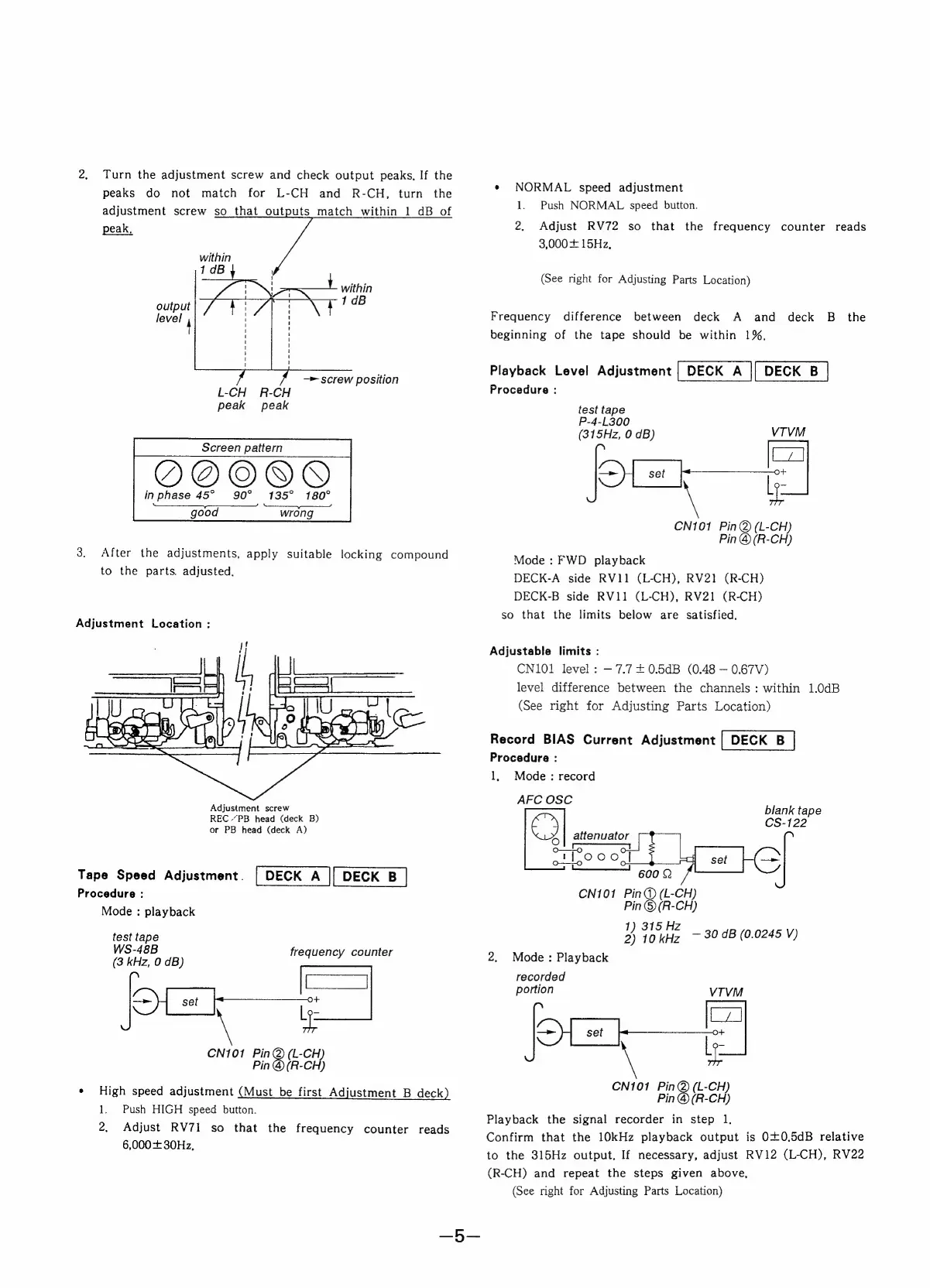
2.
Turn
the
adjustment
screw
and
check
output
peaks.
If
the
peaks
do
not
match
for
L-CH
and
R-CH,
turn
the
adjustment
screw
so
that
outputs
match
within
1
dB
of
peak,
within
1dB
within
output
1qB
level
"
—>
screw
position
L-CH
R-CH
peak peak
Screen
pattern
inphase
45°
90°
135°
180°
ny
good
wrong
3.
After
the
adjustments,
apply
suitable
locking
compound
to
the
parts.
adjusted,
Adjustment
Location
:
Adjustment
screw
REC
“PB
head
(deck
B)
or
PB
head
(deck
A)
Tape
Speed
Adjustment.
Procedure
:
Mode
:
playback
test
tape
WS-48B
frequency
counter
(3
kHz,
0
dB)
fieets
ol
set
O+
CN101
Bee
ech
Pin
@
(R-CH)
¢
High
speed
adjustment
(Must
be
first
Adjustment
B
deck)
1.
Push
HIGH
speed
button.
2,
Adjust
RV71
so
that
the
frequency
counter
reads
6,000
+
30Hz,
e
NORMAL
speed
adjustment
1.
Push
NORMAL
speed
button.
2.
Adjust
RV72
so
that
the
frequency
counter
reads
3,000+
15Hz,
(See
right
for
Adjusting
Parts
Location)
Frequency
difference
between
deck
A
and
deck
B
the
beginning
of
the
tape
should
be
within
1%,
Playback
Level
Adjustment
Procedure:
test
tape
P-4-L300
(315Hz,
0
dB)
pee
CN101
Pin@
(L-CH)
Pin
@(R-CH)
VIVM
Mode
:
FWD
playback
DECK-A
side
RV11
(L-CH),
RV21
(R-CH)
DECK-B
side
RV11
(L-CH),
RV21
(R-CH)
so
that
the
limits
below
are
satisfied.
Adjustable
limits
:
CN101
level:
7.7
£0.5dB
(0.48
0.67V)
level
difference
between
the
channels:
within
1.0dB
(See
right
for
Adjusting
Parts
Location)
Record
BIAS
Current
Adjustment
|
DECK
B
Procedure
:
1,
Mode:
record
AFC
OSC
blank
tape
C7)
CS-122
j
attenuator
oo
O
H
}6Se
mas
———
500
©
CN101
Pin@
(L-CH)
Pin
©
(R-CH)
1)
315
Hz
2)
10
kHz
~
30
dB
(0.0245
V)
2.
Mode:
Playback
recorded
portion
VTVM
pas
CN101
A
ey
Pin
@(R-CH)
Playback
the
signal
recorder
in
step
1.
Confirm
that
the
10kHz
playback
output
is
0+0,5dB
relative
to
the
315Hz
output.
If
necessary,
adjust
RV12
(L-CH),
RV22
(R-CH)
and
repeat
the
steps
given
above,
(See
right
for
Adjusting
Parts
Location)

Related product manuals