1-2
HVR-DR60
ENGLISH JAPANESE
ENGLISH JAPANESE
X
i.LINK I:
ATA A :
Power Supply P:
Button K:
MPEG/AVI M:
Other X:
Fatal Error F:
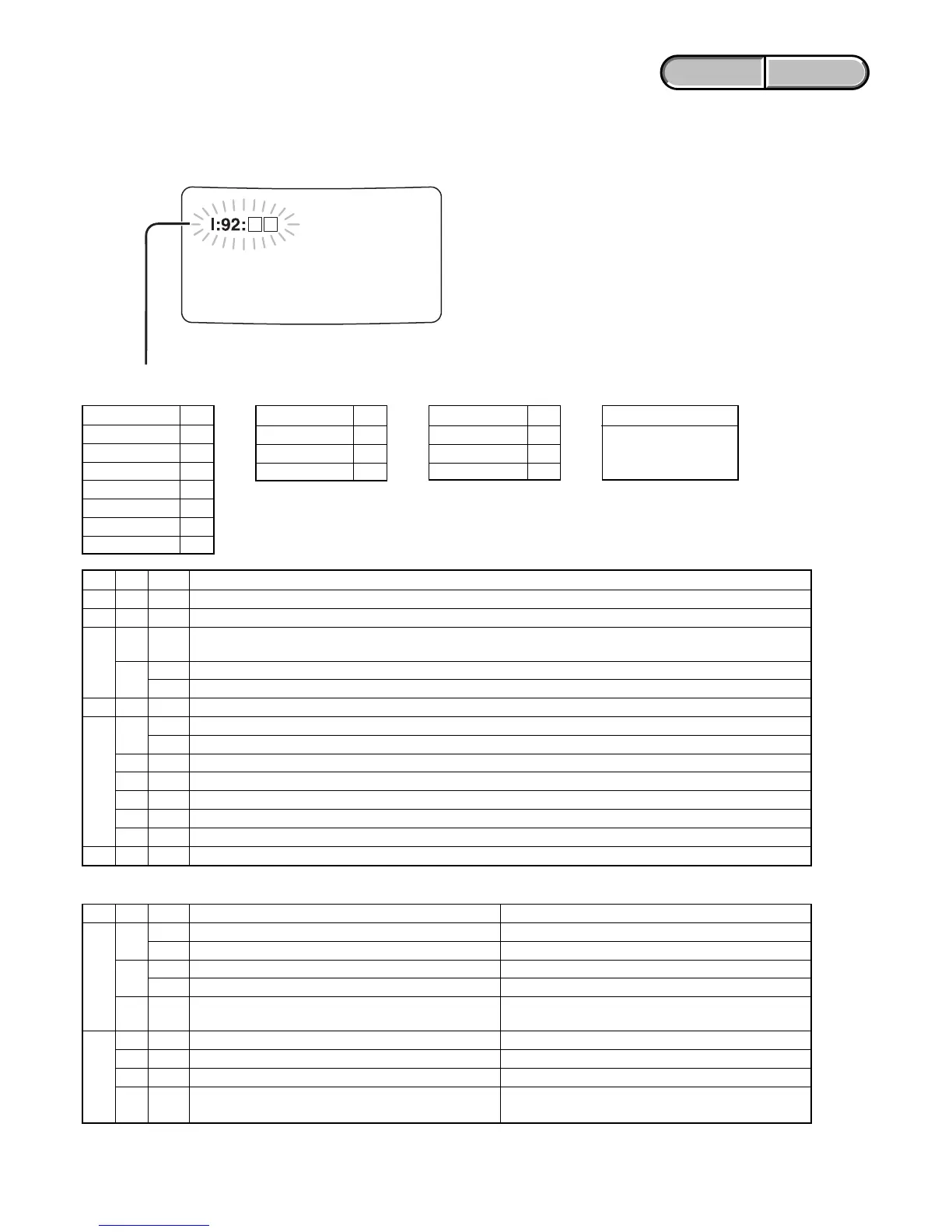
1-2. DESCRIPTION ON SELF-DIAGNOSIS DISPLAY
When an error occurs the following warning indicators may appear on the LCD screen.
And this unit is sent error code to camera.
Self-diagnosis display : X:Yy:ZZ
XYyZZDescription
I12ZZReturnable i.LINK-related error (The code that is corresponded to ZZ, is representative for status of i.LINK..)
A12ZZReturnable HDD-related error (The code that is corresponded to ZZ, is representative for error of ATA..)
12 ZZ
Error is occurred when the power supply -related command is sent from Main controller to Sub controller. (ZZ is
P
given value)
21
01 In case that error has been occurred with power supply controller of each device using by Sub controller.
02 Cannot enter into sleep mode
M12ZZStream processor abnormally (ZZ is given value. Such as, when AVI format is differed, ZZ becomes 01 etc.)
11
01 HDD failure
02 i.LINK error
12 ZZ In case that error has been detected into file system etc.
F21ZZIn case that cannot communicates to Sub controller
22 ZZ In case that cannot controls the others device from Sub controller
91 ZZ Others, fatal error related with hardware
92 ZZ Others, fatal error related with software
X99ZZIn case that for DV SIGNAL PROCESSOR (IC501), error code etc. of firmware is to displaying.
Principal Eroor Code
XYyZZ Countermeasure Description
12
01 Turn the unit back on again. Overflow of receiving buffer.
02 Turn the unit back on again. FAT error.
A90
01 Store the unit at room temperature for a little Caution the unit to low temperature.
11 Store the unit at room temperature for a little Caution the unit to high temperature.
91 01
Turn the unit back on again. Detect the communication error with selecting the
computer mode.
11 01 Turn the unit back on again. HDD has failed, or communication error between HDD.
12 01 Format the HDD HDD format error.
F2001Turn the unit back on again. Unit failed PHY (Physical Layer) reset.
29 00
There is partucularly no solution. (In this case, No writing into the sub controller firmware.
perform the firmware updates automatically.)
Y
Main 1y
Sub 2y
Other 9y
y
Physical Y1
Logical Y2
Other Y9
ZZ
When error is defined
in the devise, the error
code of it is displayed.







 To Next Page