EasyManua.ls Logo

Sony HVR-M10E - User Manual

Sony HVR-M10E
329 pages
Print Icon
To Next Page IconTo Next Page
Loading...
HVR-M10U
US Model
Canadian Model
HVR-M10E
AEP Model
HVR-M10C
Chinese Model
HVR-M10N/M10P
E Model
HVR-M10J
Japanese Model
SERVICE MANUAL
DIGITAL HD VIDEOCASSETTE RECORDER
Link
SERVICE NOTE
DISASSEMBLY
BLOCK DIAGRAMS
FRAME SCHEMATIC DIAGRAMS
SCHEMATIC DIAGRAMS
PRINTED WIRING BOARDS
REPAIR PARTS LIST
SPECIFICATIONS
ADJUSTMENT
SERVICE NOTE
DISASSEMBLY
BLOCK DIAGRAMS
FRAME SCHEMATIC DIAGRAMS
SCHEMATIC DIAGRAMS ADJUSTMENT
PRINTED WIRING BOARDS
REPAIR PARTS LIST
SPECIFICATIONS
Link
Revision History
Revision History
Ver. 1.5 2006. 10
How to use
Acrobat Reader
How to use
Acrobat Reader
Sony EMCS Co.
2006J1600-1
©2006.10
Published by Kohda TEC
9-876-852-11
HVR-M10C/M10E/M10J/M10N/M10P/M10U
HVR-M10C/M10E/M10J
M10N/M10P/M10U
RMT-843
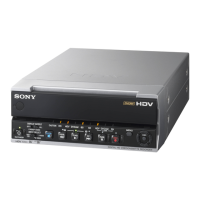
Photo : HVR-M10E
Z (Z311) MECHANISM
INSTRUCTION MANUAL is shown at the end of this document.
Reference number search on printed wiring boards is available.
TO TAKE OUT A CASSETTE WHEN NOT EJECT (FORCE EJECT)

Table of Contents

Questions and Answers

  • V
    Victoria RodriguezSep 6, 2025
    Why is the CHG lamp flashing on my Sony VCR?
    • A
      Andrew WilkersonSep 6, 2025
      If the CHG (charge) lamp on your Sony VCR is flashing while the battery is charging, correctly reinstall the battery. If it continues to flash, remove the power cord from the AC outlet and contact Sony Customer Service, as the battery is likely faulty.
  • J
    Justin PorterAug 22, 2025
    Why won't my Sony HVR-M10E power on?
    • K
      krystal78Aug 22, 2025
      If the power cord of the AC adapter is disconnected or the battery is discharged, nearly discharged, or incorrectly installed, the power cannot be turned on. Connect the AC power cord or install a charged battery.
  • A
    anna83Sep 3, 2025
    What to do if Sony VCR turns off immediately even with battery?
    • J
      Jeffery CantuSep 3, 2025
      If there is enough remaining battery power but the power turns off immediately on your Sony VCR, fully recharge the battery. The remaining battery power will then be displayed correctly. The issue could be due to a faulty battery power indication or improper charging.
  • G
    George OrozcoSep 2, 2025
    Why is the battery power not displayed correctly on my Sony HVR-M10E?
    • W
      walkerbrianSep 2, 2025
      If the remaining battery power is not displayed correctly on your Sony VCR, fully recharge the battery. If the battery is expended quickly even after recharging, the battery life is over and needs replacement. This can also occur if the battery has been used in extremely high or low temperatures for long hours, or charging is insufficient.
  • J
    jhobbsAug 31, 2025
    What to do if Sony HVR-M10E VCR doesn't work with AC adapter?
    • W
      William HensleySep 1, 2025
      If your Sony VCR is not functioning properly when using the AC adapter, turn off the power, remove the power cord from the AC outlet, and then reconnect it.
  • C
    Christopher BellAug 30, 2025
    How to display remaining tape time on Sony HVR-M10E VCR?
    • T
      Tracy CarneyAug 30, 2025
      To display the remaining tape time on your Sony VCR, set [ REMAINING] on the [OTHERS] menu to [ON].
  • R
    Raymond Wright MDAug 29, 2025
    Why does my Sony HVR-M10E VCR battery drain so fast?
    • J
      Justin MejiaAug 29, 2025
      If the battery is expended quickly on your Sony VCR, fully recharge it. If it still drains quickly, the battery life is likely over, and you should replace it with a new one. Note that extremely low ambient temperatures or insufficient charging can also cause this.
  • P
    Patrick VargasAug 27, 2025
    How to fix a Sony HVR-M10E VCR remote that is not working?
    • A
      Allen SantanaAug 27, 2025
      If the supplied wireless Remote Commander for your Sony VCR isn't working, set [REMOTE CTRL] on the [OTHERS] menu to [ON].
  • E
    Erin AdamsAug 27, 2025
    What to do if my Sony HVR-M10E won't operate?
    • K
      karinamartinAug 27, 2025
      If your Sony VCR unit won't operate even after turning it on, it could be due to moisture condensation or the cassette not being inserted correctly. Eject and reinsert the cassette straight. Disconnect the power supply (battery or AC adapter) and then reconnect it after about 1 minute. If it still doesn't work, use a sharp-tipped ballpoint pen to press the RESET button (note that this will clear all settings).
  • J
    Justin LeeAug 25, 2025
    Why is the audio noisy on my Sony HVR-M10E?
    • J
      James VegaAug 26, 2025
      Noisy audio on your Sony VCR can be caused by a damaged tape or dirty video heads. Try removing the cassette and inserting another one. If the problem persists, clean the video heads using the supplied cleaning cassette.

Summary

Chapter 1 Overview

Features

Highlights the key digital HD videocassette recorder capabilities, including HDV format support, DVCAM/DV format compatibility, and various input/output jacks.

Location and Function of Parts

Details the physical layout and function of controls and connectors on the Front Panel, Section behind Operation Panel, Rear Panel, and Remote Commander.

Chapter 2 Playback and Recording

Notes on Power Supply and Video Cassettes

Provides essential information on using power supplies, handling video cassettes, and precautions related to moisture condensation.

Playback

Explains how to connect the unit to monitors and perform various playback functions, including different speeds and scene searching.

Recording;Dubbing

Guides users on connecting to external equipment for recording and dubbing, setting various modes, and handling audio dubbing procedures.

Chapter 3 Dubbing;Editing

Chapter 4 Adjusting and Setting Through Menus

Chapter 5 Maintenance

Troubleshooting

Offers solutions for common operational issues, battery problems, cassette tape errors, playback, recording, and dubbing malfunctions.

Sony HVR-M10E Specifications

General IconGeneral
Remote ControlYes
Power SupplyAC 100-240V, 50/60Hz
FormatHDV/DV
Video Recording FormatDV
Audio Recording FormatPCM
Tape Speed18.8 mm/sec
Video InputComposite, S-Video
Video OutputComposite, S-Video
Audio OutputRCA x2
Input/OutputIEEE 1394, USB
DisplayLCD

Related product manuals