73
Menu List
Chapter 4 Menu and Detailed Settings
DIAGNOSIS Menu
This menu is only for viewing and no setting is made using this menu.
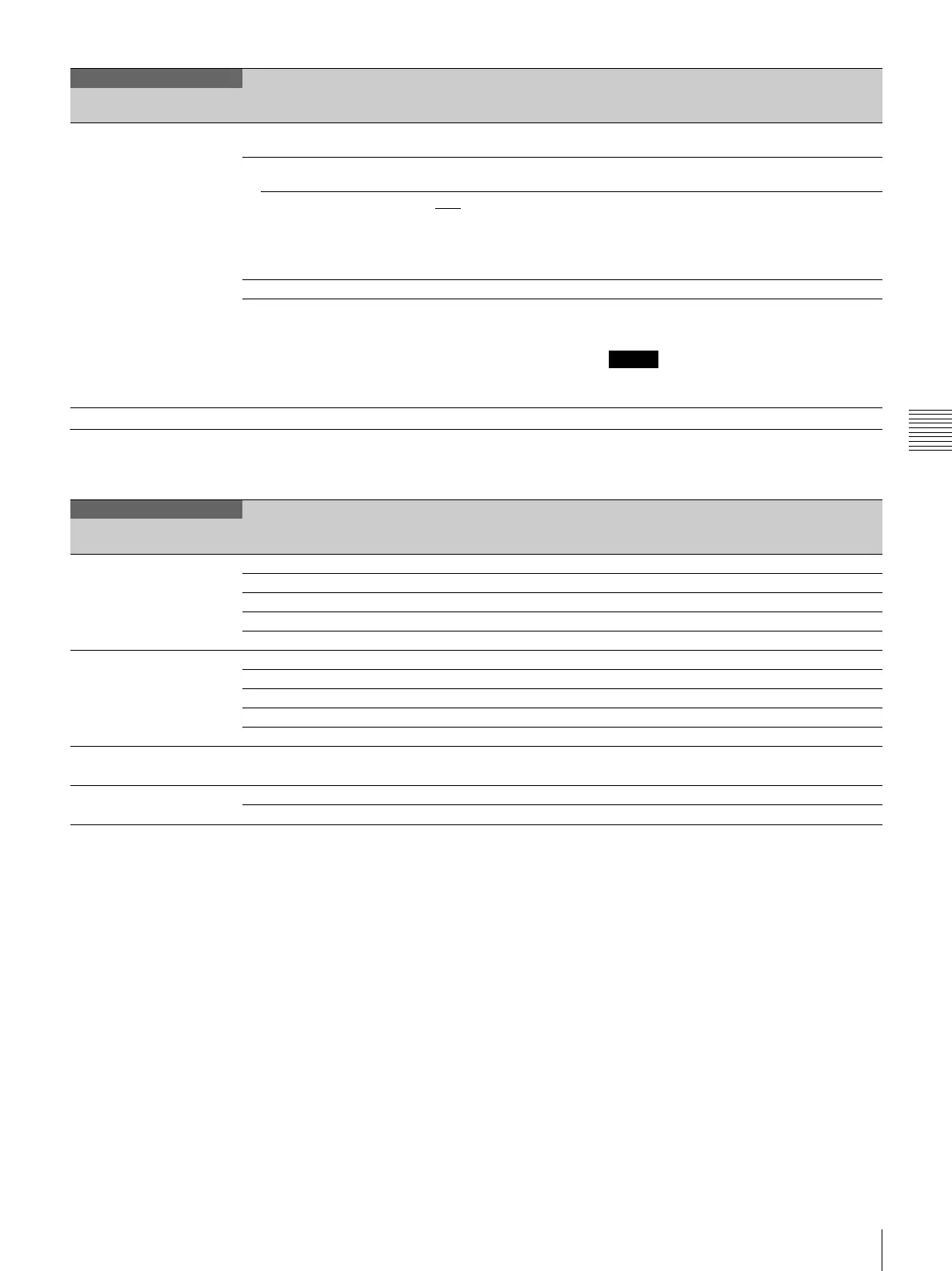
<FILE CLEAR>
F05
PRESET OPERATOR Returns the operator file to the factory preset.
(Execute by ENTER.)
REFERENCE (ALL) Returns the reference file to the factory preset.
(Execute by ENTER.)
10 SEC CLEAR ON, OFF
Clears a specific item in the reference file by
holding the menu control knob pressed for 10
seconds.
See “To return a menu item to its standard
value” (page 52).
ALL MENU RESET Returns all the settings to the factory preset.
M.S. FORMAT Initializes a “Memory Stick Duo.” (Execute by
ENTER.)
Note
Clears all the data stored in a “Memory Stick
Duo.”
DIAGNOSIS
Page title
Page No.
Item Settings Description
<BOARD STATUS>
D01
OHB OK, NG Displays the OHB Block status.
DPR OK, NG Displays the DPR board status.
SY OK, NG Displays the SY board status.
IF OK, NG Displays the IF board status.
PS OK, NG Displays the PS board status.
<PLD VERSION>
D02
SY Displays the PLD version for SY board.
DPR1 Displays the PLD1 version for DPR board.
DPR2 Displays the PLD2 version for DPR board.
IF Displays the PLD version for IF board.
TX Displays the TX-PLD version for DPR board.
<ROM VERSION>
D03 (U18)
AT Display the ROM (software) version.
<SERIAL NO>
D04
MODEL MODEL NAME Displays the model name.
NO SERIAL NO Displays the serial number.
FILE
Page title
Page No.
Item Settings Description


 To Next Page