33
Recording/Playback
GB
Playback on the camcorder
In the default setting, movies and photos that are recorded on the internal memory are played.
Tips
To change the recording media, see page 20.
1
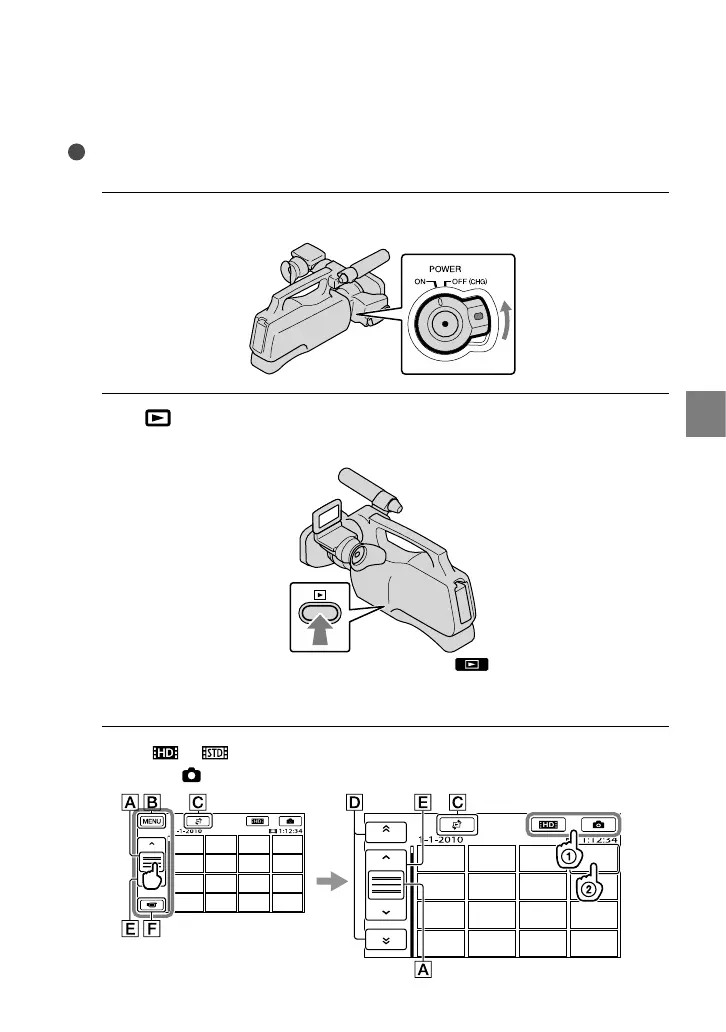
Slide the POWER switch to ON while pressing the green button.
2
Press
(VIEW IMAGES).
The VISUAL INDEX screen appears after some seconds.
You can display the VISUAL INDEX screen also by touching (VIEW IMAGES) on the LCD
screen.
Images are displayed and sorted by recording date.
3
Touch
or () a desired movie () to playback a movie.
Touch the
(Photo) () a desired photo () to view a photo.


 To Next Page