Playing images on a TV
Playback image quality depends on the type of TV, or the jacks used to make the connection.
Use the supplied AC Adaptor to obtain AC power (p. 14).
Refer also to the instruction manuals supplied with the device to be connected.
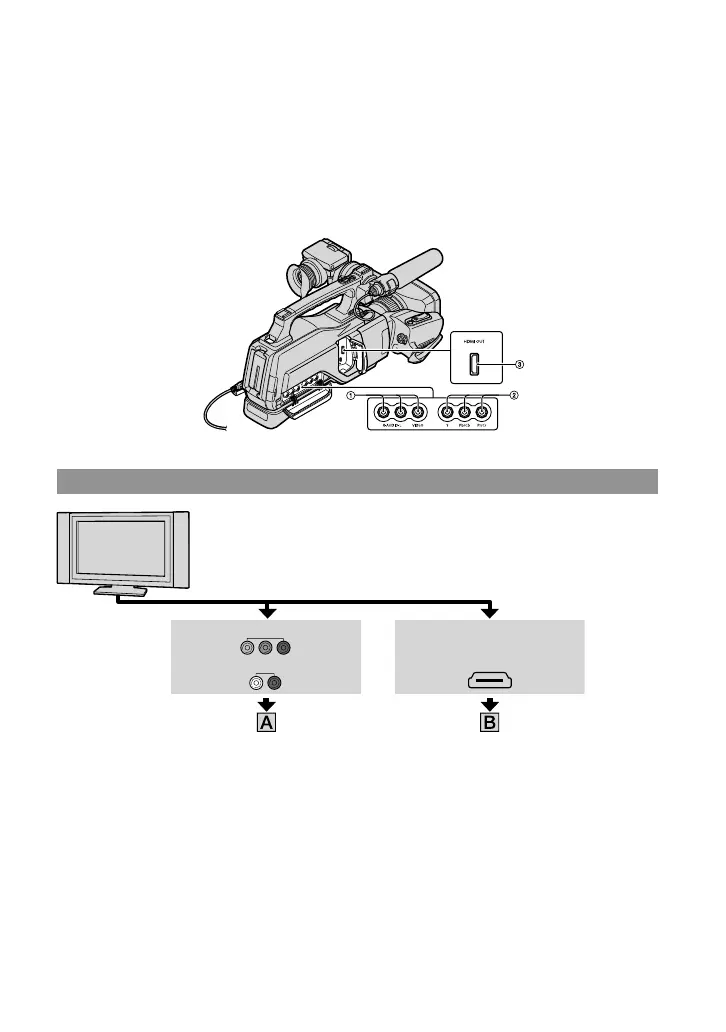
Jacks on your camcorder
Open the jack cover and connect the cable.
R-AUDIO-L VIDEO Y Pb/Cb Pr/Cr
HDMI OUT
Connecting to a high definition TV
COMPONENT IN VIDEO
High definition image quality (HD) movies are played back in
high definition image quality (HD).
Standard definition image quality (STD) movies are played back in
standard definition image quality (STD).
AUDIO HDMI IN


 To Next Page