63
Saving movies and photos with a computer
GB
appears.
To add movies to the previously selected
ones, select the movies in the main
window and drag and drop onto the
window for selecting movies.
5
Follow the instructions on the
screen to create a disc.
It may take a long time to create a disc.
Playing an AVCHD disc on a
computer
You can play back AVCHD discs using
“Player for AVCHD” that is installed
together with “PMB.”
To start “Player for AVCHD” Click
[Start] [All Programs] [PMB]
[PMB Launcher] [View] [Player
for AVCHD].
See the “Player for AVCHD” help on the
operation.
Movies may not be played smoothly
depending on the computer environment.
Creating a Blu-ray Disc
You can create a Blu-ray Disc with a high
definition image quality (HD) movie
previously imported to a computer
(p
. 61).
To create a Blu-ray Disc, the BD Add-on
Software for “PMB” must be installed.
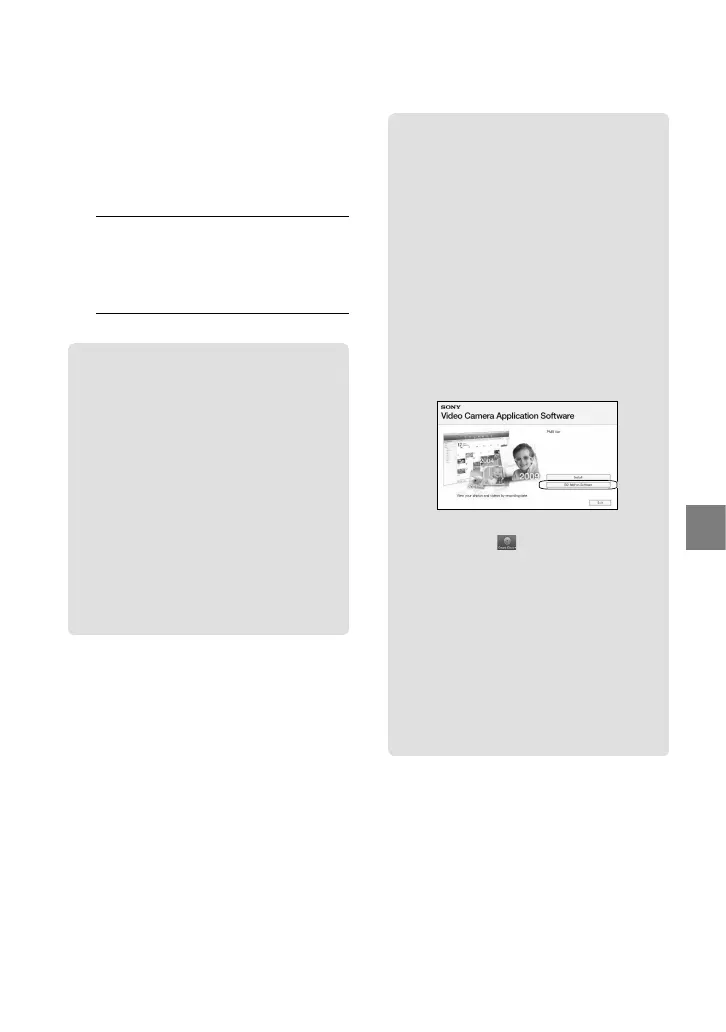
Click [BD Add-on Software] on the
installation screen of “PMB,” and install
this plug-in according to the on-screen
instructions.
Connect your computer to the internet
when you install [BD Add-on Software].
Place an unused Blu-ray Disc in the disc
drive, and click
[Create Blu-ray
Disc (HD)] in step 4 of “Creating an
AVCHD disc” (p
. 62). Other procedures
are the same as that for creating an
AVCHD disc.
Your computer must support the creation of
Blu-ray Disc.
BD-R (unrewritable) and BD-RE
(rewritable) media are available for creating
Blu-ray Disc. You cannot add contents to
either type of disc after creating the disc.


 To Next Page