EasyManua.ls Logo

Sony ICF-2001 - Section 3 Adjustments; PLL1 Adjustment; PLL2 Adjustment

Sony ICF-2001
13 pages
Print Icon
To Next Page IconTo Next Page
To Previous Page IconTo Previous Page
Loading...
Front
panel
and
right
side
Green
key
marks
on
the
radio
for
scanning
or
presetting
[1
for
AM
(LW,
MW,
SW)
reception
a
for
SSB/CW
reception
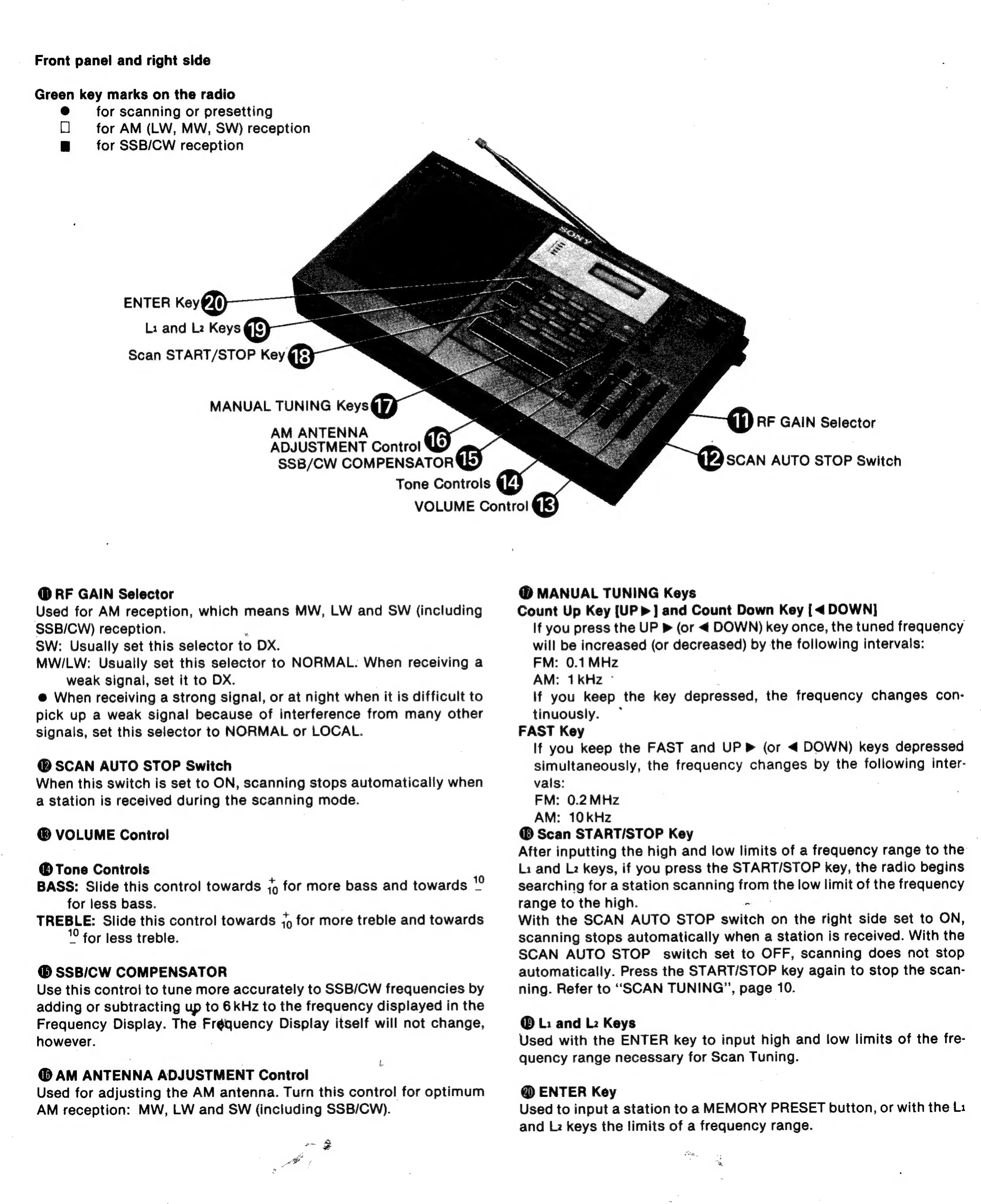
ENTER
Key@@)
Li
and
Lz
Keys
@f)
Scan
START/STOP
Key
@}3}
MANUAL
TUNING
Keys@¥/
AM
ANTENNA
1G
ADJUSTMENT
Control
SSB/CW
COMPENSATOR
@)
Tone
Controls
{43
VOLUME
Control
@
RF
GAIN
Selector
Used
for
AM
reception,
which
means
MW,
LW
and
SW
(including
SSB/CW)
reception.
SW:
Usually
set
this
selector
to
DX.
MWILW:
Usually
set
this
selector
to
NORMAL.
When
receiving
a
weak
signal,
set
it
to
DX.
@
When
receiving
a
strong
signal,
or
at
night
when
it
is
difficult
to
pick
up
a
weak
signal
because
of
interference
from
many
other
signals,
set
this
selector
to
NORMAL
or
LOCAL.
@
SCAN AUTO
STOP
Switch
When
this
switch
is
set
to
ON,
scanning
stops
automatically
when
a
station
is
received
during
the
scanning
mode.
VOLUME
Control
Tone
Controls
BASS:
Slide
this
control
towards
jg
for
more
bass
and
towards
for
less
bass.
TREBLE:
Slide
this
control
towards
j9
for
more
treble
and
towards
for
less
treble.
SSB/CW
COMPENSATOR
Use
this
control
to
tune
more
accurately
to
SSB/CW
frequencies
by
adding
or
subtracting
up
to
6
kHz
to
the
frequency
displayed
in
the
Frequency
Display.
The
Fréquency
Display
itself
will
not
change,
however.
te
@
AM
ANTENNA
ADJUSTMENT
Control
Used
for
adjusting
the
AM
antenna.
Turn
this
control
for
optimum
AM
reception:
MW,
LW
and
SW
(including
SSB/CW).
3
+
wh)
RF
GAIN
Selector
KVASCAN
AUTO
STOP
Switch
@
MANUAL
TUNING
Keys
Count
Up
Key
[UP
>]
and
Count
Down
Key
[<
DOWN]
If
you
press
the
UP
»
(or
<
DOWN)
key
once,
the
tuned
frequency
will
be
increased
(or
decreased)
by
the
following
intervals:
FM:
0.1
MHz
AM:
1kHz
-
lf
you
keep
the
key
depressed,
the
frequency
changes
con-
tinuously.
FAST
Key
If
you
keep
the
FAST
and
UP
Pm
(or
<
DOWN)
keys
depressed
simultaneously,
the
frequency
changes
by
the
following
inter-
vals:
FM:
0.2MHz
AM:
10
kHz
Scan
START/STOP
Key
After
inputting
the
high
and
low
limits
of
a
frequency
range
to
the
Li
and
Lz
keys,
if
you
press
the
START/STOP
key,
the
radio
begins
searching
for
a
station
scanning
from,
the
low
limit
of
the
frequency
range
to
the
high.
With
the
SCAN
AUTO
STOP
awlich
on
the
right
side
set
to
ON,
scanning
stops
automatically
when
a
station
is
received.
With
the
SCAN
AUTO
STOP
switch
set
to
OFF,
scanning
does
not
stop
automatically.
Press
the
START/STOP
key
again
to
stop
the
scan-
ning.
Refer
to
“SCAN
TUNING”,
page
10.
@
L:
and
Lz
Keys
Used
with
the
ENTER
key
to
input
high
and
low
limits
of
the
fre-
quency
range
necessary
for
Scan
Tuning.
@
ENTER
Key
Used
to
input
a
station
to
a
MEMORY
PRESET
button,
or
with
the
Li
and
Lz
keys
the
limits
of
a
frequency
range.

Other manuals for Sony ICF-2001

Related product manuals