EasyManua.ls Logo

Sony ICF-2001 - AM IF Alignment; 2 ND IF ALIGNMENT; 1 ST IF ALIGNMENT

Sony ICF-2001
13 pages
Print Icon
To Next Page IconTo Next Page
To Previous Page IconTo Previous Page
Loading...
COMPUTER
BATTERIES
Since
this
radio
is
controlled
by
a
microcomputer,
the
computer
batteries
must
be
installed
when
you
operate
the
radio.
If
not,
the
computer
will
not
operate,
nothing
will
appear
in
the
Frequency
Display,
and
the
radio
will
not
function
properly.
Computer
battery
installation
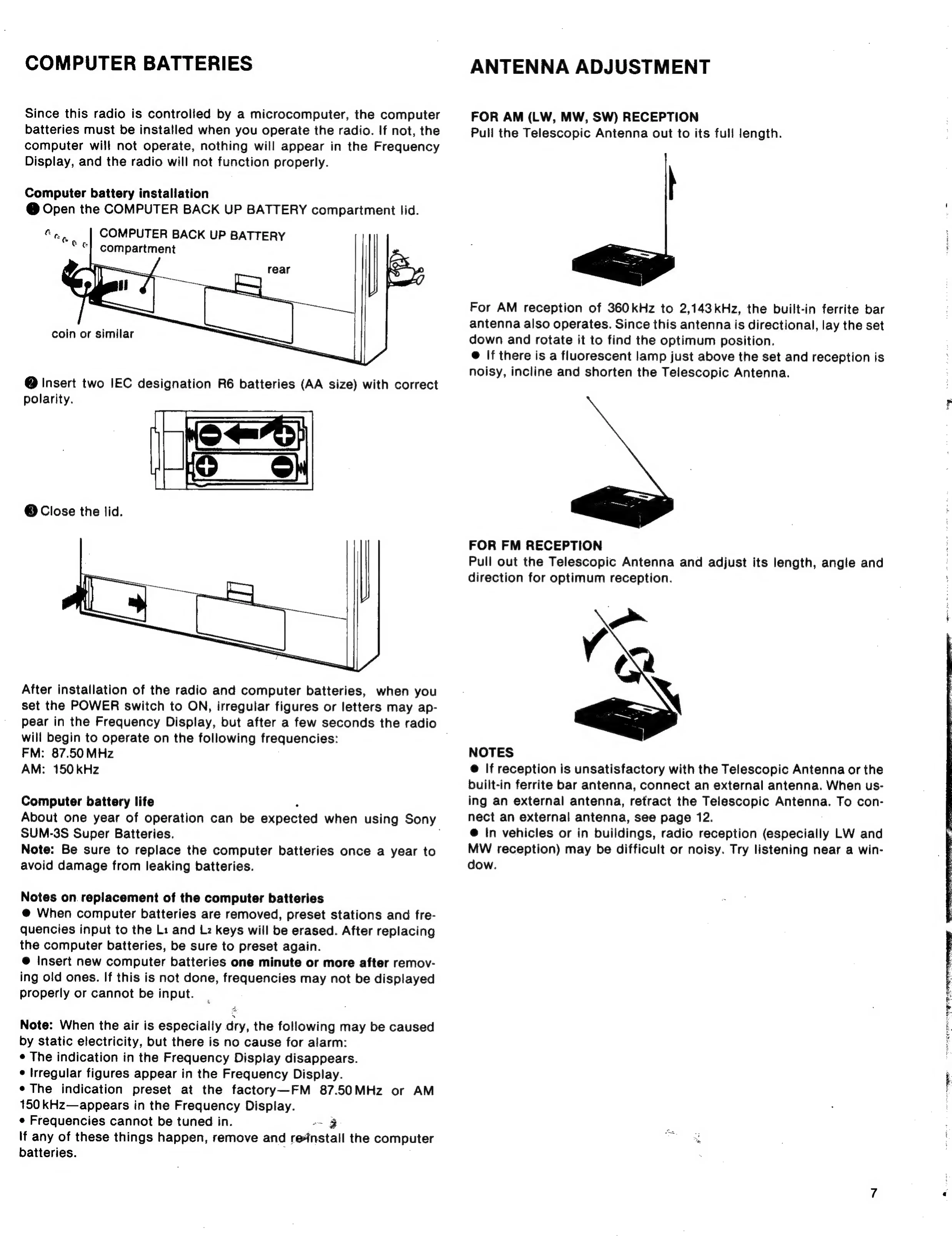
@
Open
the
COMPUTER
BACK
UP
BATTERY
compartment
lid.
COMPUTER
BACK
UP
BATTERY
compartment
coin
or
similar
@
Insert
two
IEC
designation
R6
batteries
(AA
size)
with
correct
polarity.
@
Close
the
lid.
After
installation
of
the
radio
and
computer
batteries,
when
you
set
the
POWER
switch
to
ON,
irregular
figures
or
letters
may
ap-
pear
in
the
Frequency
Display,
but
after
a
few
seconds
the
radio
will
begin
to
operate
on
the
following
frequencies:
FM:
87.50
MHz
AM:
150
kHz
Computer
battery
life
.
About
one
year
of
operation
can
be
expected
when
using
Sony
SUM-3S
Super
Batteries.
Note:
Be
sure
to
replace
the
computer
batteries
once
a
year
to
avoid
damage
from
leaking
batteries.
Notes
on.
replacement
of
the
computer
batteries
@
When
computer
batteries
are
removed,
preset
stations
and
fre-
quencies
input
to
the
Li
and
Lz
keys
will
be
erased.
After
replacing
the
computer
batteries,
be
sure
to
preset
again.
@
Insert
new
computer
batteries
one
minute
or
more
after
remov-
ing
old
ones.
If
this
is
not
done,
frequencies
may
not
be
displayed
properly
or
cannot
be
input.
Note:
When
the
air
is
especially
dry,
the
following
may
be
caused
by
static
electricity,
but
there
is
no
cause
for
alarm:
¢
The
indication
in
the
Frequency
Display
disappears.
¢
Irregular
figures
appear
in
the
Frequency
Display.
¢
The
indication
preset
at
the
factory—FM
87.50MHz
or
AM
150
kHz—appears
in
the
Frequency
Display.
«
Frequencies
cannot
be
tuned
in.
--
3
If
any
of
these
things
happen,
remove
and
reinstall
the
computer
batteries.
:
ANTENNA
ADJUSTMENT
FOR
AM
(LW,
MW,
SW)
RECEPTION
Pull
the
Telescopic
Antenna
out
to
its
full
length.
=
For
AM
reception
of
360
kHz
to
2,143kHz,
the
built-in
ferrite
bar
antenna
also
operates.
Since
this
antenna
is
directional,
lay
the
set
down
and
rotate
it
to
find
the
optimum
position.
@
If
there
is
a
fluorescent
lamp
just
above
the
set
and
reception
is
noisy,
incline
and
shorten
the
Telescopic
Antenna.
>
FOR
FM
RECEPTION
Pull
out
the
Telescopic
Antenna
and
adjust
its
length,
angle
and
direction
for
optimum
reception.
NOTES
@
If
reception
is
unsatisfactory
with
the
Telescopic
Antenna
or
the
built-in
ferrite
bar
antenna,
connect
an
external
antenna.
When
us-
ing
an
external
antenna,
retract
the
Telescopic
Antenna.
To
con-
nect
an
external
antenna,
see
page
12.
@
In
vehicles
or
in
buildings,
radio
reception
(especially
LW
and
MW
reception)
may
be
difficult
or
noisy.
Try
listening
near
a
win-
dow.

Other manuals for Sony ICF-2001

Related product manuals