EasyManua.ls Logo

Sony ICF-2001 - AM Antenna Tracking Adjustment

Sony ICF-2001
13 pages
Print Icon
To Next Page IconTo Next Page
To Previous Page IconTo Previous Page
Loading...
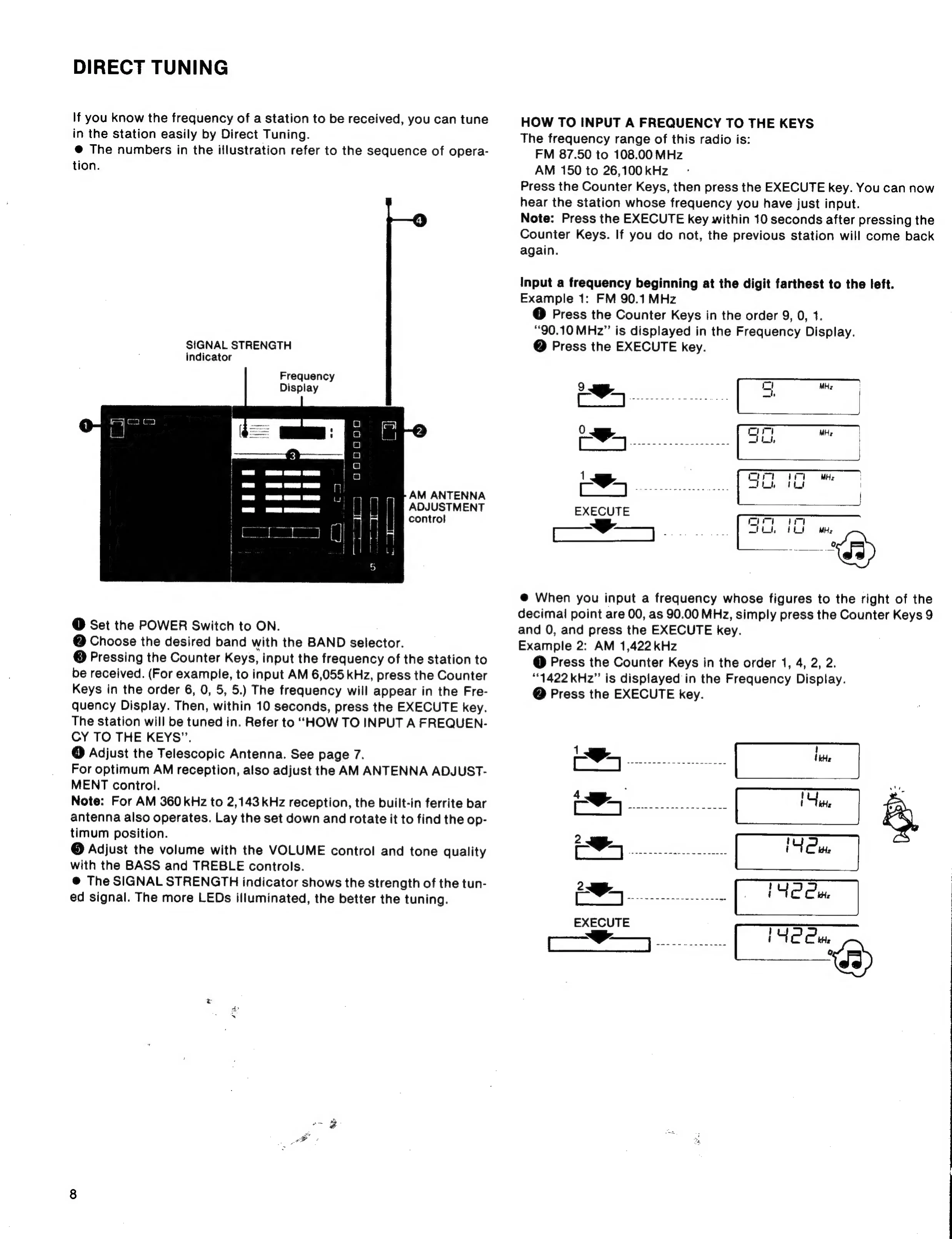
DIRECT
TUNING
If
you
know
the
frequency
of
a
station
to
be
received,
you
can
tune
in
the
station
easily
by
Direct
Tuning.
@
The
numbers
in
the
illustration
refer
to
the
sequence
of
opera-
tion.
SIGNAL
STRENGTH
indicator
Frequency
Display
1
(I
Ga ea
Co
oaogcoa
AM
ANTENNA
ADJUSTMENT
control
aL
wi
mars
3
—
arr
|
prea
aaa
|
8
AREY
|
RE)
o
@
Set
the
POWER
Switch
to
ON.
@
Choose
the
desired
band
with
the
BAND
selector.
©
Pressing
the
Counter
Keys,
input
the
frequency
of
the
station
to
be
received.
(For
example,
to
input
AM
6,055
kHz,
press
the
Counter
Keys
in
the
order
6,
0,
5,
5.)
The
frequency
will
appear
in
the
Fre-
quency
Display.
Then,
within
10
seconds,
press
the
EXECUTE
key.
The
station
will
be
tuned
in.
Refer
to
“HOW
TO
INPUT
A
FREQUEN-
CY
TO
THE
KEYS”.
@
Adjust
the
Telescopic
Antenna.
See
page
7.
For
optimum
AM
reception,
also
adjust
the
AM
ANTENNA
ADJUST-
MENT
control.
Note:
For
AM
360
kHz
to
2,143
kHz
reception,
the
built-in
ferrite
bar
antenna
also
operates.
Lay
the
set
down
and
rotate
it
to
find
the
op-
timum
position.
©
Adjust
the
volume
with
the
VOLUME
control
and
tone
quality
with
the
BASS
and
TREBLE
controls.
@
The
SIGNAL
STRENGTH
indicator
shows
the
strength
of
the
tun-
ed
signal.
The
more
LEDs
illuminated,
the
better
the
tuning.
HOW
TO
INPUT
A
FREQUENCY
TO
THE
KEYS
The
frequency
range
of
this
radio
is:
FM
87.50
to
108.00
MHz
AM
150
to
26,100
kHz
Press
the
Counter
Keys,
then
press
the
EXECUTE
key.
You
can
now
hear
the
station
whose
frequency
you
have
just
input.
Note:
Press
the
EXECUTE
key
within
10
seconds
after
pressing
the
Counter
Keys.
If
you
do
not,
the
previous
station
will
come
back
again.
Input
a
frequency
beginning
at
the
digit
farthest
to
the
left.
Example
1:
FM
90.1
MHz
@
Press
the
Counter
Keys
in
the
order
9,
0,
1.
“90.10
MHz”
is
displayed
in
the
Frequency
Display.
@
Press
the
EXECUTE
key.
@
When
you
input
a
frequency
whose
figures
to
the
right
of
the
decimal
point
are
00,
as
90.00
MHz,
simply
press
the
Counter
Keys
9
and
0,
and
press
the
EXECUTE
key.
Example
2:
AM
1,422
kHz
@
Press
the
Counter
Keys
in
the
order
1,
4,
2,
2.
“1422
kHz”
is
displayed
in
the
Frequency
Display.
@
Press
the
EXECUTE
key.
Se
ie
.
ee
rem