EasyManua.ls Logo

Sony ICF-2001 - Replacement Semiconductors

Sony ICF-2001
13 pages
Print Icon
To Next Page IconTo Next Page
To Previous Page IconTo Previous Page
Loading...
To
input
an
AM
frequency
whose
three
righthand
digits
are
000
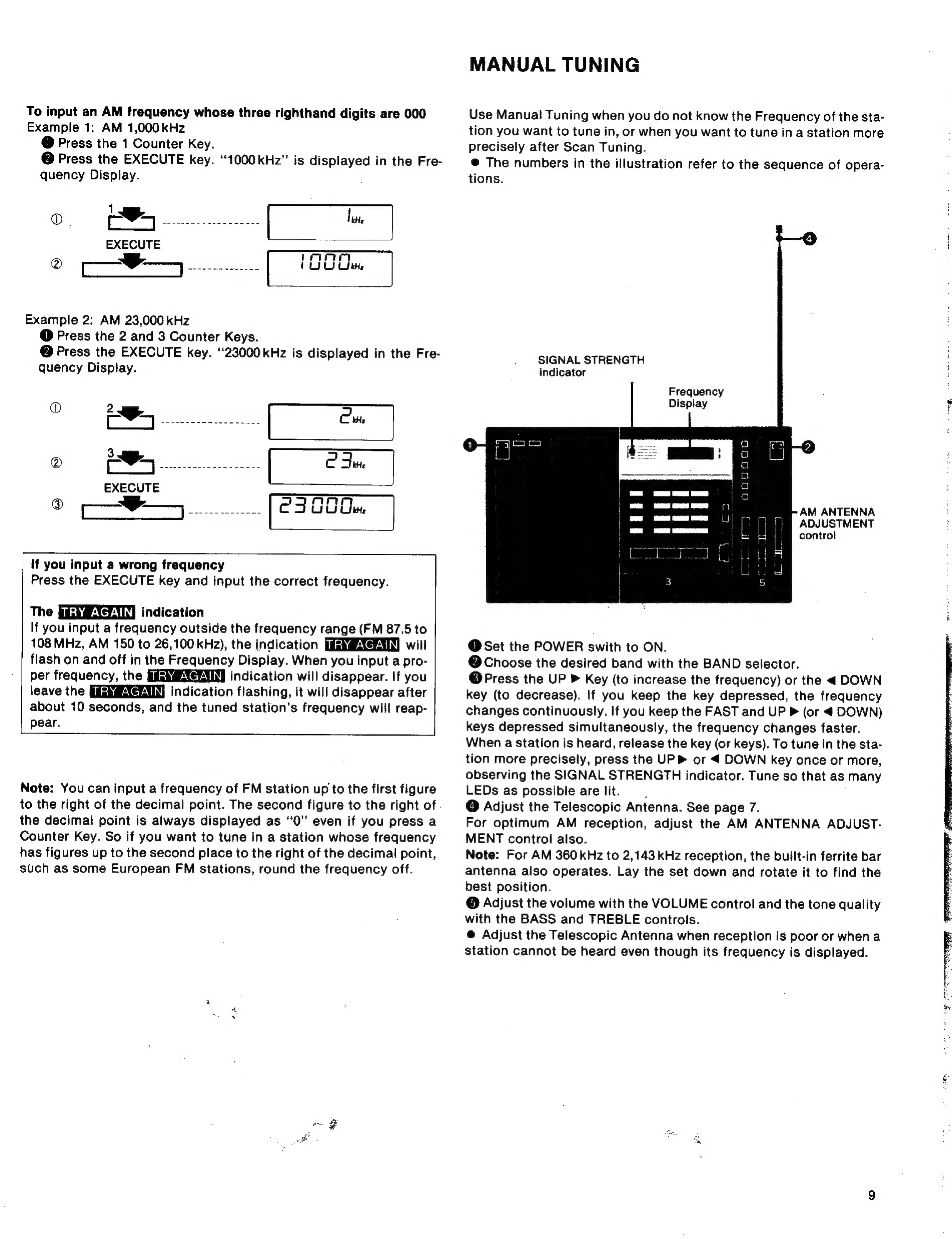
Example
1:
AM
1,000
kHz
@
Press
the
1
Counter
Key.
@
Press
the
EXECUTE
key.
“1000kHz”
is
displayed
in
the
Fre-
quency
Display.
O)
‘dia
BELEN
AIS
White
EXECUTE
2
—F-,---
(UU
Example
2:
AM
23,000
kHz
@
Press
the
2
and
3
Counter
Keys.
@
Press
the
EXECUTE
key.
“23000
kHz
is
displayed
in
the
Fre-
quency
Display.
O
aan
pores
Aras
Cite
®
aden
tort
sls
as
|
C
Fur
EXECUTE
®
co
Reece
ee
C300Cu.
If
you
input
a
wrong
frequency
|
Press
the
EXECUTE
key
and
input
the
correct
frequency.
The
indication
If
you
input
a
frequency
outside
the
frequency
range
(FM
87.5
to
108
MHz,
AM
150
to
26,100
kHz),
the
indication
will
flash
on
and
off
in
the
Frequency
Display.
When
you
input
a
pro-
per
frequency,
the
indication
will
disappear.
If
you
leave
the
indication
flashing,
it
will
disappear
after
about
10
seconds,
and
the
tuned
station’s
frequency
will
reap-
pear.
Note:
You
can
input
a
frequency
of
FM
station
up
to
the
first
figure
to
the
right
of
the
decimal
point.
The
second
figure
to
the
right
of
.
the
decimal
point
is
always
displayed
as
‘‘0”
even
if
you
press
a
Counter
Key.
So
if
you
want
to
tune
in
a
station
whose
frequency
has
figures
up
to
the
second
place
to
the
right
of
the
decimal
point,
such
as
some
European
FM
stations,
round
the
frequency
off.
MANUAL
TUNING
Use
Manual
Tuning
when
you
do
not
know
the
Frequency
of
the
sta-
tion
you
want
to
tune
in,
or
when
you
want
to
tune
in
a
station
more
precisely
after
Scan
Tuning.
@
The
numbers
in
the
illustration
refer
to
the
sequence
of
opera-
tions.
SIGNAL
STRENGTH
indicator
Frequency
Display
i
ia}
o
o
oO
i
a
oO
AM
ANTENNA
ADJUSTMENT
control
rj
ane
1
3
2}
Co
Ir
@
Set
the
POWER
swith
to
ON.
@
Choose
the
desired
band
with
the
BAND
selector.
@
Press
the
UP
»
Key
(to
increase
the
frequency)
or
the
<
DOWN
key
(to
decrease).
If
you
keep
the
key
depressed,
the
frequency
changes
continuously.
If
you
keep
the
FAST
and
UP
P
(or
<
DOWN)
keys
depressed
simultaneously,
the
frequency
changes
faster.
When
a
station
is
heard,
release
the
key
(or
keys).
To
tune
in
the
sta-
tion
more
precisely,
press
the
UP
or
4
DOWN
key
once
or
more,
observing
the
SIGNAL
STRENGTH
indicator.
Tune
so
that
as
many
LEDs
as
possible
are
lit.
:
@
Adjust
the
Telescopic
Antenna.
See
page
7.
For
optimum
AM
reception,
adjust
the
AM
ANTENNA
ADJUST-
MENT
control
also.
Note:
For
AM
360
kHz
to
2,143
kHz
reception,
the
built-in
ferrite
bar
antenna
also
operates.
Lay
the
set
down
and
rotate
it
to
find
the
best
position.
©
Adjust
the
volume
with
the
VOLUME
control
and
the
tone
quality
with
the
BASS
and
TREBLE
controls.
@
Adjust
the
Telescopic
Antenna
when
reception
is
poor
or
when
a
station
cannot
be
heard
even
though
its
frequency
is
displayed.
F