EasyManua.ls Logo

Sony ICF-2001D - Sync Adjustment; Synchronous Detection Adjustment Procedure

Sony ICF-2001D
78 pages
Print Icon
To Next Page IconTo Next Page
To Previous Page IconTo Previous Page
Loading...
ICF-2001D/2010
SYNC
ADJUSTMENT
Note:
Frequency
setting
may
alter
when
adjusted
with
shield
plate
(K)
removed
from
sync
board.
USB
and
LSB/CW
modes
are
not
provided
for
sets
to
the
Middle
Easts
and
Saudi
Arabia.
Setup:
Band:
AM
Mode:
as
directed
AM
RF
GAIN
control:
as
adequate
Frequency:
as
directed
(11,800.0
kHz
when
AM
RF
SSG
is
used)
MANUAL
TUNE
MODE:
SLOW
SYNC
switch:
as
directed
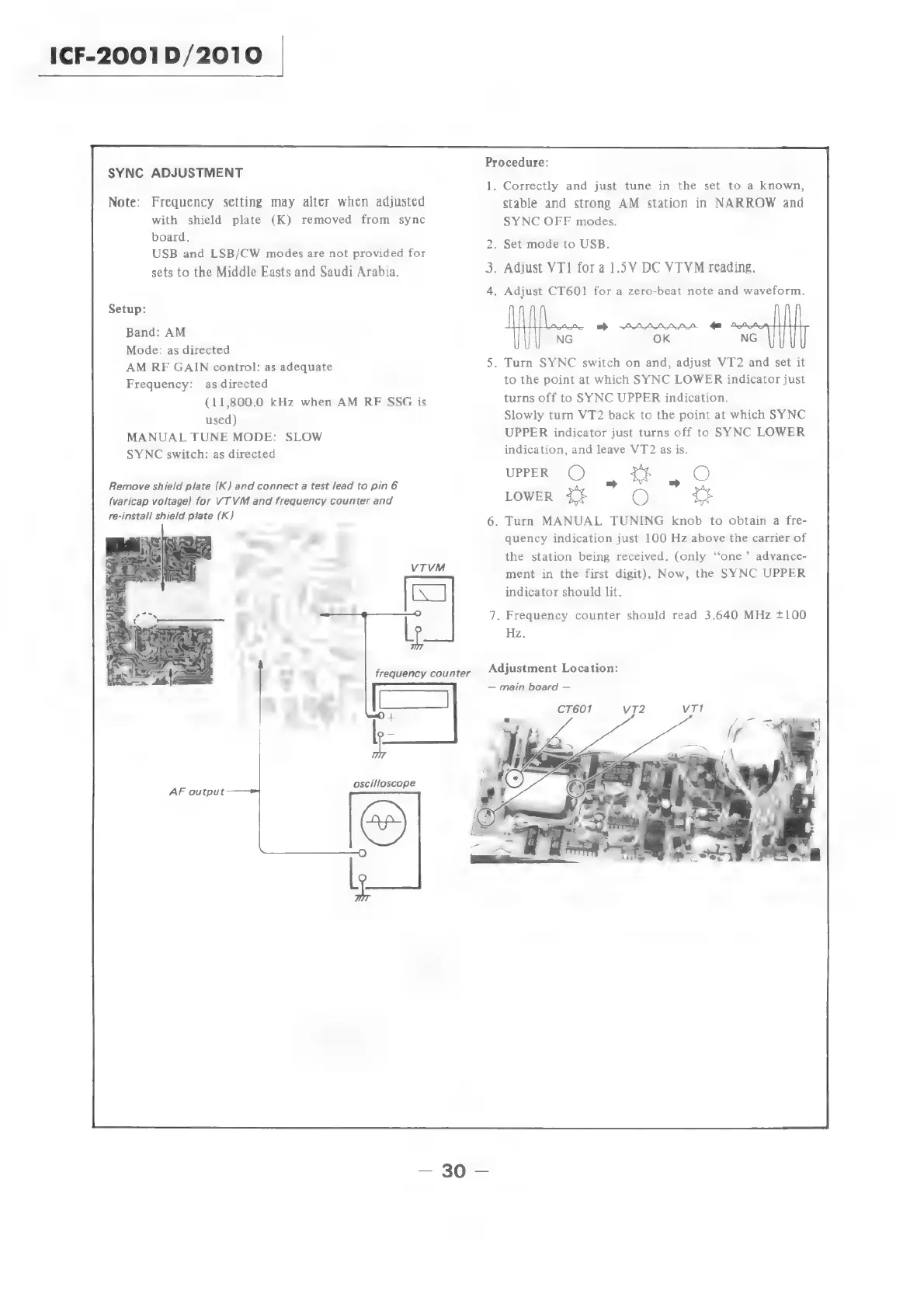
Remove
shield
plate
(K)
and
connect
a
test
/ead
to
pin6
(varicap voltage)
for
VT VM
and
frequency
counter
and
re-install
shield
plate
(K)
AF
output
——*
Procedure:
1
.
Correctly
and
just
tune
in
the
set
to
a
known,
stable
and
strong
AM
station
in
NARROW
and
SYNC
OFF
modes.
.
Set
mode
to
USB.
3.
Adjust
VT1
fora
1.5V
DC
VTVM
reading.
.
Adjust
CT601
for
a
zero-beat
note
and
waveform.
>
morn.
NG
OK
NG
.
Turn
SYNC
switch
on
and,
adjust
VT2
and
set
it
to
the
point
at
which
SYNC
LOWER
indicator
just
turns
off
to
SYNC
UPPER
indication.
Slowly
turn
VT2
back
to
the
point
at
which
SYNC
UPPER
indicator
just
turns
off
to
SYNC
LOWER
indication,
and
leave
VT2
as
is.
UPPER
(©)
e
tt
bs
O
LOWER
+$
O
tt
.
Turn
MANUAL
TUNING
knob
to
obtain
a
fre-
quency
indication
just
100
Hz
above
the
carrier
of
the
station
being
received.
(only
‘‘one’
advance-
ment
in
the
first
digit).
Now,
the
SYNC
UPPER
indicator
should
lit.
.
Frequency
counter
should
read
3.640
MHz
+100
Hz.
Adjustment
Location:
main
board
Vv72

Related product manuals