EasyManua.ls Logo

Sony ICF-2001D - IF Alignment and Tracking Adjustments; VC01 Frequency and Tracking (AM); AM 1 st I-F Alignment

Sony ICF-2001D
78 pages
Print Icon
To Next Page IconTo Next Page
To Previous Page IconTo Previous Page
Loading...
ICF-2001D/2010
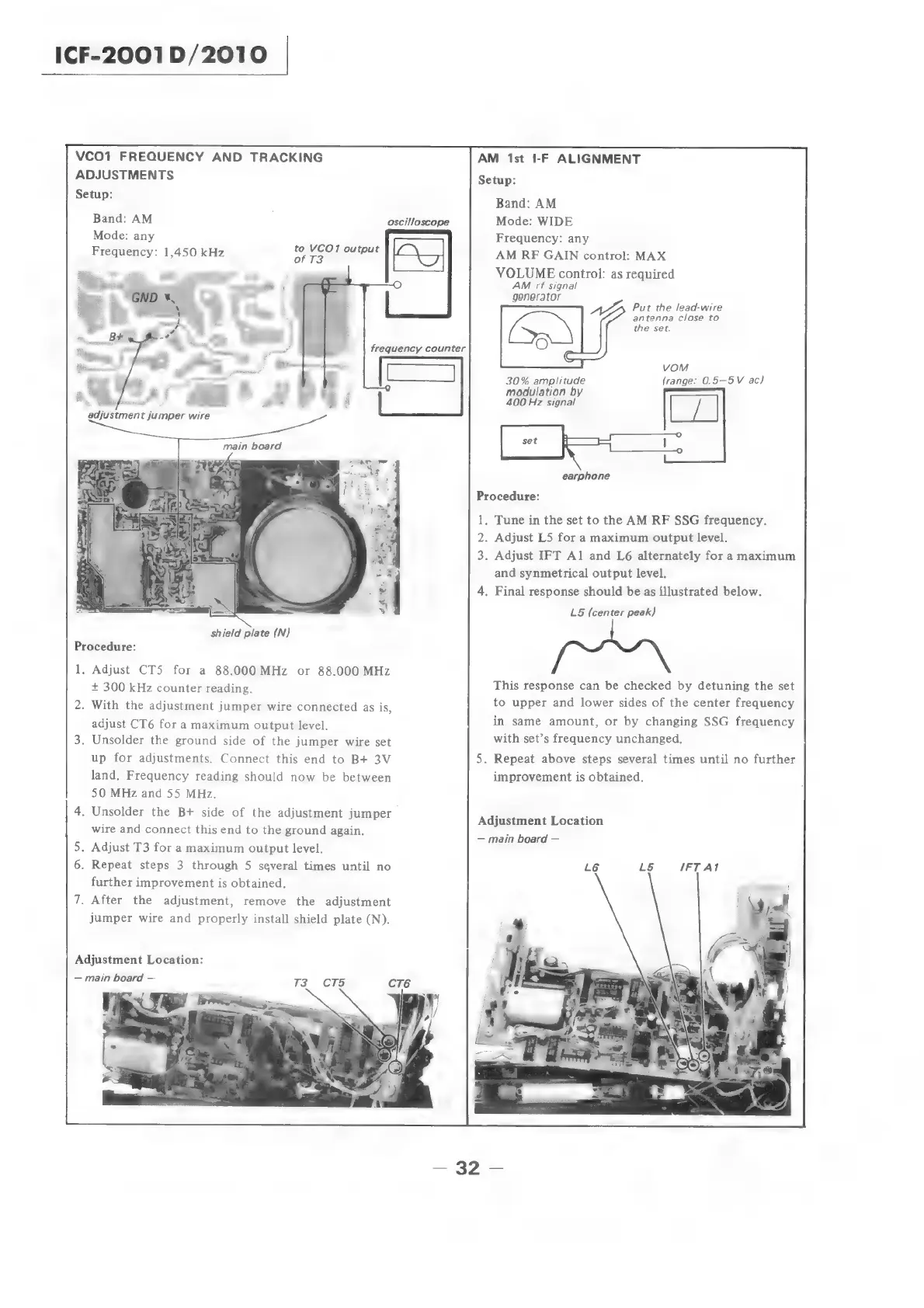
VCO1
FREQUENCY
AND
TRACKING
AM
1st
I-F
ALIGNMENT
ADJUSTMENTS
Setup:
Bonne:
Band:
AM
Band:
AM
oscilloscope
Mode:
WIDE
Mode:
any
Frequency:
any
Frequency:
1,450
kHz
ba
ot
OU
TpAE
ay
AM
RF
GAIN
control:
MAX
frequency
counter
shield
plate
(N)
Procedure:
1,
Adjust
CT5
for
a
88.000
MHz
or
88.000
MHz
+
300
kHz
counter
reading.
2.
With
the
adjustment
jumper
wire
connected
as
is,
adjust
CT6
for
a
maximum
output
level.
3.
Unsolder
the
ground
side
of
the
jumper
wire
set
up
for
adjustments.
Connect
this
end
to
B+
3V
5.
land,
Frequency
reading
should
now
be
between
50
MHz
and
55
MHz.
4.
Unsolder
the
B+
side
of
the
adjustment
jumper
wire
and
connect
this
end
to
the
ground
again.
5.
Adjust
T3
for
a
maximum
output
level.
6.
Repeat
steps
3
through
5
several
times
until
no
further
improvement
is
obtained.
7.
After
the
adjustment,
remove
the
adjustment
jumper
wire
and
properly
install
shield
plate
(N).
Adjustment
Location:
main
board
—-
4.
VOLUME
control:
as
required
AM
rf
signal
generator
;
AZ
Put
the
lead-wire
antenna
close
to
the
set.
vom
30%
amplitude
(range:
0.5—5V
ac)
modulation
by
400
Hz
signal
earphone
Procedure:
ie
2.
3:
Tune
in
the
set
to
the
AM
RF
SSG
frequency.
Adjust
LS
for
a
maximum
output
level.
Adjust
IFT
Al
and
L6
alternately
for
a
maximum
and
synmetrical
output
level.
Final
response
should
be
as
illustrated
below.
L5
(center
peak)
This
response
can
be
checked
by
detuning
the
set
to
upper
and
lower
sides
of
the
center
frequency
in
same
amount,
or
by
changing
SSG
frequency
|
with
set’s
frequency
unchanged.
Repeat
above
steps
several
times
until
no
further
improvement
is
obtained.
Adjustment
Location
main
board

Related product manuals