EasyManua.ls Logo

Sony ICF-SW40 - Pere Rere Rere

Sony ICF-SW40
22 pages
Print Icon
To Next Page IconTo Next Page
To Previous Page IconTo Previous Page
Loading...
°
loRe)
O00
}-
oo00000
O00000000
OO0000000000
GO
Gad
GO
|
ae
STANDBY
MODE
1
-
STANDBY
TIME
-
2
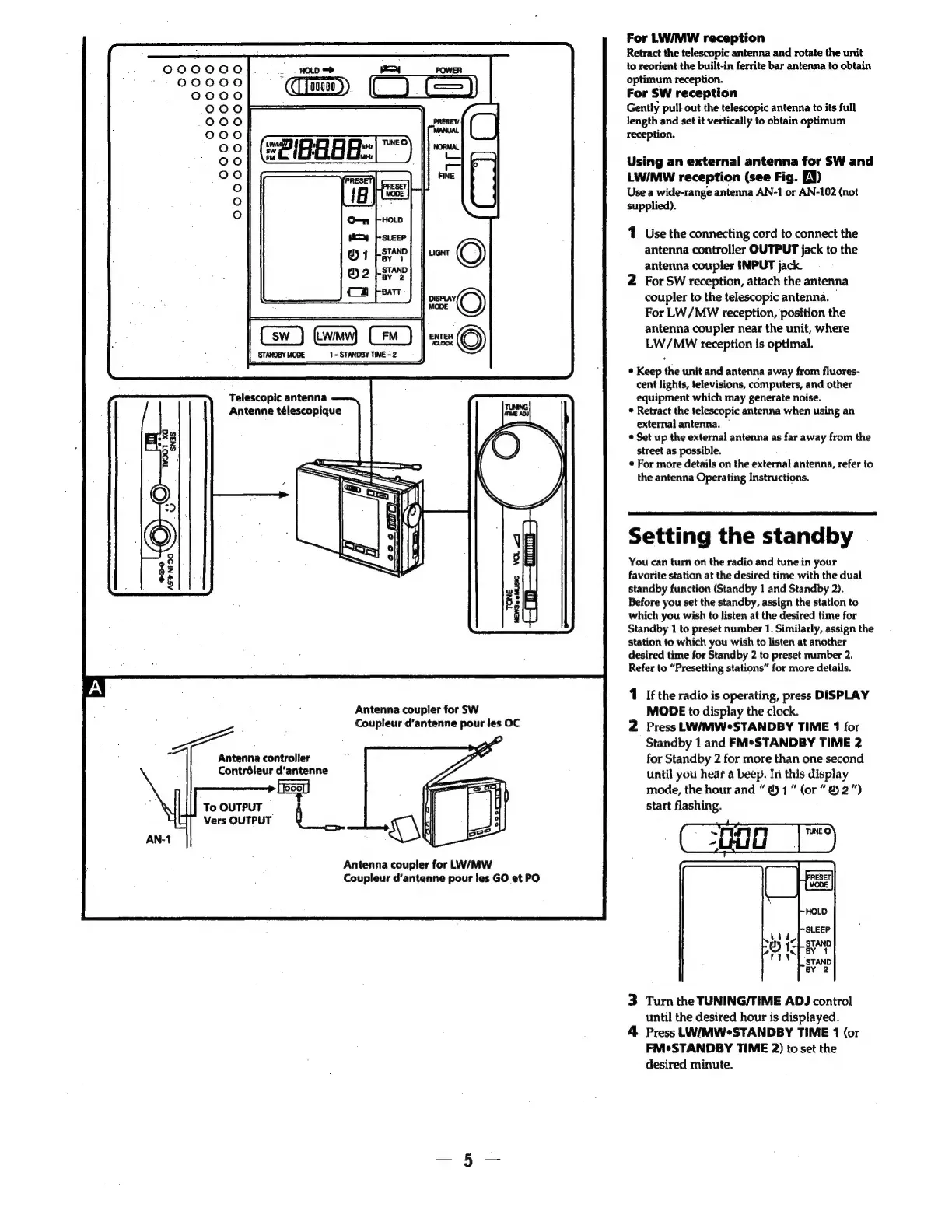
Telescopic
antenna
Antenne
télescopique
Antenna
coupler
for
SW
Coupleur
d’antenne
pour
les
OC
Antenna
controller
Contrdleur
d’antenne
[ooo]
To
OUTPUT
Vers
OUTPUT
Antenna
coupler
for
LW/MW
Coupleur
d’antenne
pour
les
GO
et
PO
For
LW/MW
reception
Retract
the
telescopic
antenna
and
rotate
the
unit
to
reorient
the
built-in
ferrite
bar
antenna
to
obtain
optimum
reception.
For
SW
reception
Gently
pull
out
the
telescopic
antenna
to
its
full
length
and
set
it
vertically
to
obtain
optimum
reception.
Using
an
external
antenna
for
SW
and
LW/MW
reception
(see
Fig.
EN)
Use
a
wide-range
antenna
AN-1
or
AN-102
(not
supplied).
;
1
Use
the
connecting
cord
to
connect
the
antenna
controller
OUTPUT
jack
to
the
antenna
coupler
INPUT
jack.
2
For
SW
reception,
attach
the
antenna
coupler
to
the
telescopic
antenna.
For
LW/MW
reception,
position
the
antenna
coupler
near
the
unit,
where
LW/MwW
reception
is
optimal.
¢
Keep
the
unit
and
antenna
away
from
fluores-
cent
lights,
televisions,
computers,
and
other
equipment
which
may
generate
noise.
*
Retract
the
telescopic
antenna
when
using
an
external
antenna.
~
¢
Set
up
the
external!
antenna
as
far
away
from
the
street
as
possible.
¢
For
more
details
on
the
external
antenna,
refer
to
the
antenna
Operating
Instructions.
Setting
the
standby
You
can
turn
on
the
radio
and
tune
in
your
favorite
station
at
the
desired
time
with
the
dual
standby
function
(Standby
1
and
Standby
2).
Before
you
set
the
standby,
assign
the
station
to
which
you
wish
to
listen
at
the
desired
time
for
Standby
1
to
preset
number
1.
Similarly,
assign
the
station
to
which
you
wish
to
listen
at
another
desired
time
for
Standby
2
to
preset
number
2.
Refer
to
“Presetting
stations”
for
more
details.
1
If
the
radio
is
operating,
press
DISPLAY
MODE
to
display
the
clock.
2
Press
LW/MWeSTANDBY
TIME
1
for
Standby
1
and
FM*STANDBY
TIME
2
for
Standby
2
for
more
than
one
second
until
you
hear
a
beep.
In
this
display
mode,
the
hour
and
@)
1”
(or
“@2”)
start
flashing.
;
~Cogad
|"
3
Turn
the
TUNING/TIME
ADJ
control
until
the
desired
hour
is
displayed.
4
Press
LW/MWeSTANDBY
TIME
1
(or
FMeSTANDBY
TIME
2)
to
set
the
desired
minute.

Related product manuals