EasyManua.ls Logo

Sony ICF-SW40 - Setting the Sleep Timer Eeeeecesscccesscnsccenscccsccccsccnsccsscosecs; Using Other Functions ++++++++Ssss+Ssseseeseeeeteesenseneseneesesens; Setting the Clock Cerscceceeccccscccsessccscsccsccceccccevccescsssensece

Sony ICF-SW40
22 pages
Print Icon
To Next Page IconTo Next Page
To Previous Page IconTo Previous Page
Loading...
5
Turn
the
TUNING/TIME
ADJ
control
until
the
desired
minute
is
displayed.
6
Press
LW/MWeSTANDBY
TIME
1
(or
FM*STANDBY
TIME
2)
The
minute
stops
flashing,
and‘a
few
seconds
later,
@)
1”
(or
2”)
stops
flashing
and
remains
in
the
display
while
the
unit
returns
to
the
clock
display.
To
set/cancel
standby
mode
or
confirm’
the
standby
time
Each
time
STANDBY
MODE
is
pressed,
the
display
changes
in
the
following
order.
@1t*—-
©2*—
1
02
(None)
(ee
oe
ee
*
The
display
will
be
flashing
initially.
Only
while
the
display
is
flashing,
the
preset
standby
time
will
be
displayed
to
allow
checking
of
the
standby
time
for
Standby
1
or
Standby
2.
©
When
the
standby
time
arrives
and
standby
is
activated,
the
radio
turns
on.
The
unit
will
then
turn
off
automatically
after
60
minutes.
To
turn
off
the
radio
before
60
minutes
have
elapse,
press
POWER.
\
*
When
you
have
set
Standby
1
And
Standby
2,
and
a
second
preset
standby
time
arrives
while
the
first
standby
function
is
operating,
the
most
recent
standby
function
will
have
priority
over
the
other
and
tune
in
the
appropriate
station.
©
When
identical
standby
times
are
set
for
Standby
1
and
Standby
2,
only
Standby
1
is
operational.
©
To
cancel
the
standby
function
temporarily,
slide
HOLD-to
the
right
to
display
“Om”
while
the
radio
is
turned
off.
When
the
hold
function
is
canceled
and
“Om”
disappears,
the
standby
function
is
operational.
Activating
the
buzzer
To
activate
the
buzzer
instead
of
the
radio
at
the
desired
time,
delete
the
station
assigned
to
either
preset
number
1
or
preset
number
2
as
necessary.
Refer
to
“Deleting
a
preset
station”
for
further
details.
To
stop
the
buzzer,
press
any
button.
The
buzzer
will
sound
continuously
for
about
60
minutes
if
no
button
is
pressed.
¢
The
buzzer
volume
is
not
adjustable.
Setting
the
sleep
timer
You
can
turn
off
the
radio
automatically
after
a
specified
number
of
minutes
(60,
30,
or
15
minutes)
with
the
sleep
timer.
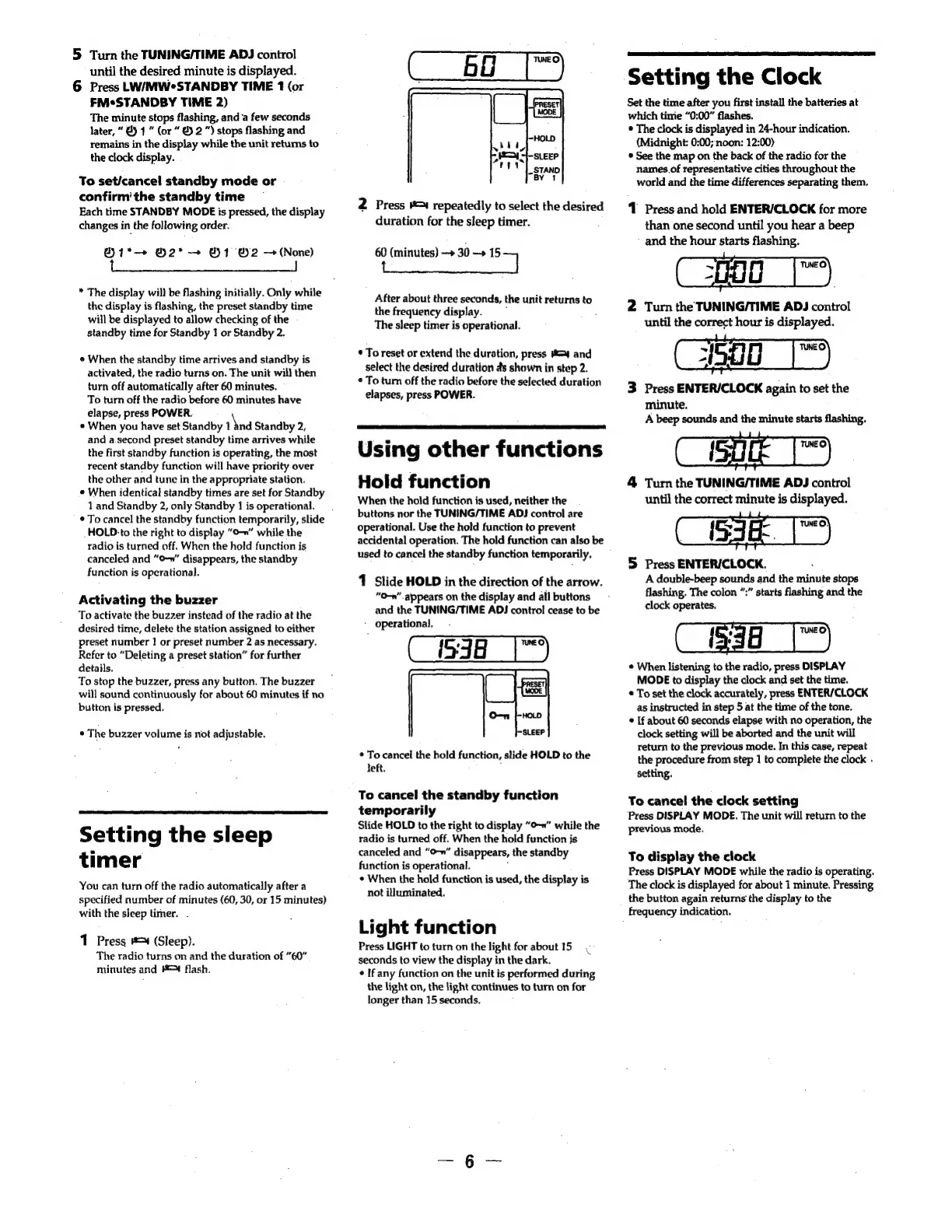
1
Press
#=4
(Sleep).
The
radio
turns
on
and
the
duration
of
“60”
minutes
and
#4
flash.
2
Press
=
repeatedly
to
select
the
desired
duration
for
the
sleep
timer.
60
(minutes)
>
30
—»
same
After
about
three
seconds,
the
unit
returns
to
the
frequency
display.
:
The
sleep
timer
is
operational.
*
To
reset
or
extend
the
duration,
press
#43
and
select
the
desired
duration
as
shown
in
step
2.
¢
To
turn
off
the
radio
before
the
selected
duration
elapses,
press
POWER.
Using
other
functions
Hold
function
When
the
hold
function
is
used,
neither
the
buttons
nor
the
TUNING/TIME
ADJ
control
are
operational.
Use
the
hold
function
to
prevent
accidental
operation.
The
hold
function
can
also
be
used
to
cancel
the
standby
function
temporarily,
1
Slide
HOLD
in
the
direction
of
the
arrow.
“O-n"
appears
on
the
display
and
all
buttons
and
the
TUNING/TIME
ADJ
control
cease
to
be
-
operational.
S538
|
©
To
cancel
the
hold
function,
slide
HOLD
to
the
left.
To
cancel
the
standby
function
temporarily
Slide
HOLD
to
the
right
to
display
“o-n”
while
the
radio
is
turned
off.
When
the
hold
function
is
canceled
and
“O-»"
disappears,
the
standby
function
is
operational.
.
°
When
the
hold
function
is
used,
the
display
is
not
illuminated.
Light
function
Press
LIGHT
to
turn
on
the
light
for
about
15
seconds
to
view
the
display
in
the
dark.
¢
If
any
function
on
the
unit
is
performed
during
the
light
on,
the
light
continues
to
turn
on
for
longer
than
15
seconds.
C
Setting
the
Clock
Set the
time
after
you
first
install
the
batteries
at
which
time
“0:00”
flashes.
*
The
clock
is
displayed
in
24-hour
indication.
(Midnight:
0:00;
noon:
12:00)
*
See
the
map
on
the
back
of
the
radio
for
the
names
of
representative
cities
throughout
the
world
and
the
time
differences
separating
them.
1
Press
and
hold
ENTER/CLOCK
for
more
than
one
second
until
you
hear
a
beep
-
and
the
hour
starts
flashing.
aug
|")
2
Turn
the
TUNING/TIME
ADJ
control
until
the
correct
hour
is
displayed.
1500
3
Press
ENTER/CLOCK
again
to
set
the
minute.
A
beep
sounds
and
the
minute
starts
flashing.
:
:
E
4
Turn
the
TUNING/TIME
ADJ
control
until
the
correct
minute
is
displayed.
5
Press
ENTERICLOCK.
A
double-beep
sounds
and
the
minute
stops
flashing.
The
colon
”:”
starts
flashing
and
the
clock
operates.
¢
When
listening
to
the
radio,
press
DISPLAY
MODE
to
display
the
clock
and
set
the
time.
*
To
set
the
clock
accurately,
press
ENTER/CLOCK
as
instructed
in
step
5
at
the
time
of
the
tone.
¢
If
about
60
seconds
elapse
with
no
operation,
the
clock
setting
will
be
aborted
and
the
unit
will
return
to
the
previous
mode.
In
this
case,
repeat
the
procedure
from
step
1
to
complete
the
clock
.
setting.
a
To
cancel
the
clock
setting
‘Press
DISPLAY
MODE.
The
unit
will
return
to
the
previous
mode.
To
display
the
clock
Press
DISPLAY
MODE
while
the
radio
is
operating.
The
clock
is
displayed
for
about
1
minute.
Pressing
the
button
again
returns
the
display
to
the
frequency
indication.

Related product manuals