EasyManua.ls Logo

Sony ICF-SW40 - Page 9

Sony ICF-SW40
22 pages
Print Icon
To Next Page IconTo Next Page
To Previous Page IconTo Previous Page
Loading...
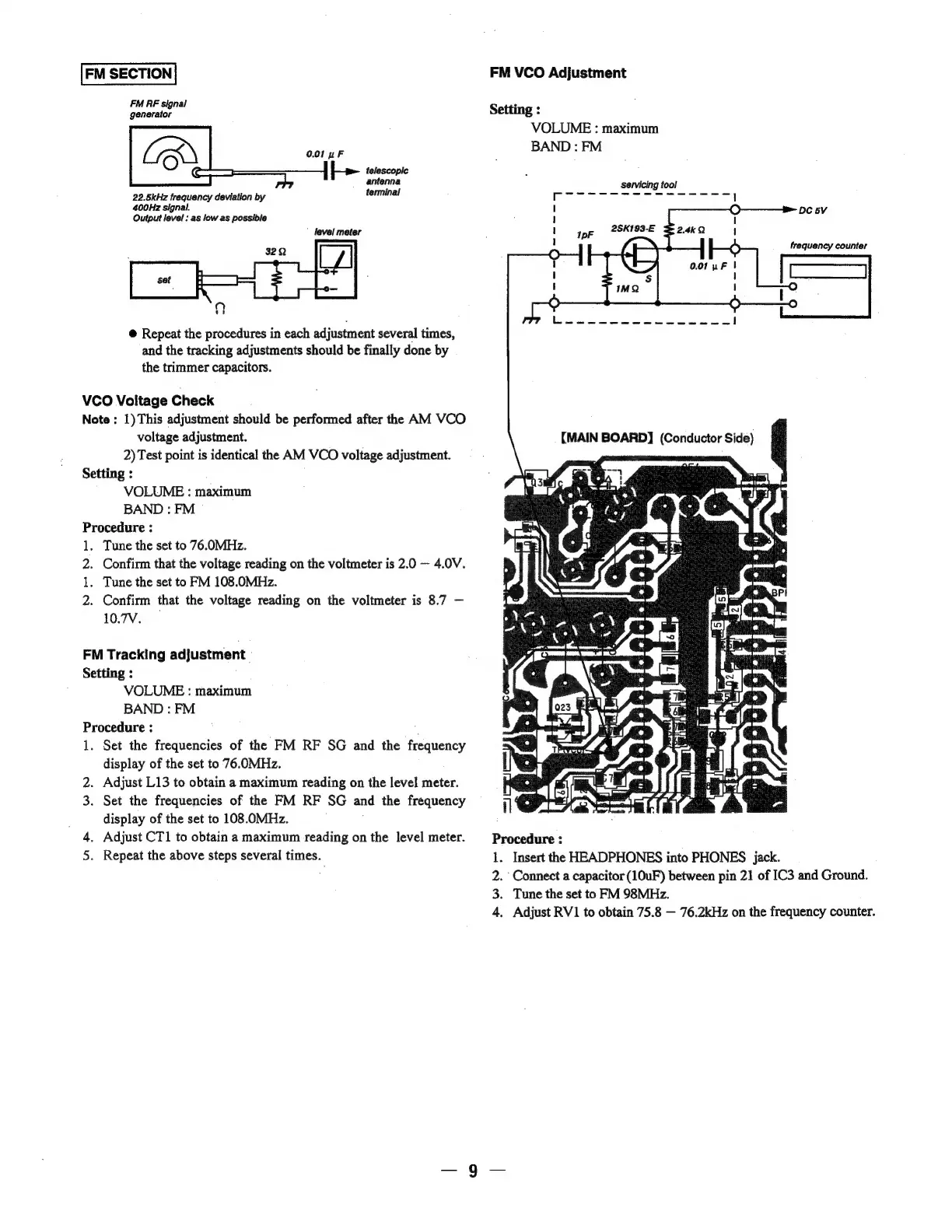
FM
SECTION
FM
RF
signal
generator
0.01
uF
telescopic
antenna
terminal
(Co
22.5kHz
frequency
deviation
by
400Hz
signal.
Output
level
:
as
low
as
possible
level
meter
@
Repeat
the
procedures
in
each
adjustment
several
times,
and
the
tracking
adjustments
should
be
finally
done
by
the
trimmer
capacitors.
VCO
Voitage
Check
Note
:
1)
This
adjustment
should
be
performed
after
the
AM
VCO
voltage
adjustment.
2)
Test
point
is
identical
the
AM
VCO
voltage
adjustment.
Setting
:
VOLUME
:
maximum
BAND
:
FM
Procedure
:
1.
Tune
the
set
to
76.0MHz.
2.
Confirm
that
the
voltage
reading
on
the
voltmeter
is
2.0
—~
4.0V.
1.
Tune
the
set
to
FM
108.0MHz.
2.
Confirm
that
the
voltage
reading
on
the
voltmeter
is
8.7
10.7V.
FM
Tracking
adjustment
Setting
:
VOLUME
:
maximum
BAND
:
FM
Procedure
:
;
1.
Set
the
frequencies
of
the
FM
RF
SG
and
the
frequency
display
of
the
set
to
76.0MHz.
2.
Adjust
L13
to
obtain
a
maximum
reading
on
the
level
meter.
3.
Set
the
frequencies
of
the
FM
RF
SG
and
the
frequency
display
of
the
set
to
108.OMHz.
4.
Adjust
CT1
to
obtain
a
maximum
reading
on
the
level
meter.
5.
Repeat
the
above
steps
several
times.
FM
VCO
Adjustment
Setting
:
VOLUME
:
maximum
BAND
:
FM
Servicing
tool
Rye
cree
ee
Ge
Ne
pepe
spe
l
DC
5V
frequency
counter
:
I
(MAIN
BOARD]
(Conductor
Side)
.
Insert
the
HEADPHONES
into
PHONES
jack.
Connect
a
capacitor
(10uF)
between
pin
21
of
IC3
and
Ground.
.
Tune
the
set
to
FM
98MHz.
.
Adjust
RV1
to
obtain
75.8
76.2kHz
on
the
frequency
counter.

Related product manuals