GB
38
Adjusting the brightness of still images
(Exposure compensation)
You can adjust the exposure in 1/3 EV steps in a range of –3.0 EV to +3.0 EV.
Using the self-timer
1
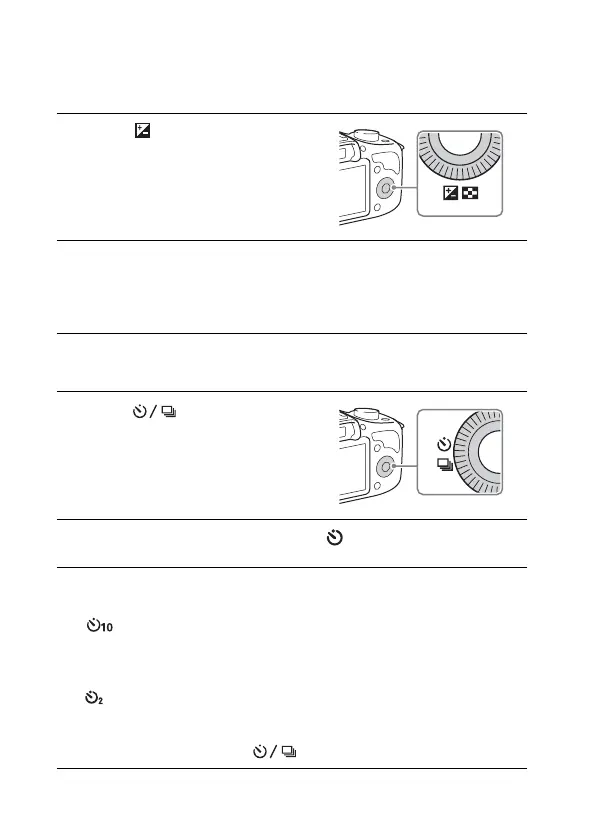
Press (Exposure Comp.)
on the control wheel.
• When you select [Intelligent Auto]
or [Superior Auto], the [Photo
Creativity] screen appears.
2
Turn the control wheel to select the desired value, and
press the center.
• When the image is too bright, set [Exposure Comp.] toward –.
• When the image is too dark, set [Exposure Comp.] toward +.
1
Press (Drive Mode) on
the control wheel.
2
Turn the control wheel to select (Self-timer).
3
Press OPTION, and then turn the control wheel to select
the desired mode and press the center.
(Self-timer: 10 Sec): Sets the 10-second delay self-timer. Use this
when you want to include yourself in the picture.
When you press the shutter button, the self-timer lamp flashes and beeps
until the shutter operates.
(Self-timer: 2 Sec): Sets the 2-second delay self-timer. You can
prevent blur caused by camera-shake that occurs when the shutter button
is pressed.
• To cancel the timer, press (Drive Mode) again.



 To Next Page