Related Topic
List of icons on the screen for shooting movies
List of icons on the screen for shooting still images
List of icons on the playback screen
5-043-414-12(1) Copyright 2022 Sony Corporation
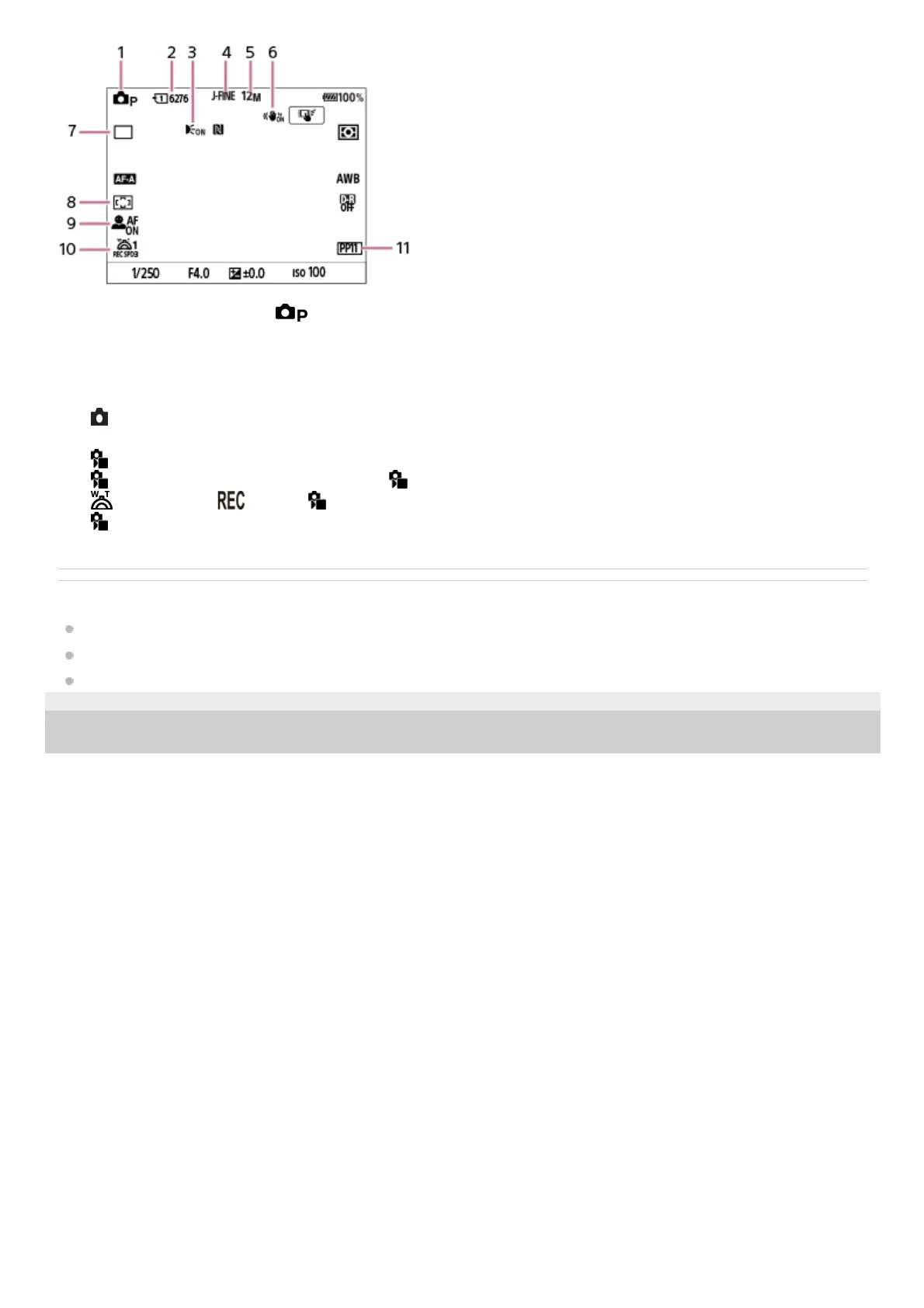
The shooting mode is set to
(Program Auto).1.
Number of still images that can be recorded on the memory card in the currently displayed slot2.
Displayed when [AF Illuminator] is set to [Auto] and the camera detects that the AF Illuminator is required3.
[JPEG/HEIF Switch] is set to [JPEG]. [JPEG Quality] is set to [Fine].4.
[JPEG Image Size] is set to [12M].5.
[
SteadyShot] is set to [On].6.
[Drive Mode] is set to [Single Shooting].7.
[
Focus Area] is set to [Wide].8.
[
Face/Eye Prior. in AF] is set to [On] and [ Face/Eye Subject] is set to [Human].9.
[
1st Zoom Spd. ] under [ Zoom Lever Speed] is set to [3].10.
[
Picture Profile] is set to [PP11].11.



 To Next Page