Help Guide
Interchangeable Lens Digital Camera
ILX-LR1
Identifying parts
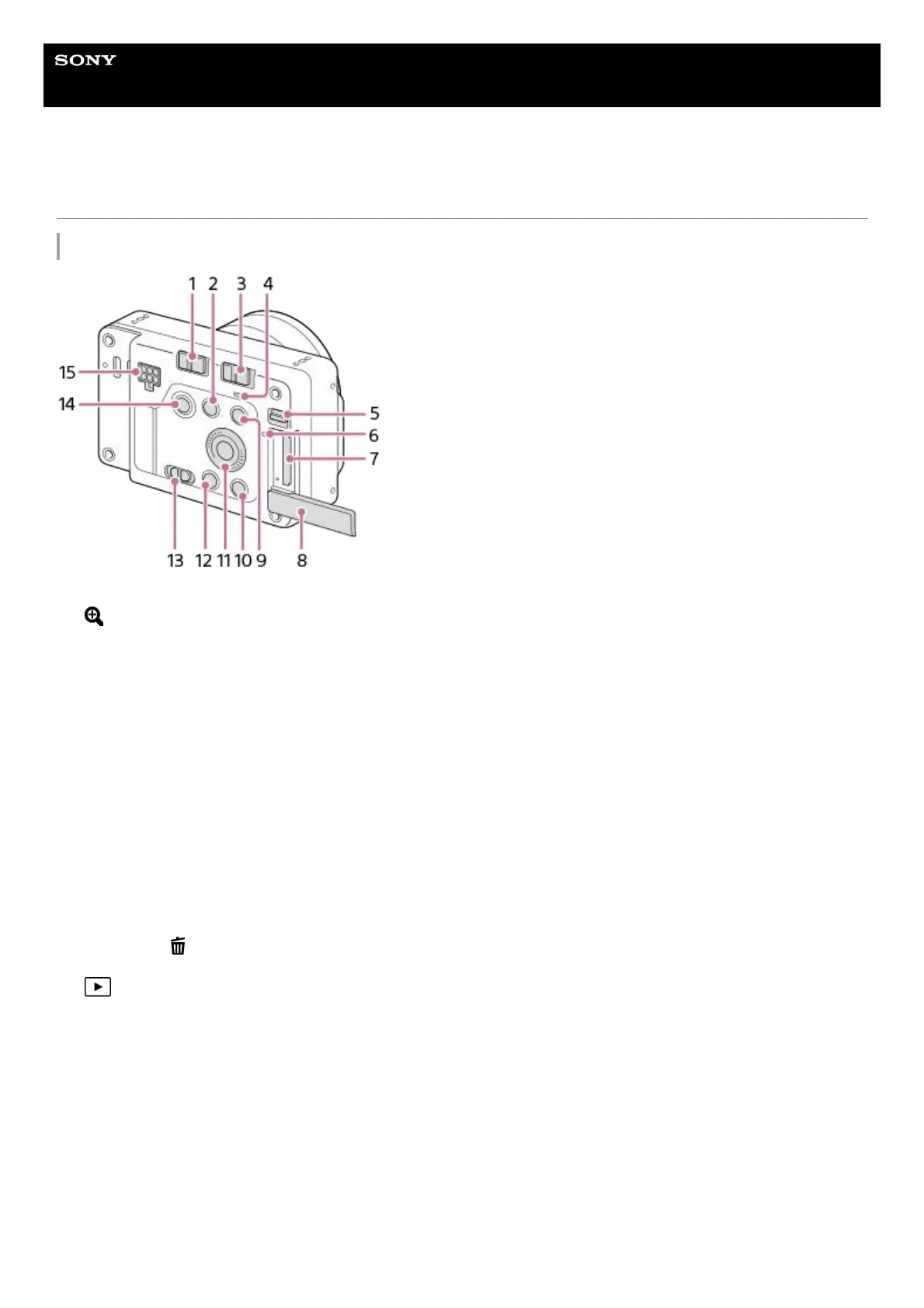
Rear side
LOCK switch1.
(Enlarge) button
During playback, you can enlarge the playback screen.
When shooting, you can use the functions assigned in the custom key settings. The function for shooting is not
assigned by default. Assign your desired function using the custom key settings.
2.
ON/OFF (Power) switch3.
Power lamp
When lit up in green: Power is being supplied, and the ON/OFF (power) switch is turned on
When lit up in red: Power is being supplied, and the ON/OFF (power) switch is turned off
4.
Memory card cover switch5.
Access lamp6.
Memory card slot7.
Memory card cover8.
MENU button9.
For shooting: C button (Custom button)
For viewing: (Delete) button
10.
Control wheel11.
(Playback) button12.
Still/Movie/S&Q switch13.
Shutter/MOVIE (Movie) button14.
Power & Control terminal15.



 To Next Page