Administrating the Camera
Saving the SolidPTZ Display Area and Action — Preset position Menu (SNC-DM110 / DM160 / CM120 only)
56
enter the user name and password set for the
Administrator boxes in the User menu.
OK/Cancel
See “Buttons common to every menu” on page 28.
Saving the SolidPTZ
Display Area and Action
— Preset position Menu (SNC-
DM110 / DM160 / CM120 only)
When you click in the Administrator menu,
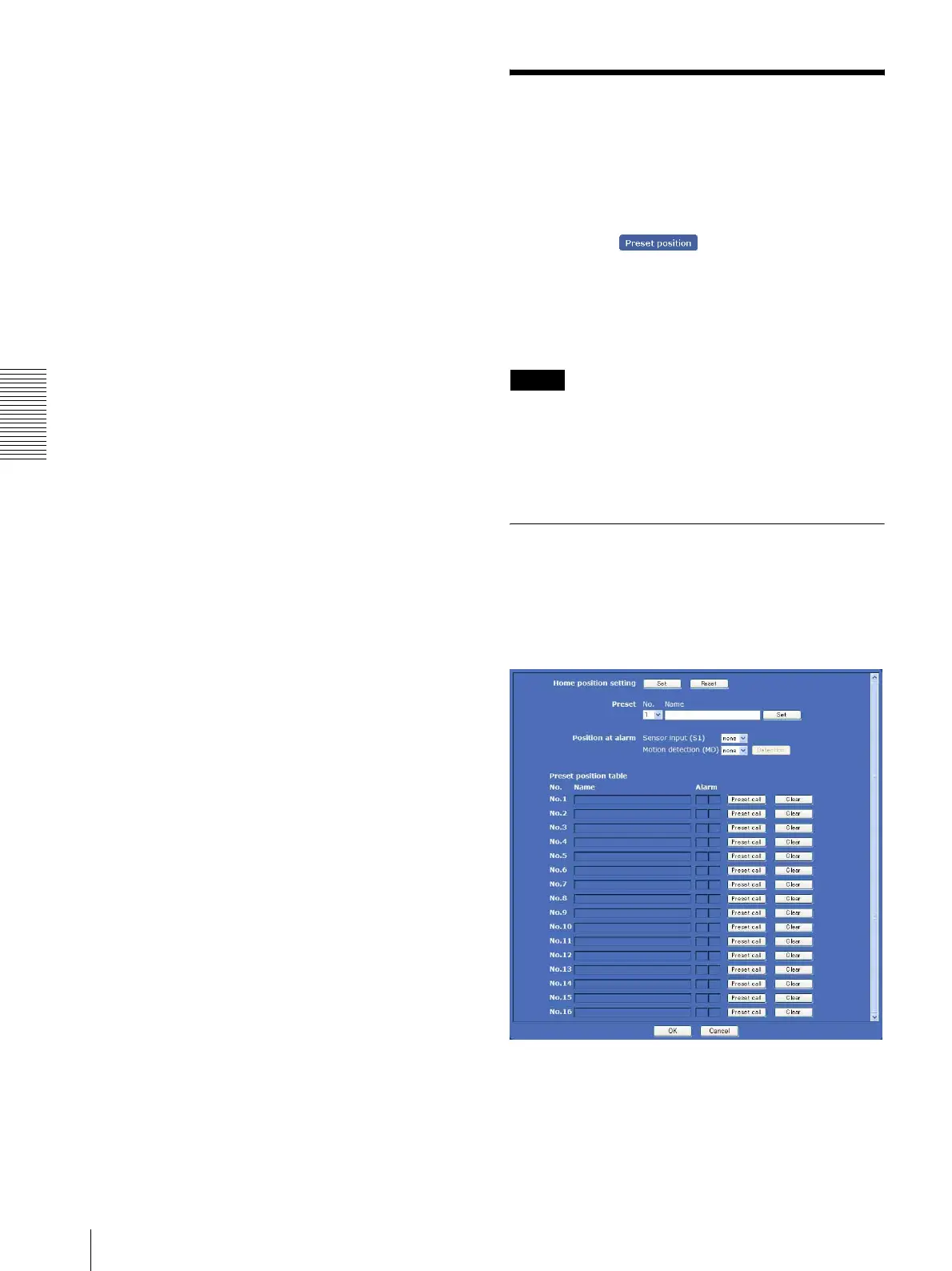
the Preset position menu appears. Use this menu to save
pan, tilt and zoom positions and set tours (programmed
action).
The Preset position menu consists of 2 tabs: Position
and Tour.
Notes
• When the SolidPTZ is disabled (page 42), you cannot
control the Preset position menu.
• When the SolidPTZ is disabled (page 42), the preset
Position at alarm, PTZ on motion detection and
Tour are also disabled.
Position Tab — Saving pan/tilt/
zoom position
You can set up to 16 display areas (pan, tilt and zoom
positions).
Display sample: SNC-DM160
Home position setting
Set the current display area as the home position.








 To Next Page