VCR and Cable
Use this hookup if:
[] You have cable TV that does not require a cable box.
Disconnect all power sources before making any connections.
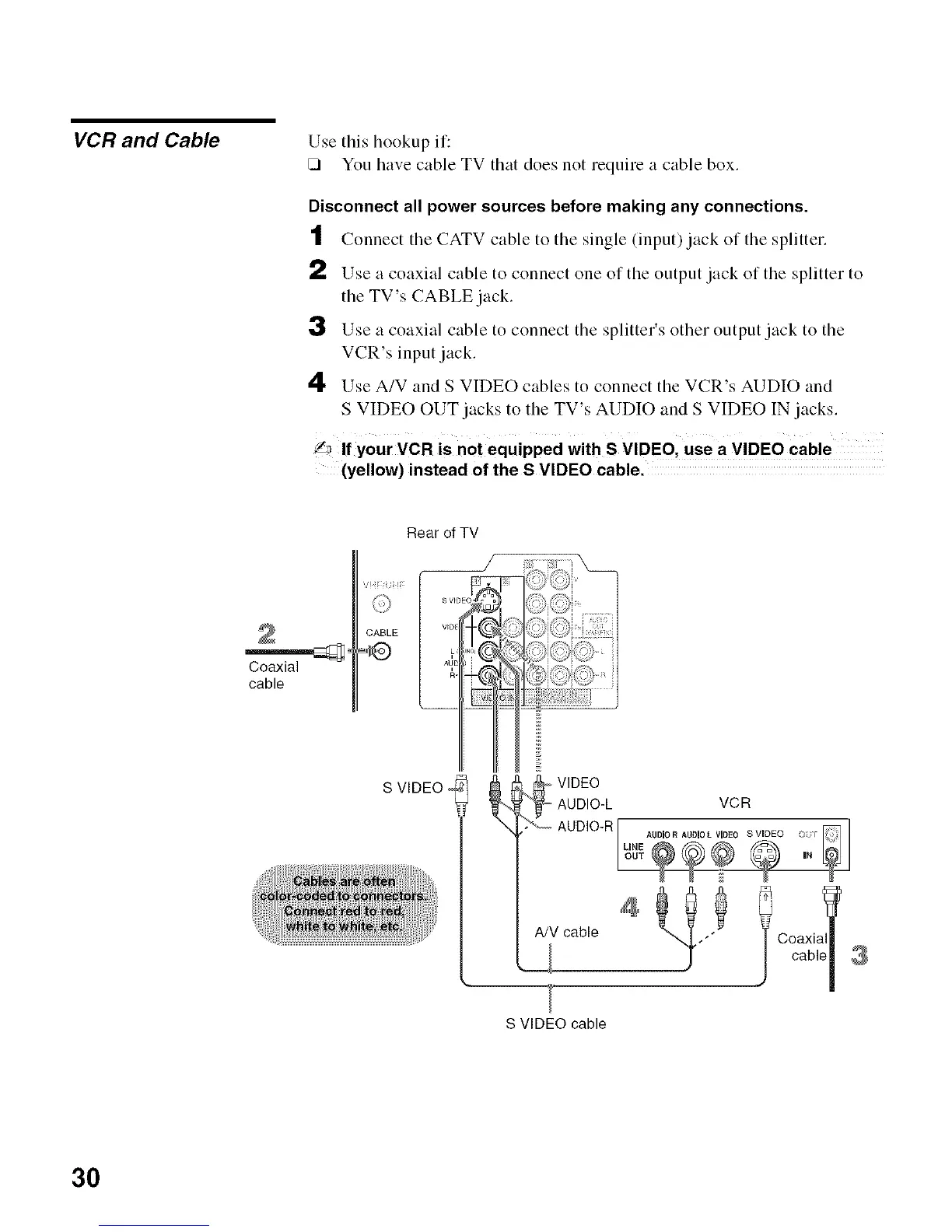
t Connect tile CATV cable to tile single (input) jack of tile splitter.
t,) Use a coaxial cable to connect one of the output jack of the splitter to
the TV's CABLE jack.
3 Use a coaxial cable to connect the splitter's other output jack to the
VCR's input jack.
4 Use A/V and S VIDEO cables to connect the VCR's AUDIO and
S VIDEO OUT jacks to the TV's AUDIO and S VIDEO IN jacks.
_lf y0ur VCR is not equipped with S VIDEOI use a VIDEO Cable
(yellow) instead of the S VIDEO cable.
Roar of TV
Coaxial
cable
S VIDEO
S VIDEO cable
3O






 To Next Page