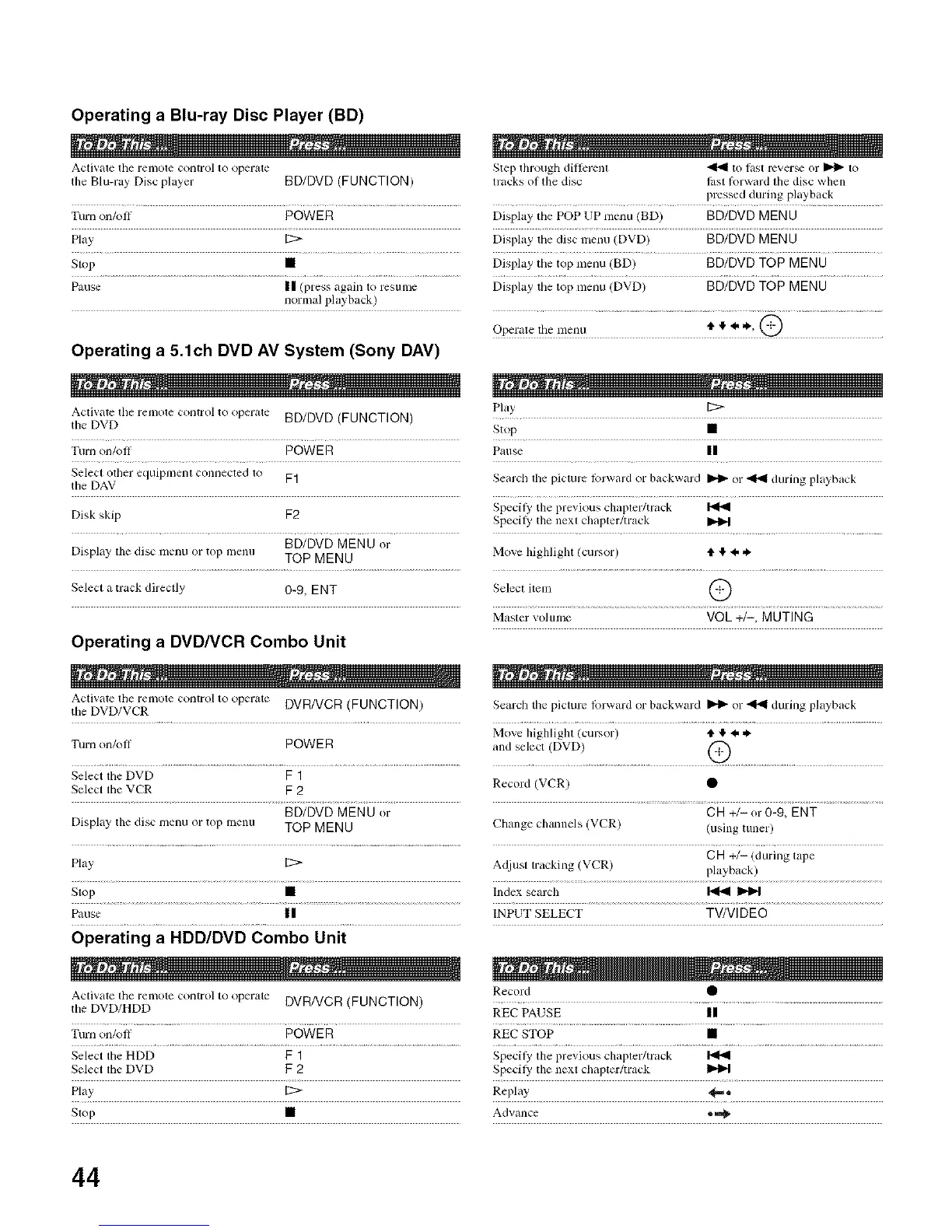
Operating a Blu-ray Disc Player (BD)
Activate the remote COlltrolto operate Step through dillerent "_ to last rever_ or I_ to
tile Blu-ray Disc player BD/DVD (FUNCTION) tracks ol tile disc lbst lkn-ward lhe disc when
pressed during pk/yback
Turn on/oil POWER Display the POP UP nlenu (BD) BD/DVD MEN U
Play [2> Display the disc nlenu (DVD) BD/DVD MENU
Stop • Display the top menu (BD) BD/DVD TOP MENU
Pause II (press again to resulne Display the top mellu (DVD) BD/DVD TOP MENU
normal playback)
Operate the nlenu _. ,e,+, ,% @
Operating a 5.1ch DVD AV System (Sony DAV)
Activate tim remote control to operate BD/DVD (FUNCTION)
the DVD
Turn on/oll POWER
Play
Stop •
Pause II
Select other equipmenl connecled to F1 Search the picture lk)rward or backward _ or _ during playback
the DAV
Disk skip F2
BD/DVD MENU or
Display the disc nlenu or top menu TOP MENU
Select a track directly 0-9, ENT
Specify tile previous chapter/track
Specily tile nexl chapler/track Jl_
Move highlight (cursor) tl, Ip 4, ,_
Select item @
Master vohune VOL +/-, MUTING
Operating a DVD/VCR Combo Unit
Activate tile relnote control to operate DVR/VCR (FUNCTION) Search the picture lbrward or backward _ or _ dm-ing playback
tile DVD/VCR
Move highlighl (cursor) tl, I_4, ,k.
Turn on/off POWER and select (DVD) (_
Select the DVD F 1
Select tile VCR F 2 Record (VCR) •
BD/DVD MENU or CH +/-or 0-9, ENT
Display tile disc nlenu or top lnenu TOP MENU Change channels (VCR) (using tuner)
CH +/- (during tal)e
Play [2> Adjust tracking (VCR) playback)
Stop • Index sem'ch I_
Pause II INPUT SELECT TV/VI D EO
Operating a HDD/DVD Combo Unit
Activate tile relnote control to operate DVR/VCR (FUNCTION) Record •
the DVD/HDD REC PAUSE |1
Tmn on/oil POWE R REC STOP •
Select the HDD F 1 Specily tile pl+evious chapter/track I_
Select tile DVD F 2 Specil_' tile next chapter/track
Play [2> Replay _==+
Slop • Advance •
44






 To Next Page