- 6 -
KDF-E42/50A12U
RM-ED002
SECTION 1 SELF DIAGNOSIS FUNCTION
LE-4B Self Diagnostic Software
LE-4B chassis TV’s contain a self diagnosis function. In the event of an error occurring, the STANDBY LED indicator will automatically begin
to flash. The number of times the STANDBY LED indicator flashes translates to a probable source of the problem. If an error symptom cannot
be reproduced, the remote commander can be used to review the failure occurrence data stored in memory to reveal past problems and how often
these problems occur.
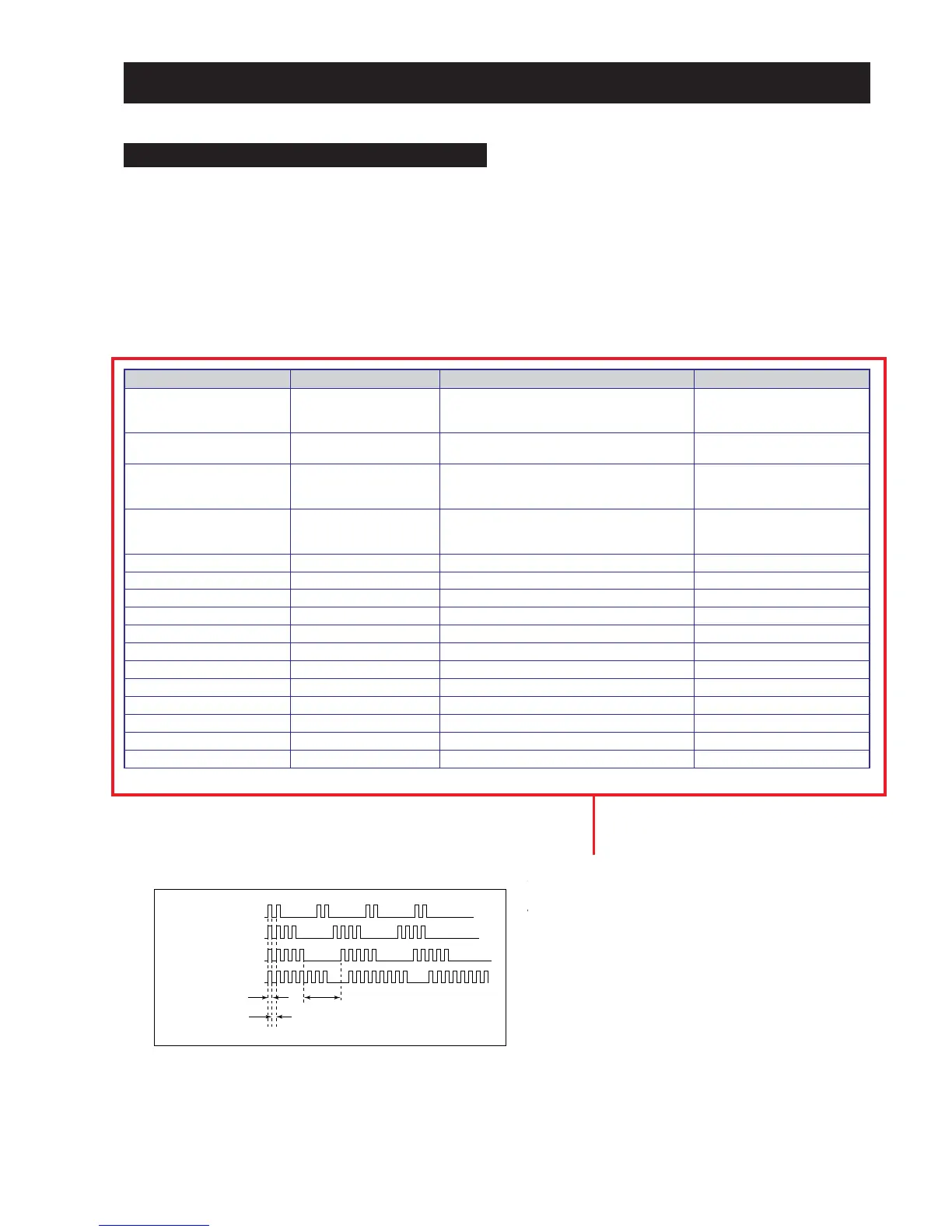
1. DIAGNOSTIC TEST INDICATORS
When an error occurs, the STANDBY indicator will flash a set number of times to indicate the possible cause of the problem. If there is more
than one error, the indicator will identify the first of the problem areas.
The result for all of the following diagnosis items are displayed on screen. No error has occured if the screen displays a “0”.
egasseMrorrE edoCDEL noitacoLesuaCelbaborP motpmyS
rorrErevoCpmaL20
tonsirevocpmaL-
.ylerucesdehcatta
.ylerucestestonsipmaL-
dnuosoN/erutcipoN-
torPpmaL30
ecruosthgilrofpmaL-
.tuosnrub
torPnaF40
.rewoponsahnaF-
tonsirotcennocnaF-
.ylerucesdehcatta
dnuosoN/erutcipoN-
torPpmeT50
hgihsierutarepmetteS-
rotcennocrosnespmeT-
.ylerucesdehcattatonsi
dnuosoN/erutcipoN-
torPPS60.rorrenoitcetorPsrekaepS-dnuosoN/erutcipoN-
latigiD80.rorredraobN-dnuosoN/erutcipoN-
renuT90.rorrerenuT-dnuosoN/erutcipoN-
PS01.rorrerosecorpdnuoS-
PVS11.rorrerosecorpoediV-
CEDC21.rorreredocedamorhC-
hctiwSVA31.rorrehctiwsVA-
CTR41.rorrekcolcemiTlaeR-
1PXEP61.rorre1rednapxetroP-
2PXEP71.rorre2rednapxetroP-
MVN91.rorreMVN-
CII02.rorresubC2I-dnuosoN/erutcipoN-
2. DISPLAY OF STANDBY INDICATOR FLASH COUNT







 To Next Page