E:\DATA\4297517111\4297517111_KDL32BX310_EN\01US05INS.fm
masterpage:Right
KDL-32BX310
4-297-517-11(1)
11
Getting Started
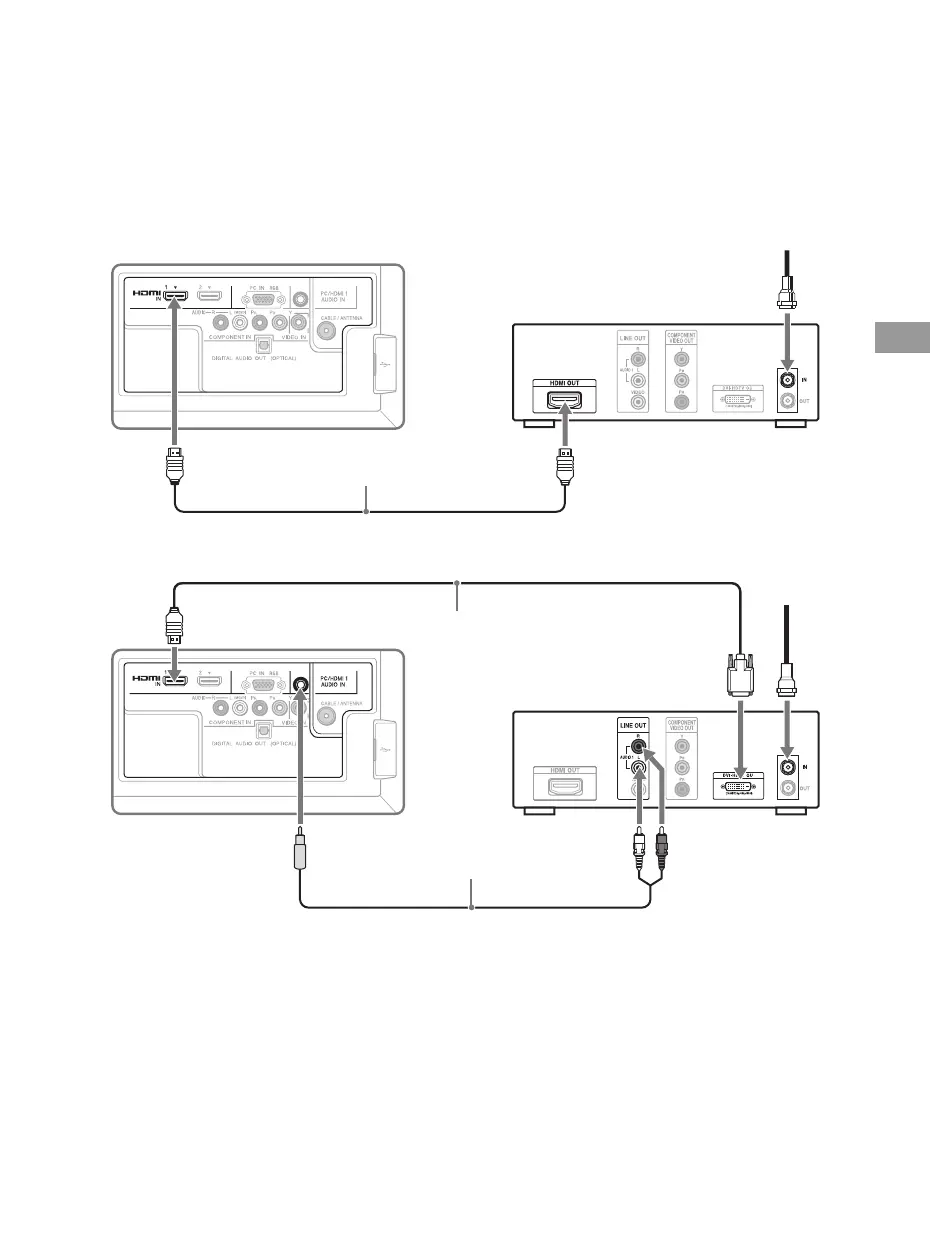
HD Cable Box/HD Satellite Box
You can enjoy high-definition programming by subscribing to a high-definition cable service or a
high-definition satellite service. For the best possible picture, make sure you connect this equipment
to your TV via the HDMI or component video (with audio) input located on the back of your TV.
Shown with HDMI Connection
Shown with DVI Connection
Rear of TV
HDMI cable
HD cable box/
HD satellite box
CATV/Satellite antenna cable
Rear of TV
DVI-to-HDMI cable
HD cable box/
HD satellite box
CATV/Satellite
antenna cable
Audio cable
(stereo mini plugs)
(Continued)
01US0 Cov-UC.book Page 11 Wednesday, July 13, 2011 11:08 AM




 To Next Page