E:\DATA\4297517111\4297517111_KDL32BX310_EN\01US05INS.fm
masterpage:Left
12
KDL-32BX310
4-297-517-11(1)
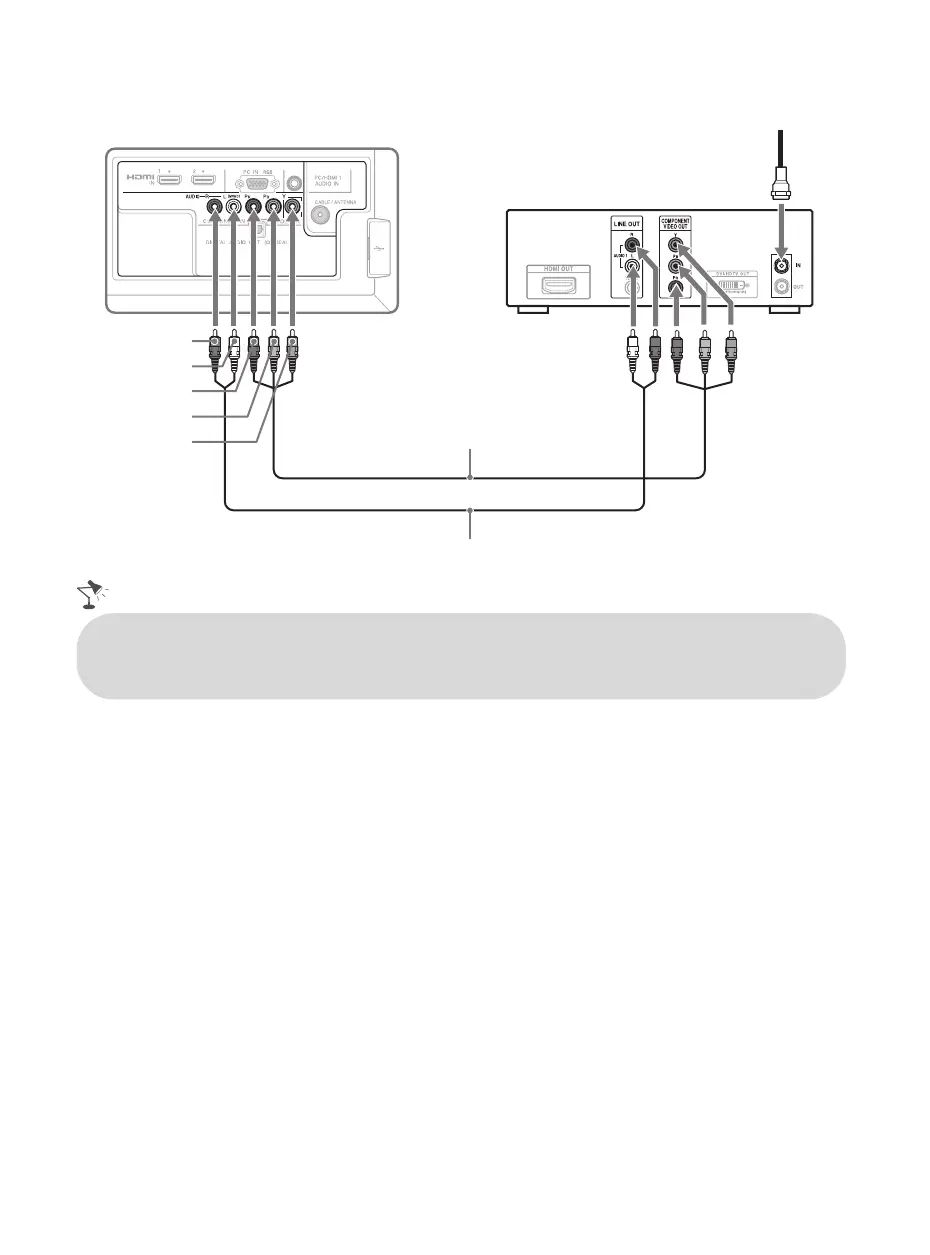
Shown with Component Connection
Rear of TV
CATV/Satellite antenna cable
AUDIO-R (red)
AUDIO-L (white)
Component video cable
Audio cable
P
R
(red)
P
B
(blue)
Y (green)
HD cable box/
HD satellite box
• If your equipment has a DVI output and not an HDMI output, connect the DVI output to the
HDMI IN 1 (with DVI-to-HDMI cable or adapter) and connect the audio output to the AUDIO
IN of PC IN. For details, see page 8.
01US0 Cov-UC.book Page 12 Wednesday, July 13, 2011 11:08 AM




 To Next Page