13
GB
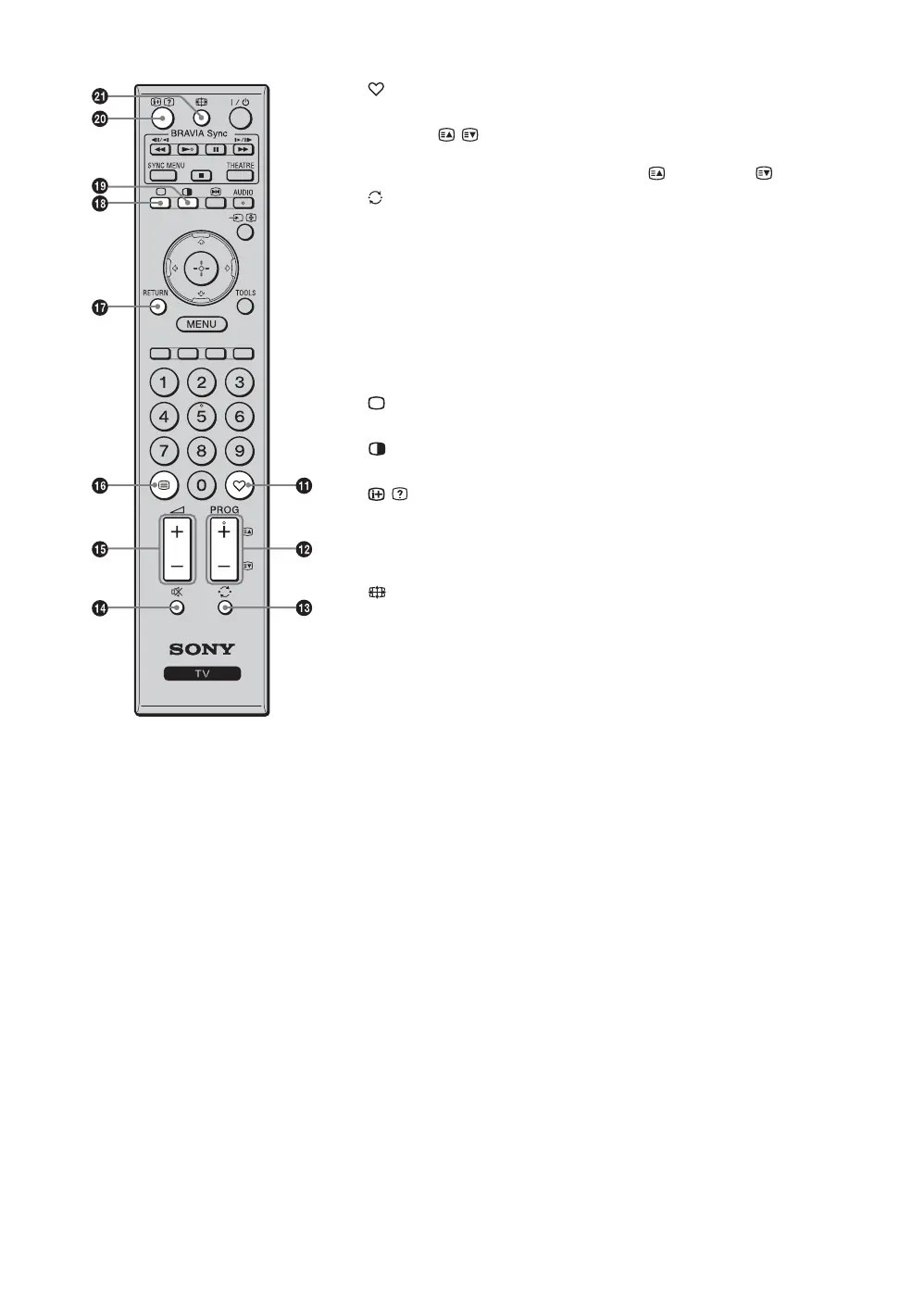
qa — Favourite list
Displays the favourite list that you have specified (page 17).
qs PROG +/–/ /
• In TV mode (page 15): Selects the next (+) or previous (–) channel.
• In Text mode (page 15): Selects the next ( ) or previous ( ) page.
qd — Previous channel
Returns to the previous channel watched (for more than five seconds).
qf % — Mute
Press to mute the sound. Press again to restore the sound.
If you press % in standby mode, the TV turns on without sound.
qg 2 +/– — Volume
qh / — Text (page 15)
qj RETURN
Returns to the previous screen of any displayed menu.
qk — TV mode
Exit Text mode, or return to TV mode.
ql — Twin Picture (page 20)/PIP (page 21) (for PC input)
Displays two pictures simultaneously.
w; / — Info / Text reveal
• In TV mode: Displays information. Press once to display the current
channel number and screen mode. Press again to display clock
information. Press a third time to remove the display from the screen.
• In Text mode (page 15): Reveals hidden information (e.g. answers to a quiz).
wa — Wide Mode (page 15)





 To Next Page