4
GB
Start-up Guide
1: Checking the
accessories
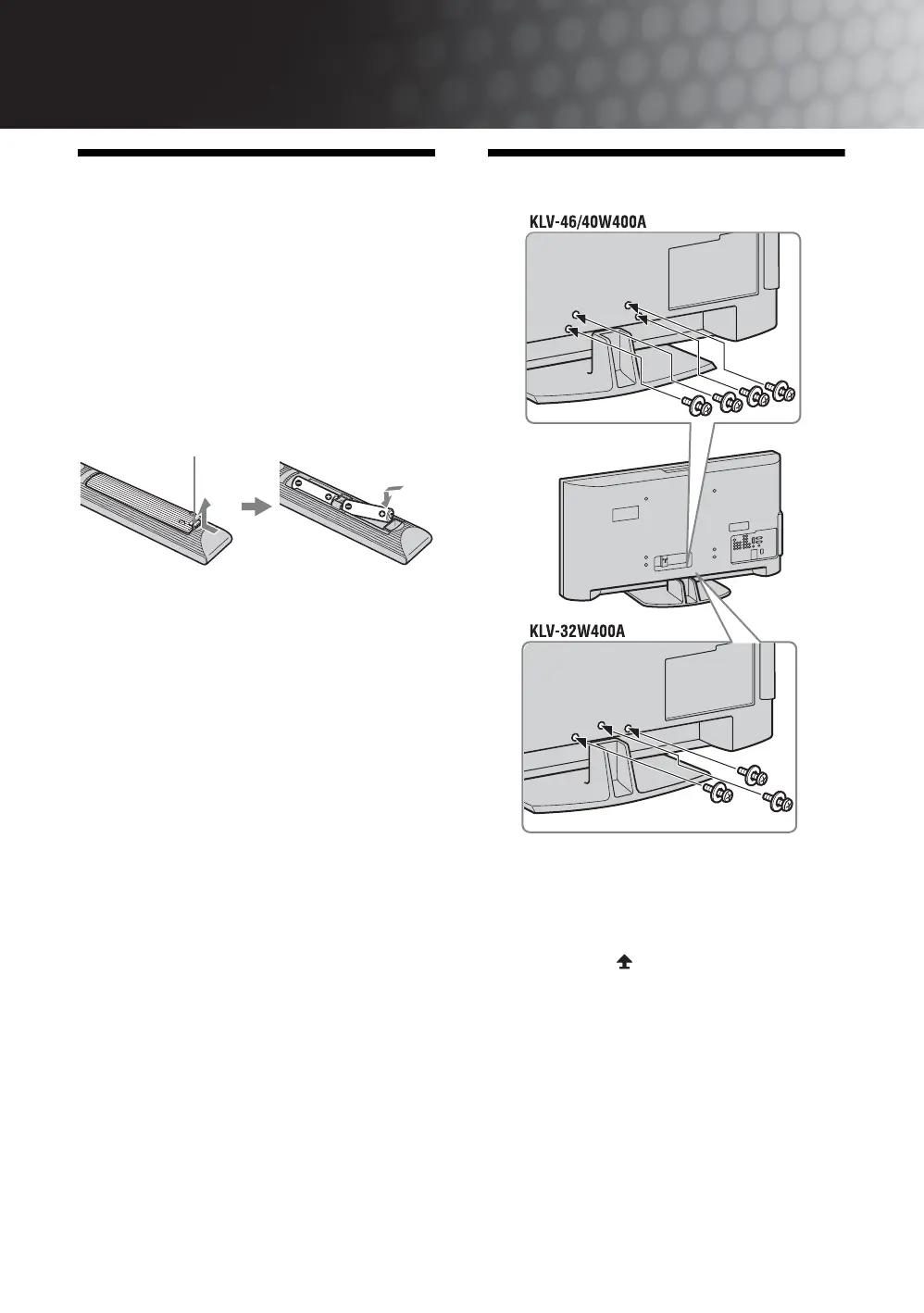
Stand (1) and screws (3) (KLV-32W400A)
Stand (1) and screws (4) (KLV-46/40W400A)
Remote RM-GA011 (1)
Size AA batteries (R6 type) (2)
To insert batteries into the remote
~
• Observe the correct polarity when inserting batteries.
• Do not use different types of batteries together or mix old
and new batteries.
• Dispose of batteries in an environmentally friendly way.
Certain regions may regulate the disposal of batteries.
Please consult your local authority.
• Handle the remote with care. Do not drop or step on it, or
spill liquid of any kind onto it.
• Do not place the remote in a location near a heat source, a
place subject to direct sunlight, or a damp room.
2: Attaching the stand
1 Place the TV onto the stand by aligning the
screw hole alignment lines over the stand
as shown.
2 Fix the TV to the stand according to the
arrow marks that guide the screw holes
using the supplied screws.
~
• This TV is very heavy, so two or more people should place
the TV on the stand.
• If using an electric screwdriver, set the tightening torque
at approximately 1.5N·m (15kgf·cm).
• When installing the TV onto the wall, follow step 1 to
prevent the TV panel from falling over.
Push and lift the cover to open.





 To Next Page