19
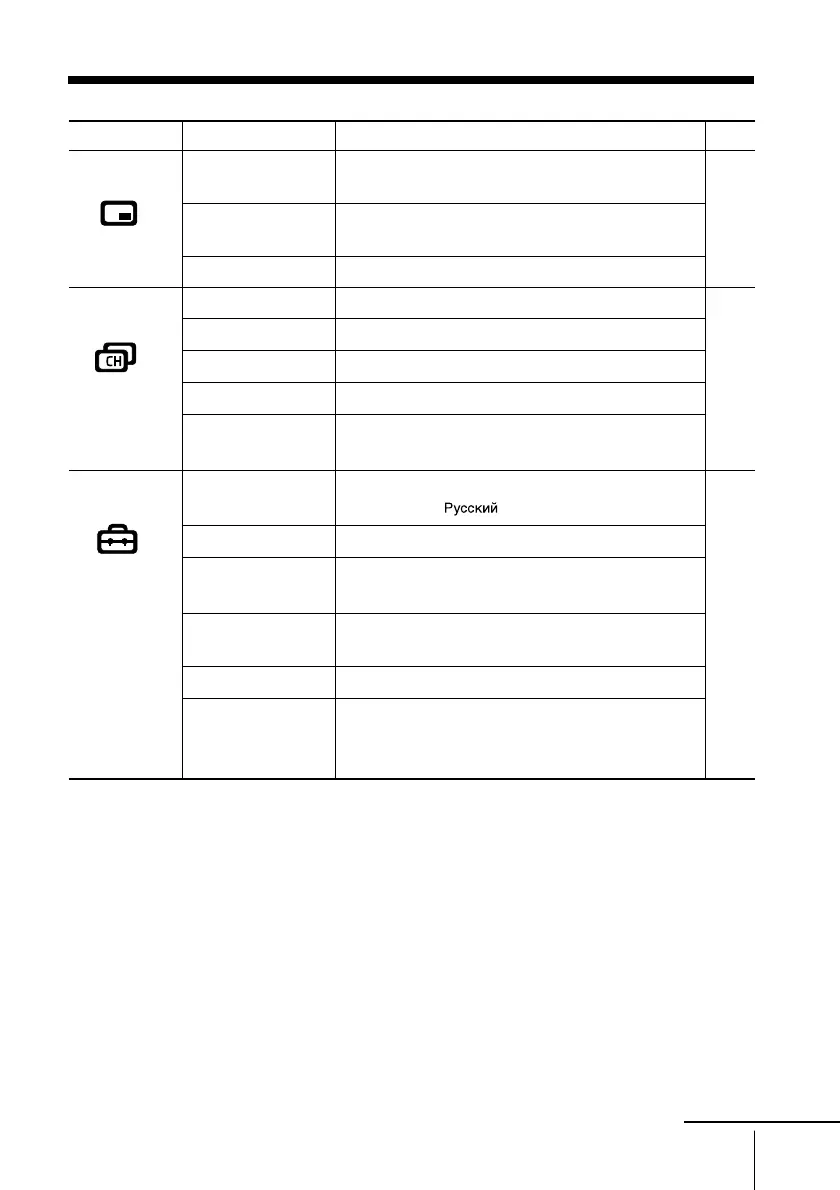
Menu Adjustment
Level 1
“PIP”
“Channel Setup”
“Setup”
Level 2
“PIP”
“Swap”
“Position”
“Auto Program”
“Manual Program”
“Program Label”
“Program Block”
“Program Sorting”
“Language”
“Picture Position”
“Party Mode
Setup”
“Wide Mode”
“Video Label”
“Color System”
Level 3/Function
Display a sub screen within the main picture:
“On” t “Off”
Exchange pictures between main screen and sub
screen.
Change the position of the sub screen
Preset channels automatically.
Preset channels manually.
Label the program number.
Block unwanted programs.
Change the order in which the channels appear on
the screen.
Change the menu language:
“English” t “ ” (Russian)
Adjust the picture position.
Adjust your TV for Party Mode.
Change the picture size:
“On” (16:9 wide-mode) t “Off”
Label the connected equipment.
Select the color system:
“Auto” t “PAL” t “SECAM” t
“NTSC3.58” t “NTSC4.43”
Page
25
26
28
continue





 To Next Page