Adjustment Using the Menus
19
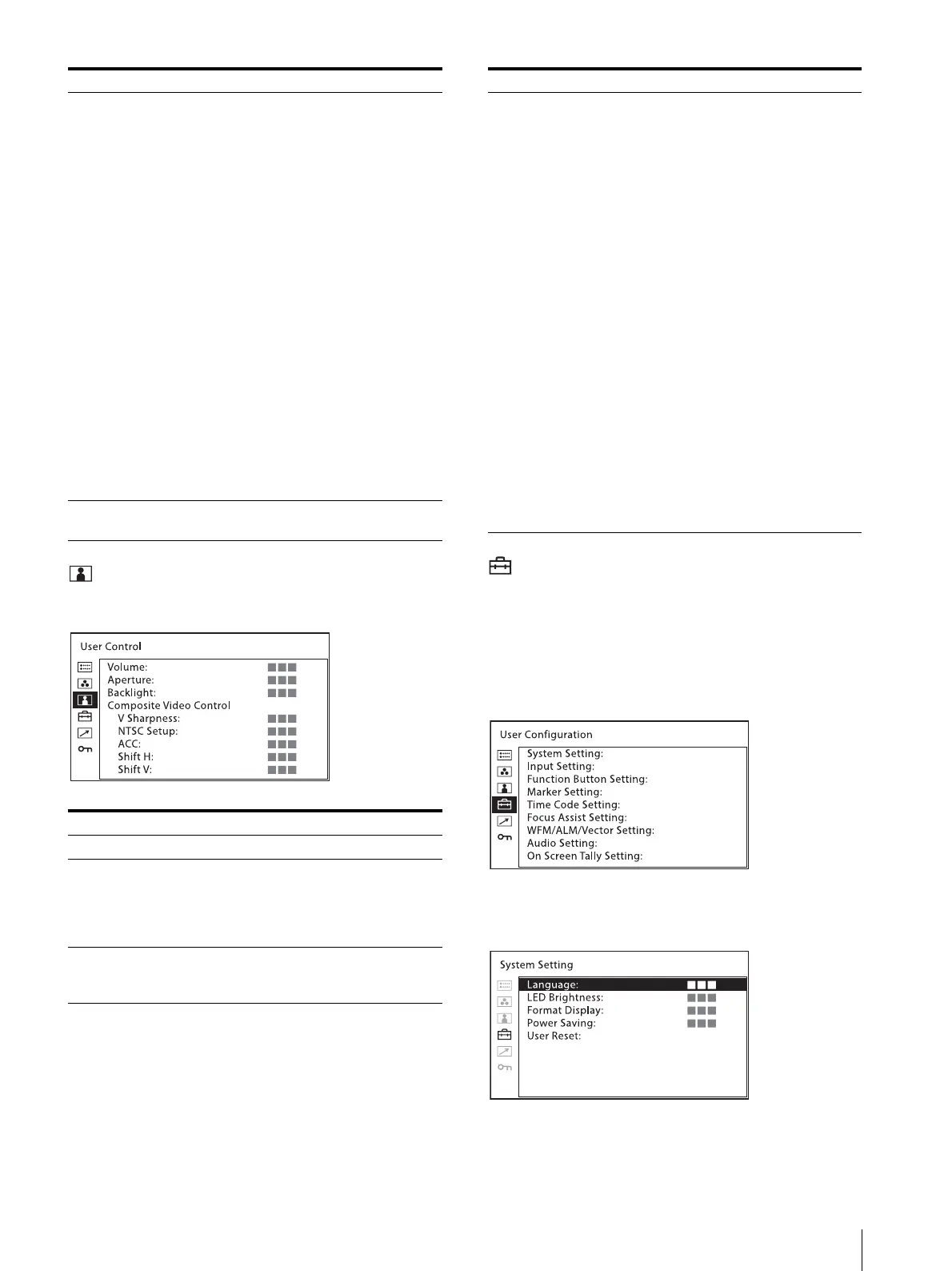
[User Control] menu
The user control menu is used for adjusting the picture.
[User Configuration] menu
The user configuration menu is used for [System
Setting], [Input Setting], [Function Button Setting],
[Marker Setting], [Time Code Setting], [Focus Assist
Setting], [WFM/ALM/Vector (waveform monitor, audio
level meter, and vectorscope) Setting], [Audio Setting]
and [On Screen Tally Setting].
[System Setting]
[Manual Adjustment] If you set the [Color Temp] to the
[User1] or [User2] setting, the item
displayed is changed from black to
white, which means you can adjust the
color temperature.
The set values are memorized.
[Adjust Gain/Bias]:
[R Gain]: Adjusts the color
balance (gain) of R (red).
[G Gain]: Adjusts the color
balance (gain) of G (green).
[B Gain]: Adjusts the color
balance (gain) of B (blue).
[R Bias]: Adjusts the color
balance (bias) of R (red).
[G Bias]: Adjusts the color
balance (bias) of G (green).
[B Bias]: Adjusts the color
balance (bias) of B (blue).
[Copy From]: If you select [D65],
[D93], [User1] or [User2], the
white balance data for the
selected color temperature will
be copied to the [User1] or
[User2] setting.
[Gamma] Select the appropriate gamma mode
from [2.2] or [2.4].
Submenu Setting
[Volume] Adjusts the volume.
[Aperture] Sharpens the picture outline. The
higher the setting, the sharper the
picture. The lower the setting, the softer
the picture. The aperture does not work
when [Focus Assist] is [On].
[Backlight] Adjusts the backlight. When the setting
is changed, the brightness of the
backlight is changed.
Submenu Setting
[Composite Video
Control]
[V Sharpness]: A crisp image can be
displayed.
When the setting is higher, the
picture becomes even more
crisp.
[NTSC Setup]: Selects the NTSC
setup level from two modes.
The 7.5 setup level is used
mainly in North America. The 0
setup level is used mainly in
Japan. You can select between
[0] and [7.5].
[ACC] (Auto Color Control): Sets
the ACC circuit [On] or [Off].
To confirm the fine adjustment,
select [Off]. Normally select
[On].
[Shift H]: Adjusts the position of the
picture. As the setting increases,
the picture moves to the right,
and as the setting decreases, the
picture moves to the left.
[Shift V]: Adjusts the position of the
picture. As the setting increases,
the picture moves up, and as the
setting decreases, the picture
moves down.
Submenu Setting



 To Next Page