77
Anti-theft system
Removing the portable panel
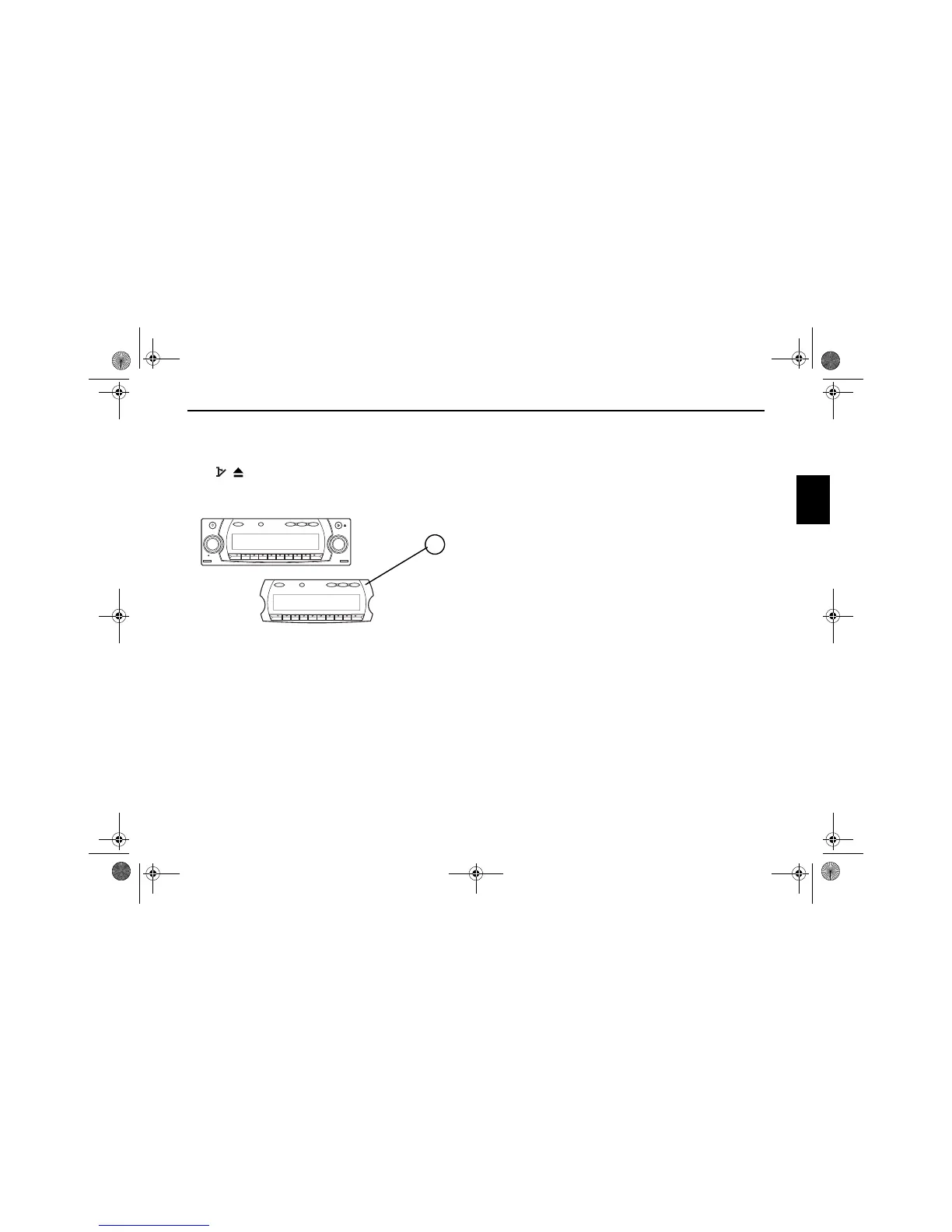
As an effective anti-theft device, the portable panel (A) can be
removed from the unit.
Press / briefly (storage medium remains in the unit).
The display folds forwards.
The portable component can then be pulled out.
The volume is limited to a maximum value after the display
has been folded down. After 20 seconds an audible signal in-
dicates that the control component is folded down. The unit
then switches off automatically.
Note: For safety reasons, it is not permitted to leave the
portable panel open when driving.
Attention : Please insert the portable panel in the
accompanying protective cover after
removal.
Do not touch the metal contacts on the
portable panel or on the radio.
Inserting portable panel
Insert the portable panel in the lower left catch and then en-
gage it in the lower right catch. Then fold up the portable pan-
el and engage it in the upper catches.
Alternately, position portable panel directly over all four
catches and press in firmly to engage.
For correct functioning, ensure that the portable panel is firm-
ly engaged in all four catches.
If a new portable panel or one from another unit is utilised, the
code number must be entered, as previously described, in or-
der to activate the unit.
TP CD TUNER NAVI
SOUND
SELECT
TP CD TUNER NAVI
SOUND
NAVISYS
VOL/INFO
A
7890_GB.book Seite 77 Montag, 1. Juli 2002 1:20 13



 To Next Page