20
Advanced Operations — Discs
This chapter consists of the following sections.
• Video-specific operations*
t page 20 to 27
• Video*/audio common operations
t page 28 to 32
• Audio-specific operations
t page 32 to 33
* Including JPEG operations.
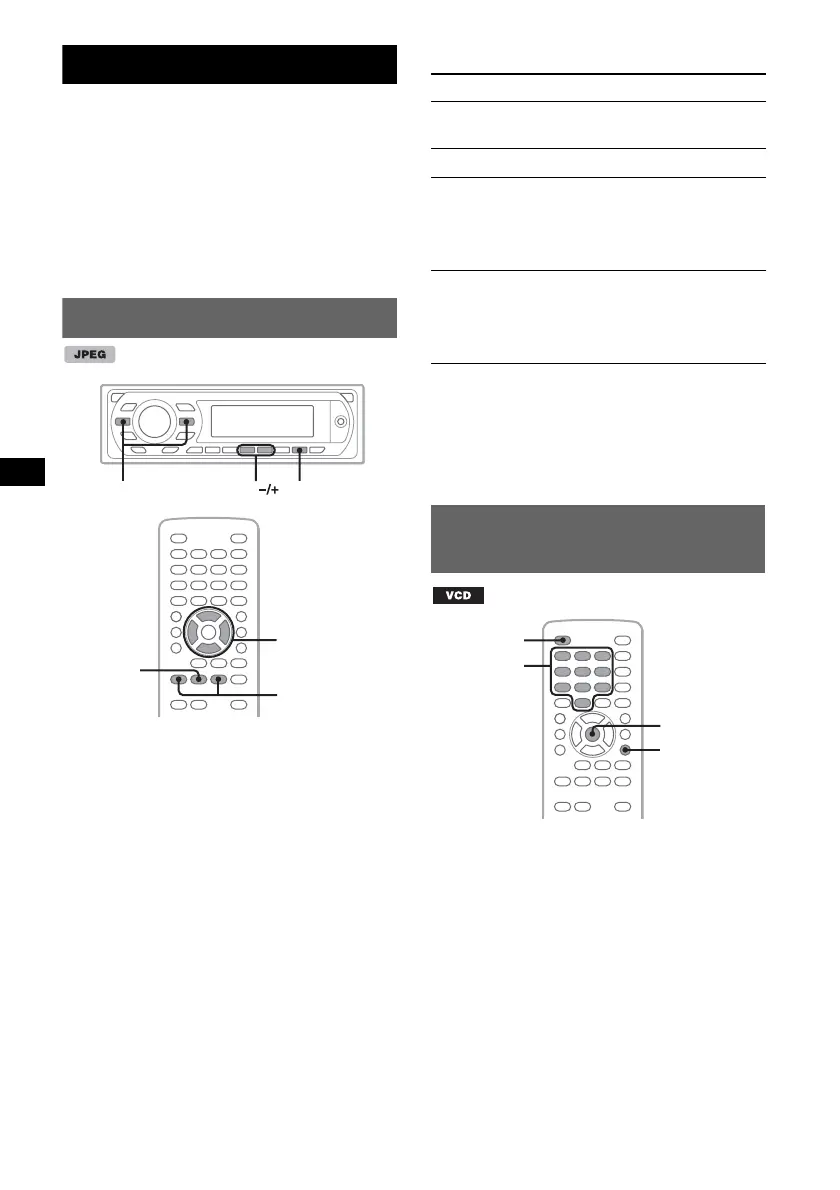
Playing JPEG files
Note
If the disc contains multiple file types, only the
selected file type (audio/image) can be played. To play
JPEG image files of such a disc, press (LIST/CAT)
during playback, select the file type (image) to list up,
then select the desired file (page 32).
You can enjoy a slide show of JPEG files on this
unit. The slide show starts automatically when
you insert a disc or press u. For details on how
to start playback, follow step 1 to 4 of “Playing
video discs” on page 14.
Other playback operations
Notes
• If a large-sized image is rotated, it may take longer
to display.
• Progressive JPEG files cannot be displayed.
Tip
You can also select a file to play using a list (page 31).
Using PBC functions
— Playback control
The PBC menu assists your operation
interactively while a PBC compatible VCD is
played.
1 Start playing a PBC compatible VCD.
The PBC menu appears.
2 Press the number buttons to select the
desired item, then press (ENTER).
3 Follow the instructions in the menu for
interactive operations.
To return to the previous display, press O.
u
.m/M>
ALBUM
Z
X
Z
</M/m/,
.m/M>
u
To Press
rotate the image Remote:
</, (rotates every 90º)
skip an image .m/M>
skip an album Remote: M/m
Main unit:
(3) (ALBUM –)/
(4) (ALBUM +)
skip albums
continuously
Remote: and hold M/m
Main unit:
and hold (3) (ALBUM –)/
(4) (ALBUM +)
Z
X
Z
ENTER
O
OFF
Number
buttons



 To Next Page