8
Hooking up the system (continued)
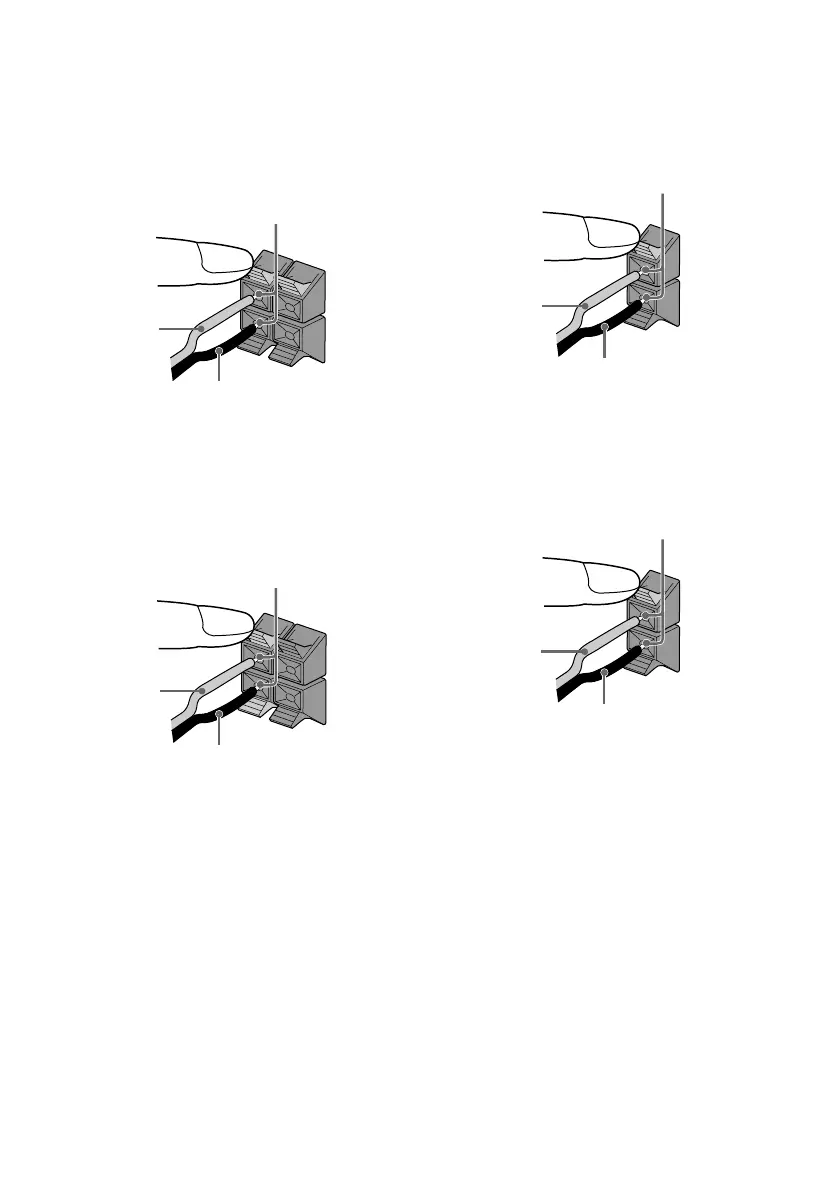
1 Connect the front speakers.
Connect the speaker cords to the FRONT
SPEAKER jacks on the unit as shown
below.
R
L
+
–
Insert only the stripped portion
Red (3)
Black (#)
3 Connect the center surround speaker.
(MHC-MG510AV/MG310AV only)
Connect the speaker cords to the
SURROUND SPEAKER CENTER jacks
on the unit as shown below.
Insert only the stripped portion
Red (3)
Black (#)
4 Connect the sub woofer.
(MHC-MG510AV only)
Connect the speaker cords to the
SURROUND SPEAKER SUB WOOFER
jacks on the unit as shown below.
Insert only the stripped portion
Red (3)
Black (#)
Red (3)
2 Connect the rear surround speakers.
(MHC-MG510AV/MG310AV only)
Connect the speaker cords to the
SURROUND SPEAKER REAR jacks on
the unit and to the jacks on the rear
surround speakers as shown below.
+
–
R
L
Insert only the stripped portion
Black (#)



 To Next Page