EasyManua.ls Logo

Sony MHC-2200CD - Page 10

Sony MHC-2200CD
31 pages
Print Icon
To Next Page IconTo Next Page
To Previous Page IconTo Previous Page
Loading...
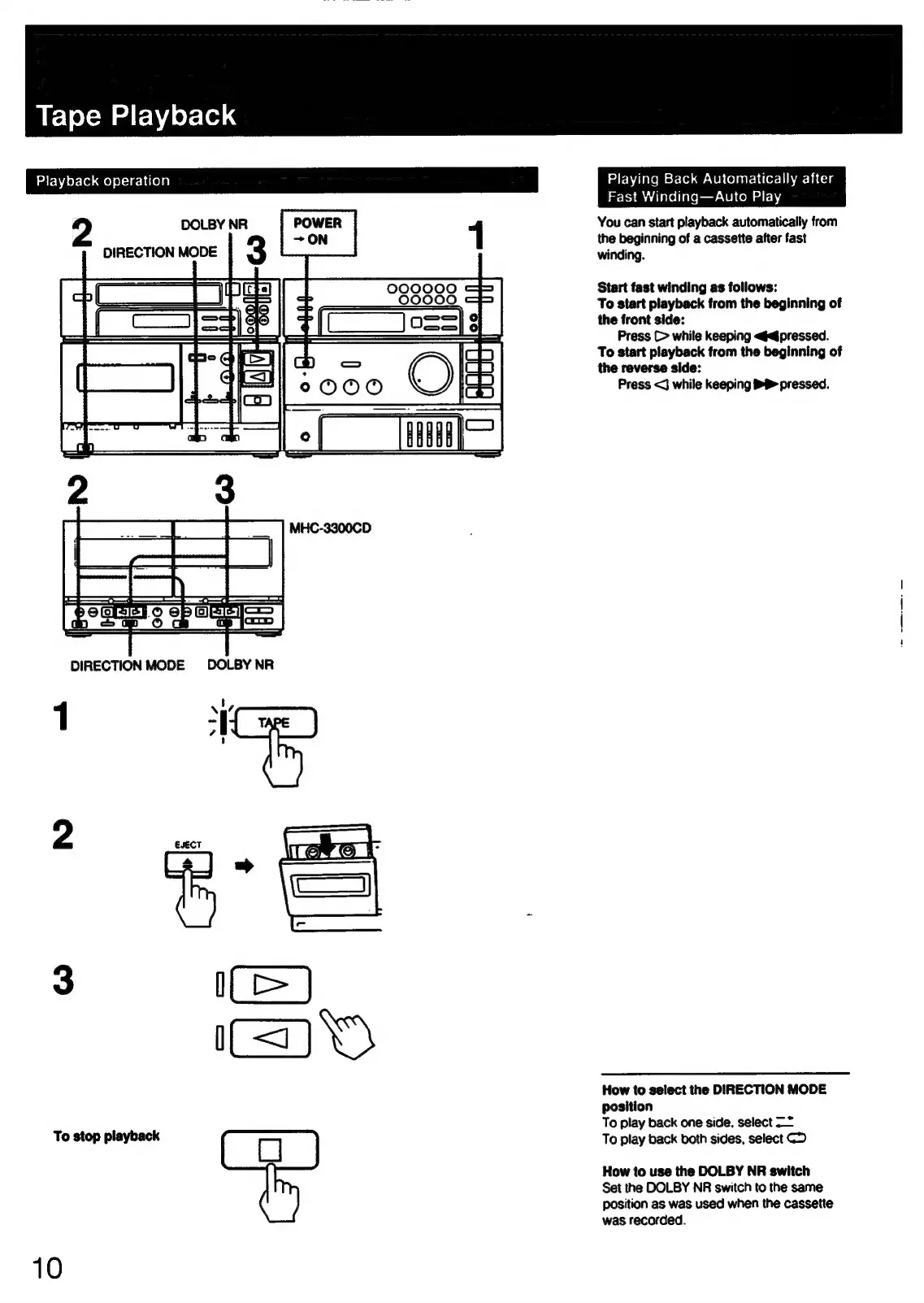
Tape
Playback
Playback
operation
2
0000
z
.
000090
=
eit
{LoS
DIRECTION
MODE
DOLBY
NR
1
‘¥
To
stop
playback
10
Playing
Back
Automatically
after
Fast
Winding—Auto
Play
You
can
start
playback
automatically
from
the
beginning
of
a
cassette
after
fast
winding.
Start
fast
winding
as
follows:
To
start
playback
from
the
beginning
of
the
front
side:
Press
(>
while
keeping
<@d/pressed.
To
start
playback
from
the
beginning
of
the
reverse
side:
Press
<J
while
keeping
®P
pressed.
How
to
select
the
DIRECTION
MODE
position
To
play
back
one
side,
select
—*
To
play
back
both
sides,
select
CD
How
to
use
the
DOLBY
NR
switch
Set
the
DOLBY
NR
switch
to
the
same
position
as
was
used
when
the
cassette
was
recorded.