EasyManua.ls Logo

Sony MHC-2200CD - Page 9

Sony MHC-2200CD
31 pages
Print Icon
To Next Page IconTo Next Page
To Previous Page IconTo Previous Page
Loading...
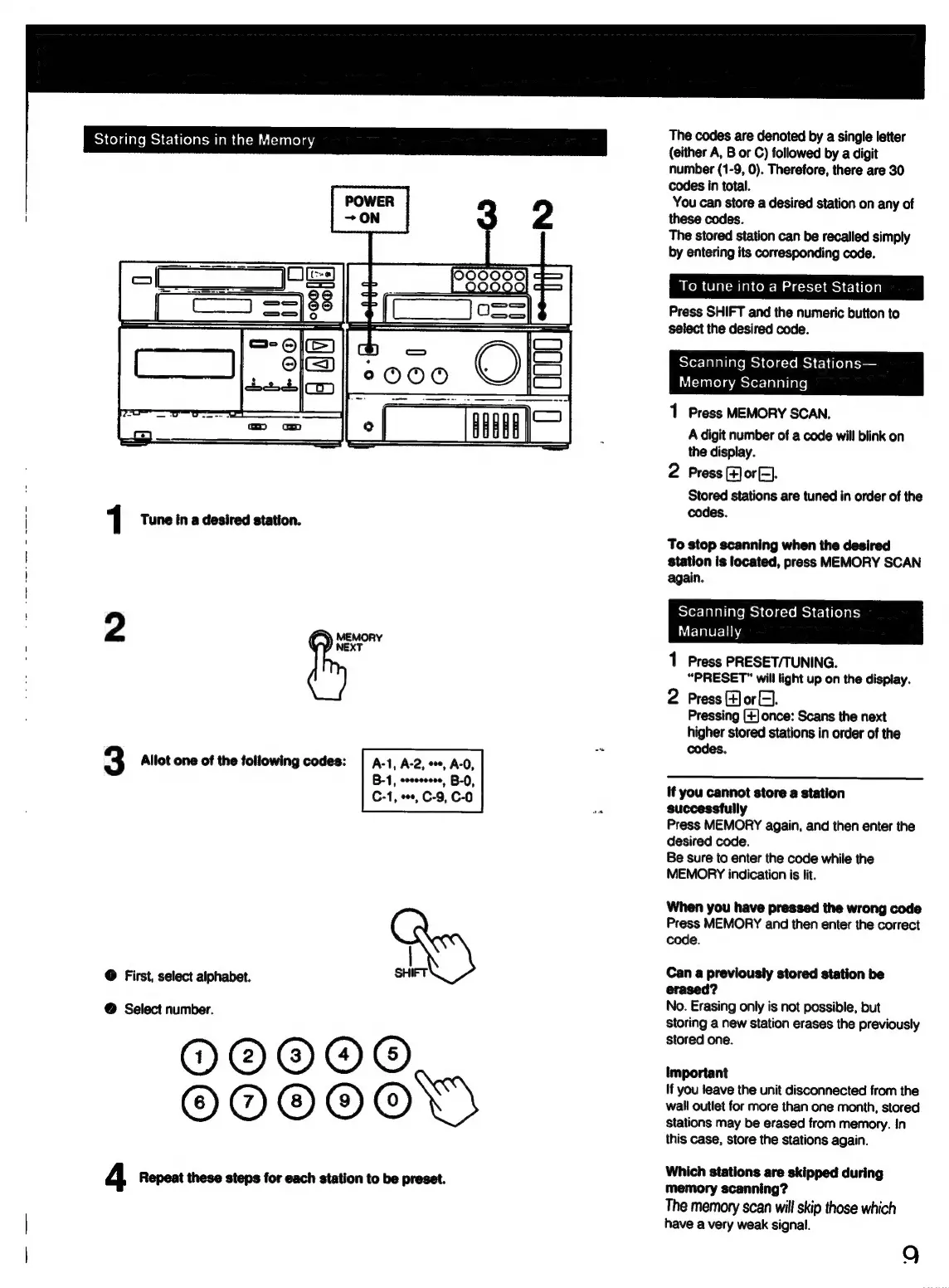
Storing
Stations
in
the
Memory
1
Tune
in
a
desired
station.
2
MEMORY
NEXT
3
Allot
one
of
the
following
codes:
|
A-1,
A-2,
+,
A-0,
B-1,
eoeccccee,
B-0,
C-1,
ee,
C-9,
C-0
@
First,
select
alphabet.
SHIFT
@
Select
number.
O@®O@O®
OMDOOOYS
4
Repeat
these
steps
for
each
station
to
be
preset.
The
codes
are
denoted
by
a
single
letter
(either
A,
B
or
C)
followed
by
a
digit
number
(1-9,
0).
Therefore,
there
are
30
codes
in
total.
You
can
store
a
desired
station
on
any
of
these
codes.
The
stored
station
can
be
recalled
simply
by
entering
its
corresponding
code.
To
tune
into
a
Preset
Station
Press
SHIFT
and
the
numeric
button
to
select
the
desired
code.
sSYor-Taballate
mes
Colg:te
mc}
f-1
t[o)
ss
i
Taastelameerer-lalaliale)
1
Press
MEMORY
SCAN.
A
digit
number
of
a
code
will
blink
on
the
display.
2
Press
(+]or
(=).
Stored
stations
are
tuned
in
order
of
the
codes.
To
stop
scanning
when
the
desired
station
is
located,
press
MEMORY
SCAN
9
a
2.
=
STor-
Talal
late
mes
Col
acts
mc}
C1
(fo)
pts)
Manually
1
Press
PRESET/TUNING.
“PRESET™
will
light
up
on
the
display.
2
Press
(4)
or
EH).
Pressing
(+]once:
Scans
the
next
higher
stored
stations
in
order
of
the
codes.
If
you
cannot
store
a
station
successfully
Press
MEMORY
again,
and
then
enter
the
desired
code.
Be
sure
to
enter
the
code
while
the
MEMORY
indication
is
lit.
When
you
have
pressed
the
wrong
code
Press
MEMORY
and
then
enter
the
correct
code.
Can
a
previously
stored
station
be
erased?
No.
Erasing
only
is
not
possible,
but
storing
a
new
station
erases
the
previously
stored
one.
important
If
you
leave
the
unit
disconnected
from
the
wall
outlet
for
more
than
one
month,
stored
Stations
may
be
erased
from
memory.
In
this
case,
store
the
stations
again.
Which
stations
are
skipped
during
memory
scanning?
The
memory
scan
will
skip
those
which
have
a
very
weak
signal.
9

Related product manuals