Basic Operations
13
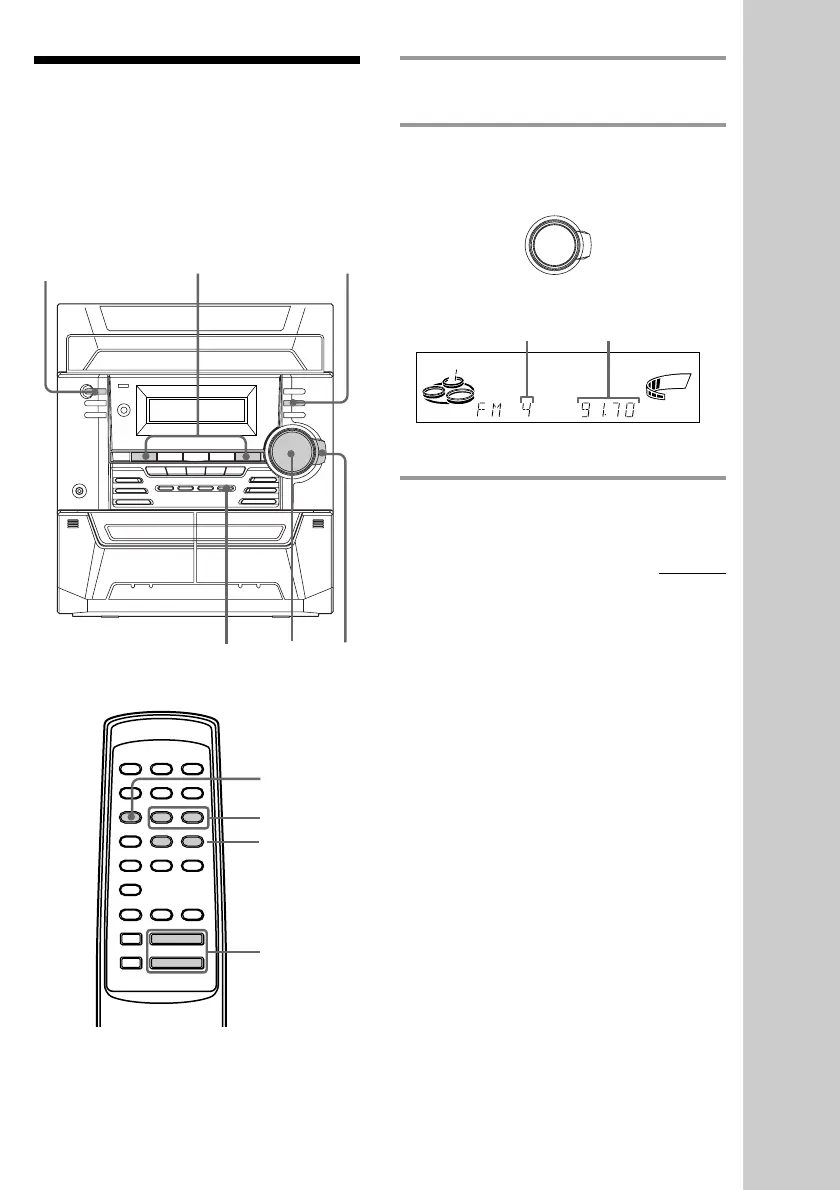
1 Press TUNER/BAND repeatedly to
select FM or AM.
2 Turn the shuttle until it clicks (or
press PRESET +/– on the remote) to
tune in the desired preset station.
* When only one station is preset, “ONE
PRESET” appears in the display.
+/–
STEREO/
MONO
VOLUME
Listening to the radio
–– Preset Tuning
Preset radio stations in the system’s memory
first (see “Step 3: Presetting radio stations” on
page 7).
2
1
Preset number* Frequency
?/1
(Power)
continued
Turn counter-
clockwise
(or press PRESET –
on the remote) for
lower preset
numbers.
Turn clockwise
(or press PRESET +
on the remote)
for higher
preset numbers.
.
nN
Xx
mM
>
TUNER/BAND
PRESET +/–
VOL +/–
TUNING +/–
VOLUME
MHz
kHz
ALL DISCS
ß
m
M



 To Next Page