MHC-EC68USB.GB.3-294-664-11(1)
15
GB
Basic Operations
Recording from a disc
onto an USB device
You can connect an optional USB device
(Digital music player or USB storage
media) to the (USB) port
on the
unit and record music from a disc to the
USB device.
You can record from a CD-DA disc or
MP3 disc only.
e audio format of les recorded by this
system is MP3.
e approximate size of the recording is
about 1 MB per minute of recording time
from a CD. e size may be larger when
recording from an MP3 disc.
See “Playable/Recordable USB devices”
(page 35) for a list of USB devices that
can be connected to this system.
Synchro Recording
You can easily record an entire disc onto
an USB device.
1
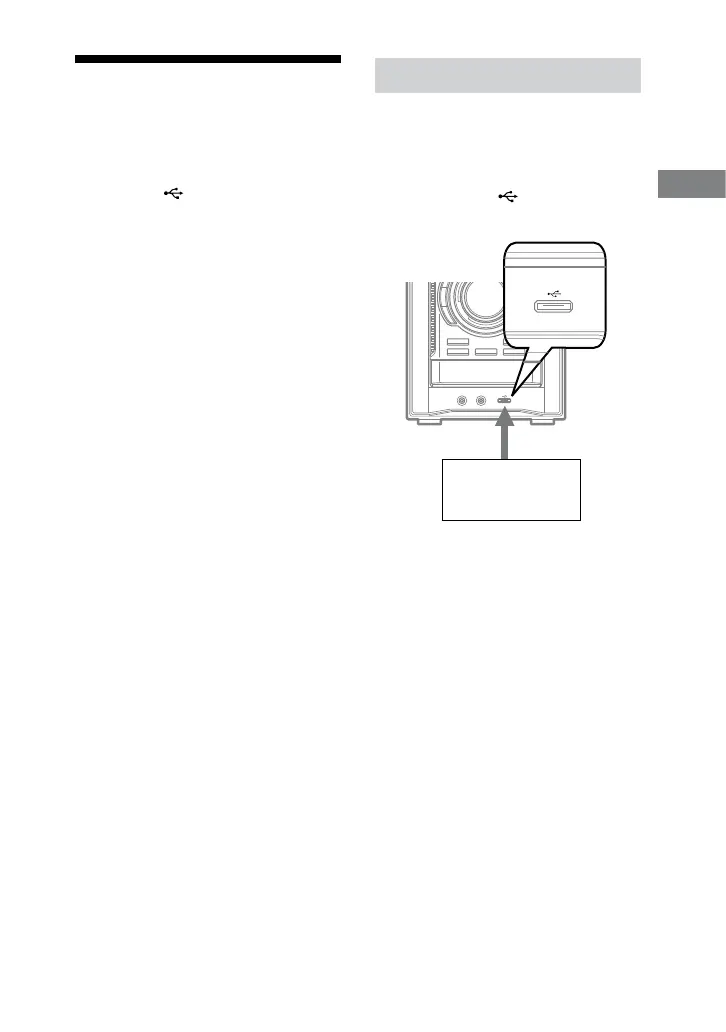
Connect a recordable USB
device to the (USB) port
as shown below.
USB device (Digital music
player or USB storage
media)
When USB cable connection is
necessary, connect the USB cable
supplied with the USB device to be
connected.
See the operation manual supplied
with the USB device to be connected
for details on the operation method.
2
Select the CD function, then
load the disc you want to
record.
Continued



 To Next Page
 Loading...