Disc – Playback
21
GB
You can make a program of up to 99 steps in the
order you want them to be played back.
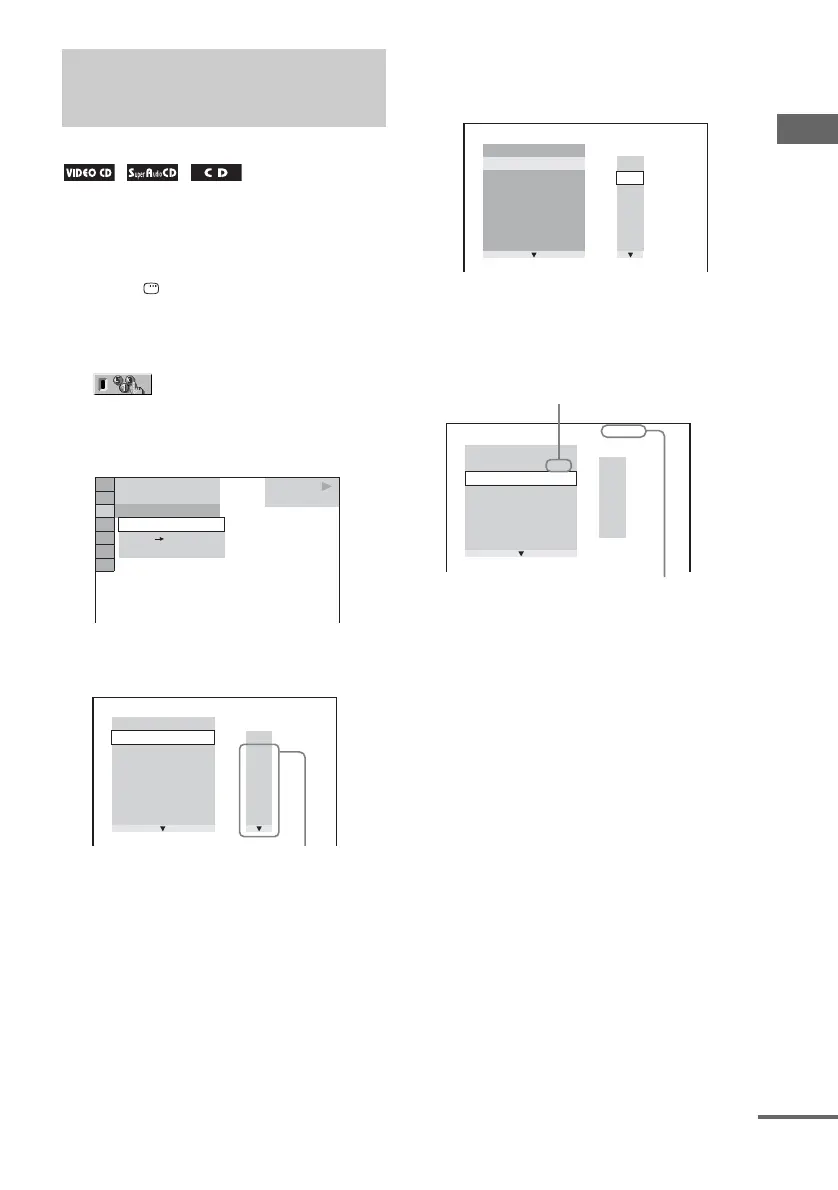
1 Press DISPLAY once or twice.
The Control Menu appears in the on-screen
display.
2 Press V or v repeatedly to select
(PROGRAM), then press
ENTER.
The options for “PROGRAM” appear in the
on-screen display.
3 Press V or v repeatedly to select “SET
t
”, then press ENTER.
4 Press b.
The cursor moves to the track row “T” (in
this case, “01”).
5 Select the track you want to program.
For example, select track “02”.
Press
V or v repeatedly to select “02”
under “T”, then press ENTER.
6 To program other tracks, repeat steps 4
to 5.
The programmed tracks are displayed in the
selected order.
7 Press H (or hH on the unit).
Program Play starts.
“PGM” lights up in the display.
When the program ends, you can restart the
same program again by pressing H (or
hH on the unit).
To return to normal playback
Press CLEAR, or select “OFF” in step 3. To play
back the same program again, select “ON” in
step 3 and press ENTER.
Creating your own
program
— Program Play
PLAY
6 (14)
T
2 : 5 0
OFF
SET
ON
OFF
CD
PROGRAM
1. TRACK
ALL CLEAR
2. TRACK
– –
– –
3. TRACK
– –
4. TRACK
– –
5. TRACK
– –
6. TRACK
– –
7. TRACK
– –
T
– –
01
02
03
04
05
06
0:00:00
Track number
PROGRAM
1. TRACK
– –
ALL CLEAR
2. TRACK
– –
3. TRACK
– –
4. TRACK
– –
5. TRACK
– –
6. TRACK
– –
7. TRACK
– –
T
– –
02
03
04
05
06
01
0:00:00
PROGRAM
1. TRACK 0 2
ALL CLEAR
2. TRACK
– –
3. TRACK
– –
4. TRACK
– –
5. TRACK
– –
6. TRACK
– –
7. TRACK
– –
0:15:30
– –
01
02
03
04
05
T
Selected track
Total time of the programmed tracks
continued


 To Next Page
 Loading...