33
GB
Operations
Listening to an iPod or iPhone
You can operate your iPod/iPhone using the
remote and listen to music and other audio content
stored on your iPod/iPhone. See “iPod/iPhone
models compatible with this system” (page 71) for
iPod/iPhone models that can be connected to this
system.
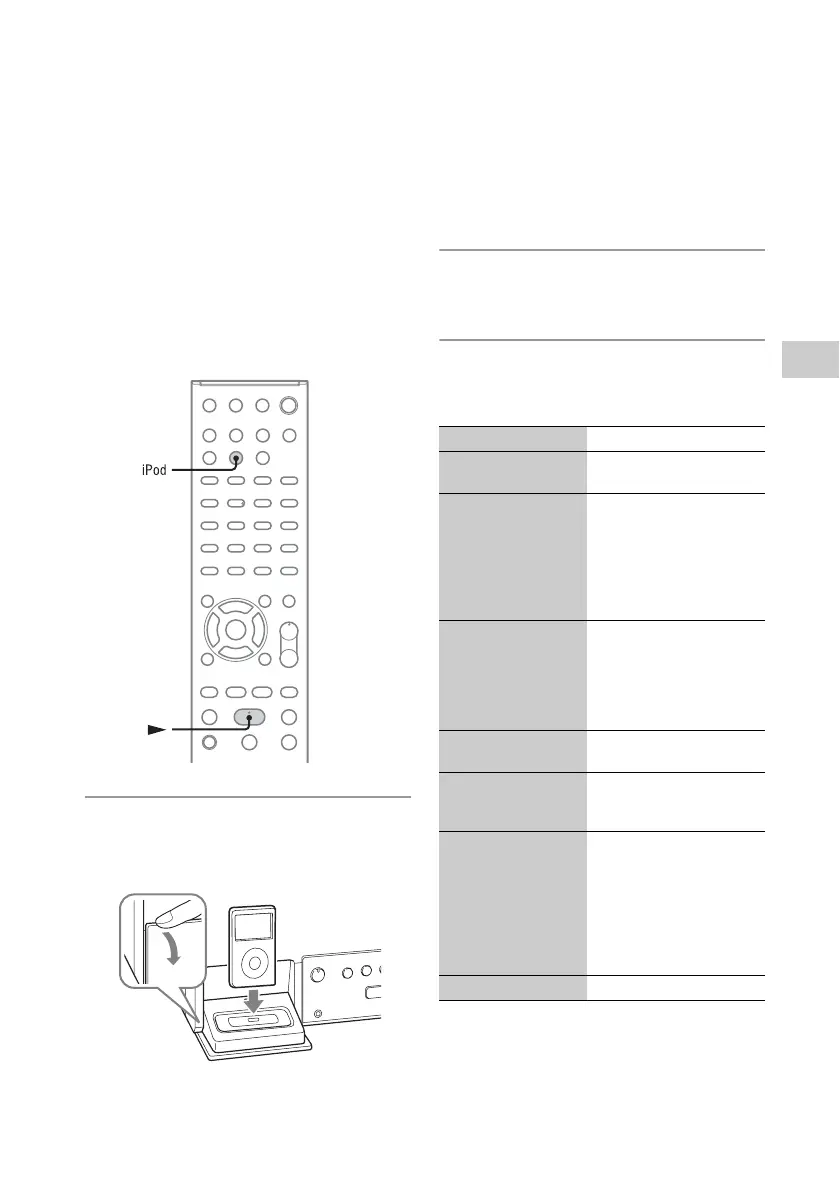
1
Open the panel where it says
“PULL OPEN,” then place the iPod
or iPhone in the iPod/iPhone Dock.
2
Press iPod to select the iPod &
iPhone function.
3
Press N to start playback.
Other operations
To Do the following:
Pause playback Press X (pause). Press X or
N to resume playback.
Scroll up/down the
iPod/iPhone menus
Hold down M/m. You can
scroll up or down the iPod/
iPhone menus much like as
the Click Wheel operations
or the drag up or down
operations of the iPod/
iPhone.
Choose the selected
item
Press ENTER. You can
choose the selected item
much like as with the center
button or the touch
operation of the iPod/
iPhone.
Find the beginning of
the previous/next track
Press . />.
Find a point in a track
or chapter of an
audiobook/podcast
Hold down m/M during
playback, and release the
button at the desired point.
Return to the previous
menu or reselect a
menu while playing
Press BACK or iPod
MENU. You can return to
the previous menu or
reselect a menu much like
as when using the Menu
button or the touch
operation of the iPod/
iPhone.
Adjust the volume Press VOLUME +/–.



 To Next Page