Part Identification
16
Overview
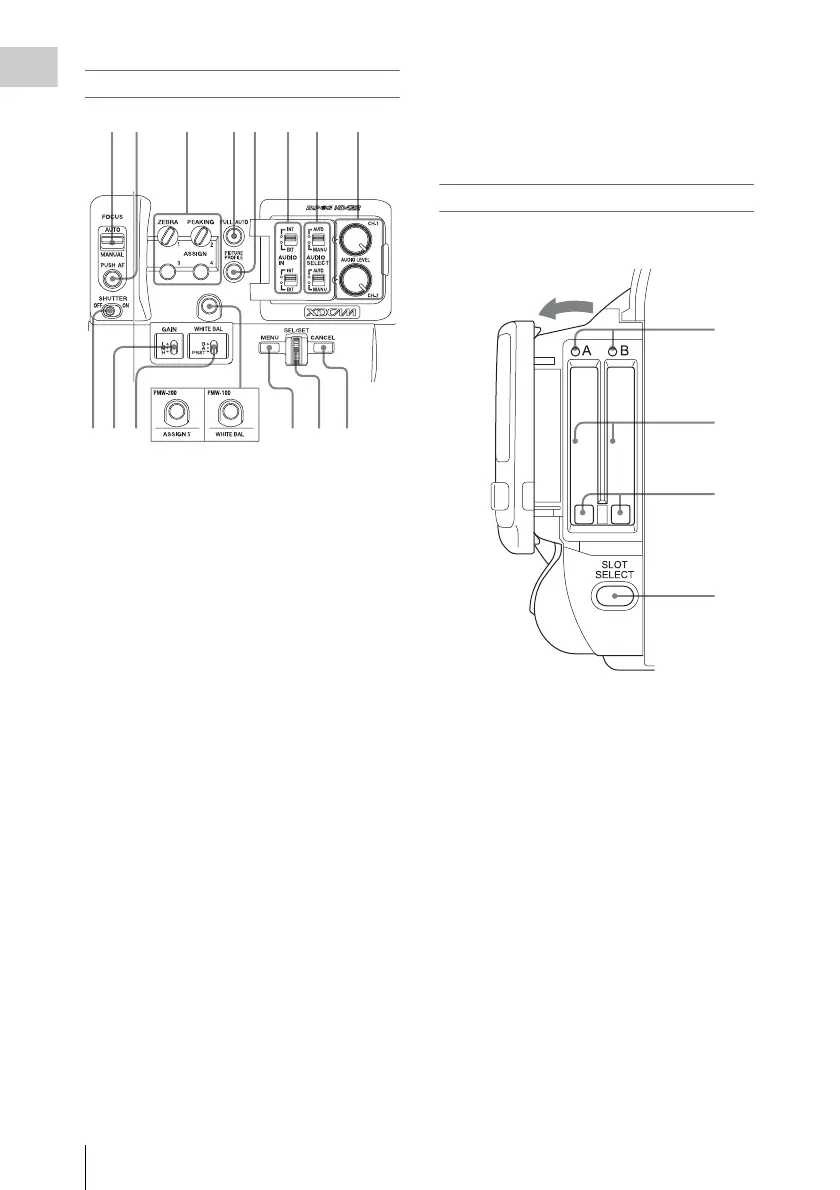
Side operation panel
1. FOCUS (focus adjustment mode) switch
(PMW-100 only) (page 41)
2. PUSH AF (momentary auto focus) button
(PMW-100 only) (page 42)
3. ASSIGN (assignable) 1/2/3/4 buttons (page
47)
ZEBRA is set to ASSIGN 1 and PEAKING
is set to ASSIGN 2 by default.
4. FULL AUTO button and indicator (page
35)
5. PICTURE PROFILE button (page 51)
6. AUDIO IN (audio input selection)
switches (page 44)
7. AUDIO SELECT (audio level control
mode selection) switches (page 44)
8. AUDIO LEVEL CH-1/CH-2 knobs (page
45)
9. SHUTTER switch (page 39)
10. GAIN switch (page 39)
11. WHITE BAL (white balance memory)
switch (page 38)
12. ASSIGN (assignable) 5 button (PMW-
200) (page 47)
13. WHITE BAL (automatic white balance
adjustment) button (PMW-100) (page 39)
14. MENU (menu display on/off) button (page
78)
15. SEL/SET dial (jog dial) (page 78)
It functions accordingly when you turn it up or
down, or you push it horizontally.
It is called the “jog dial” in the subsequent
operating instructions.
16. CANCEL button
Card slot block
The SxS memory card slots and EJECT buttons
are located behind the cover.
1.ACCESS lamps (page 25)
2.SxS memory card slots (page 25)
3.EJECT (SxS memory card eject) buttons
(page 25)
4.SLOT SELECT (SxS memory card select)
button (page 26)
12 3 45 6
11109
78
12 13
14 15 16
1
2
3
4
Open the cover



 To Next Page