Using Wi-Fi Connection (PMW-200 only)
30
Preparations
Connecting an optional CBK-WA01 Wi-Fi
Adapter or IFU-WLM3 USB Wireless LAN
Module to this camcorder allows a Wi-Fi
connection between a computer and the
camcorder.
You can also connect the camcorder and computer
via Wi-Fi by using the optional CBK-WA100
Wireless Adapter. For details on connection and
operation of the CBK-WA100, refer to the Operating
Instructions supplied with the CBK-WA100.
Making a Wi-Fi connection between a computer
and the camcorder enables you to do the
following.
Send planning metadata created on a computer to the
camcorder, and set names of clips to shoot and shot
marks for shooting.
Notes
• Before attaching or removing the CBK-WA01, turn
the power of the camcorder off.
• It may be impossible to stow the camcorder attached
with the CBK-WA01 in a carrying case.
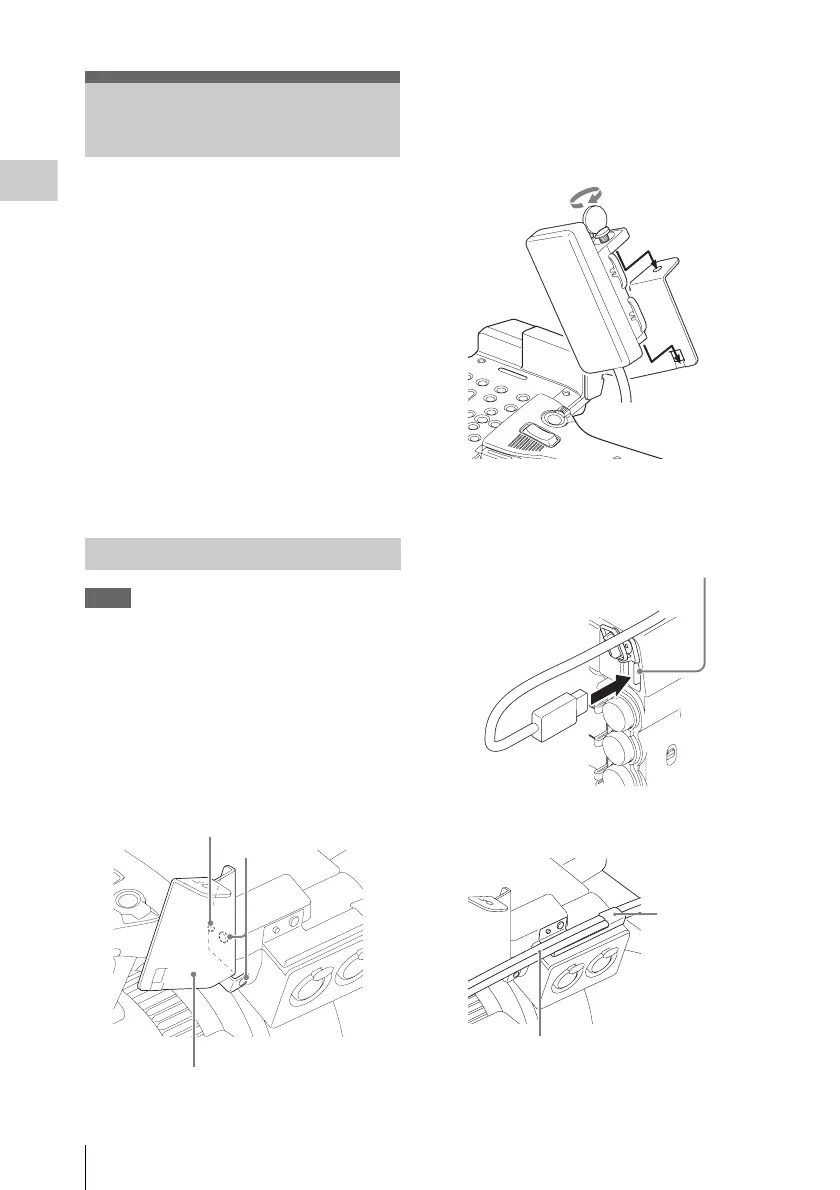
1 Remove the two screws from the
handle, place the Wi-Fi adapter fixing
bracket in the desired position, then fix
the bracket with the removed two
screws.
2 Insert the protrusion on the back of the
CBK-WA01 into the hole on the Wi-Fi
adapter fixing bracket, and tighten the
screw to fix the CBK-WA01 to the
bracket.
3 Open the cover of the external device
connector, then connect the CBK-
WA01 cable.
When you use an external microphone
Use the microphone cable holder if necessary.
Using Wi-Fi Connection
(PMW-200 only)
Fixing the CBK-WA01
Mark
Screws
Wi-Fi adapter fixing bracket
External device connector
Microphone
cable holder
Cable of the external microphone



 To Next Page