Using Wi-Fi Connection (PMW-200 only)
33
Preparations
Planning Metadata
Clicking “Upload” displays the Planning
Metadata screen which allows upload of a
planning metadata file (page 33).
Note
The configuration of items displayed in the Web
menu varies depending on the browser you are
using.
To display the Web menu
1 Launch a browser on the computer, and
navigate to “http://<camcorder’s IP
address> (setting of OTHERS
>Network >IP Address in the setup
menu)”.
Example (when the IP address is
“192.168.1.10”): Type “http://
192.168.1.10/” in the address bar.
If the connection is complete, a dialog
appears asking you to enter the user name
and password.
2 Enter the user name and password, and
click [OK].
User name: admin
Password: pmw-200 (Lower-case the model
name.)
To upload a planning metadata file
1 Insert a media such as an SxS memory
card.
2 Click “Upload” in the Web menu.
The Planning Metadata screen appears.
3 Click “Select” to show Choose File
dialog.
4 Select the planning metadata file you
want to upload, and then click “Open”.
The path of the selected file appears.
5 Click “Execute”.
The planning metadata file is loaded into the
camcorder’s memory and stored in the
media.
“OK” appears in the Status field when the
transfer is complete.
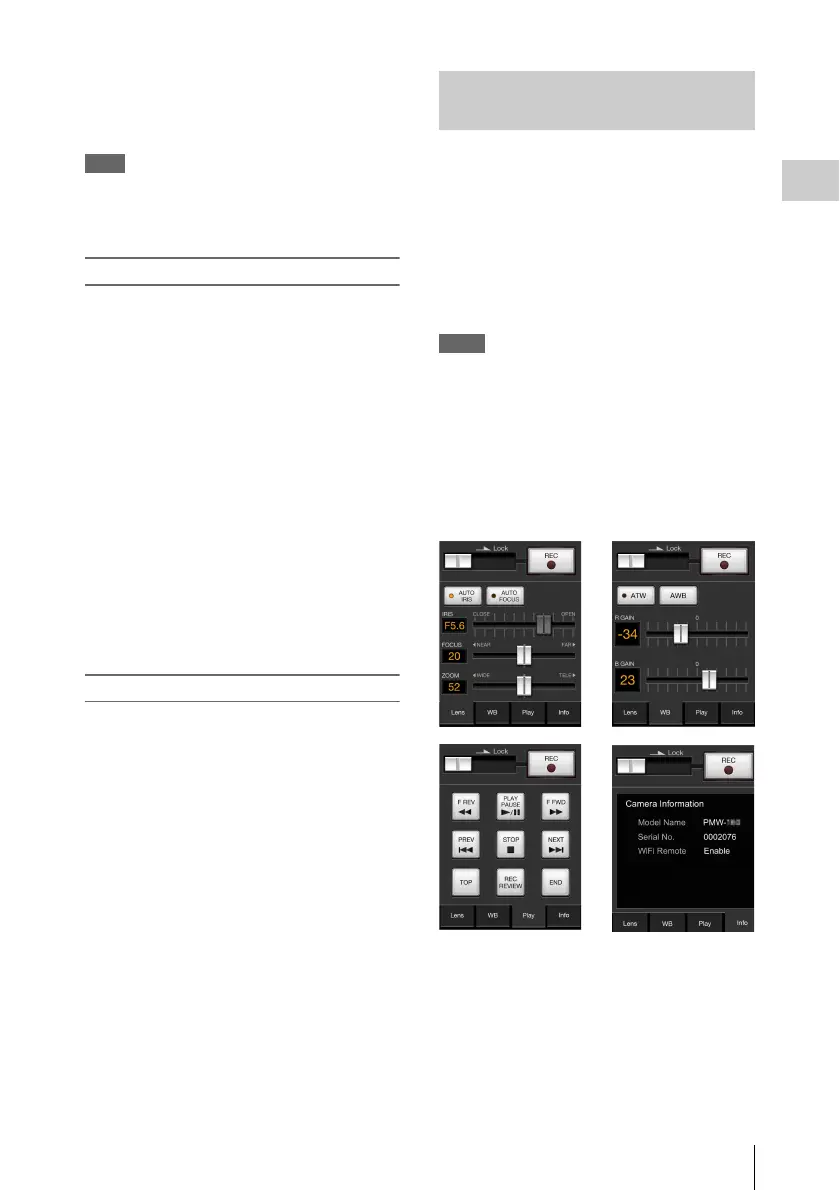
When a Wi-Fi connection is established between
a device such as smartphone, tablet, PC, etc., and
the camcorder, the Wi-Fi remote commander
appears on the device screen and the device can
be used as a remote commander.
You can start/stop recording, adjust iris/focus/
zoom, etc., with a Wi-Fi connected device. This
function is useful for setting the camcorder in a
remote place, such as the top of a crane, etc.
Notes
• When iris is not set to auto, “IRIS” slider operation and
ON/OFF setting of “Auto IRIS” are not available.
• When the focus ring is pulled rearward, “FOCUS”
slider operation and ON/OFF setting of “Auto Focus”
are not available.
• When the ZOOM switch is set to “MANUAL”,
“ZOOM” slider operation is not available.
The displays of Wi-Fi remote commander
For smartphone
Using the Wi-Fi Remote
Commander



 To Next Page