Thumbnail Screens
63
Playback
When you press the THUMBNAIL button (page 15), clips recorded on the SxS memory card are
displayed as thumbnails on the screen. If no clips are recorded on the card, a no-clip message is displayed.
You can start playback from the clip selected on the thumbnail screen. The playback picture can be seen
on the LCD monitor/EVF and external monitors.
Press the STOP/CAM button (page 15) to exit the thumbnail screen and return to the recording screen.
Note
Even if the SxS memory card contains a mixture of HD and SD clips, the normal thumbnail screen shows only clips of
the mode selected in “HD/SD” in “System” (page 98) in the OTHERS menu.
To display all recorded clips regardless of the HD/SD Mode, switch the screen to the All-Clip thumbnail screen (page 64).
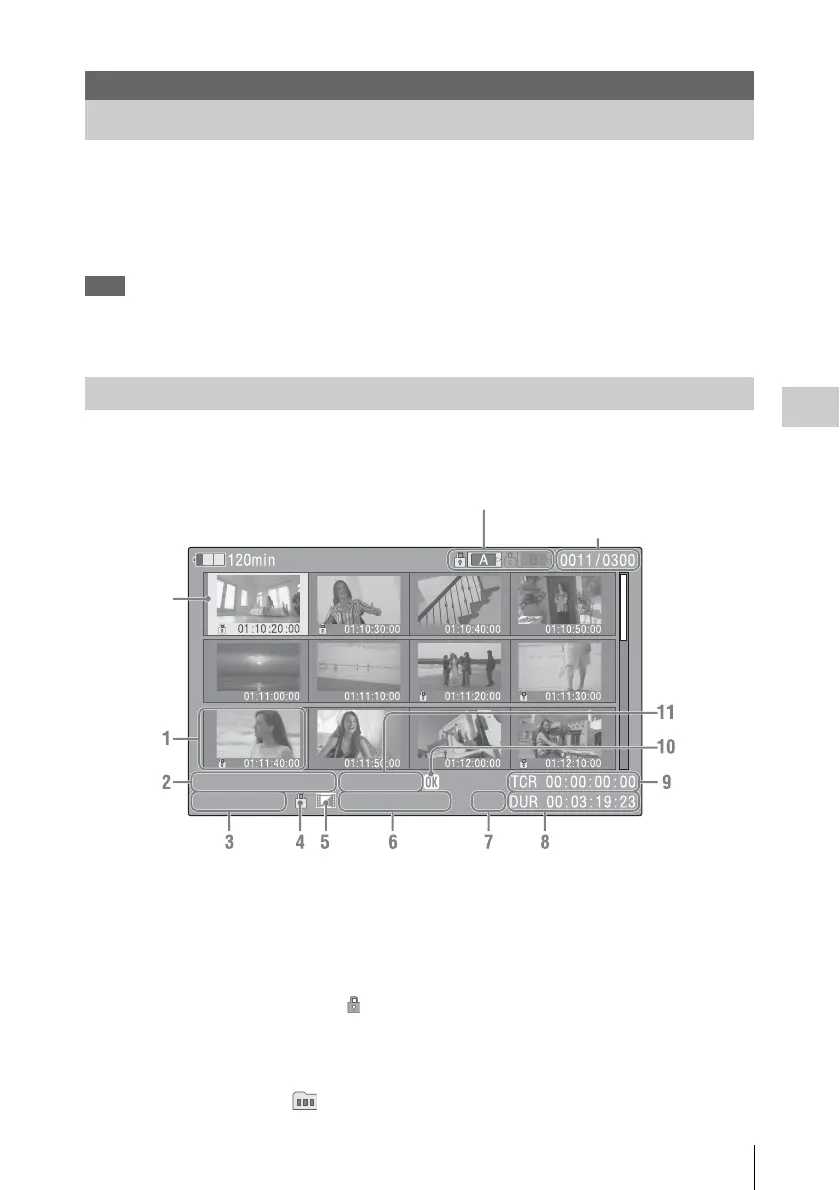
Data for the clip selected with the cursor are displayed at the bottom of the screen.
1. Thumbnail
In UDF and FAT HD Mode: The thumbnail
image for each clip is an index frame from the
clip. When recording, the first frame of a clip is
automatically set as the index frame. This frame
can be adjusted (page 72). If the clip is locked or
is set with an OK mark, the lock mark is
displayed.
In FAT SD mode: The thumbnail image for each
clip is the first frame of the clip. If the file was
split into multiple parts because its file size
exceeded 2 GB, the take mark is displayed.
Split files can be viewed via the EXPAND CLIP
screen (page 70).
2.Date and starting time of recording
3.Clip name
In FAT SD Mode, if the file was split into
multiple parts because its file size exceeded 2
GB, the segment number is displayed after the
name, separated with a slash.
4.Lock mark (UDF and FAT HD Mode
only)
Playback
Thumbnail Screens
Configuration of the Thumbnail Screen
01 / JAN / 2009
10:53
S&Q 29 / 24
JPAN0011
(
1
)
HQ
1920 / 23.9P MP4
Current clip No./ Total number of clips
Cursor
(yellow)
The icon of the current SxS memory card is highlighted, shading the nonselected
one. (If the card is write-protected, a lock icon is displayed to the left.)



 To Next Page