Parts Identifications
18
Overview
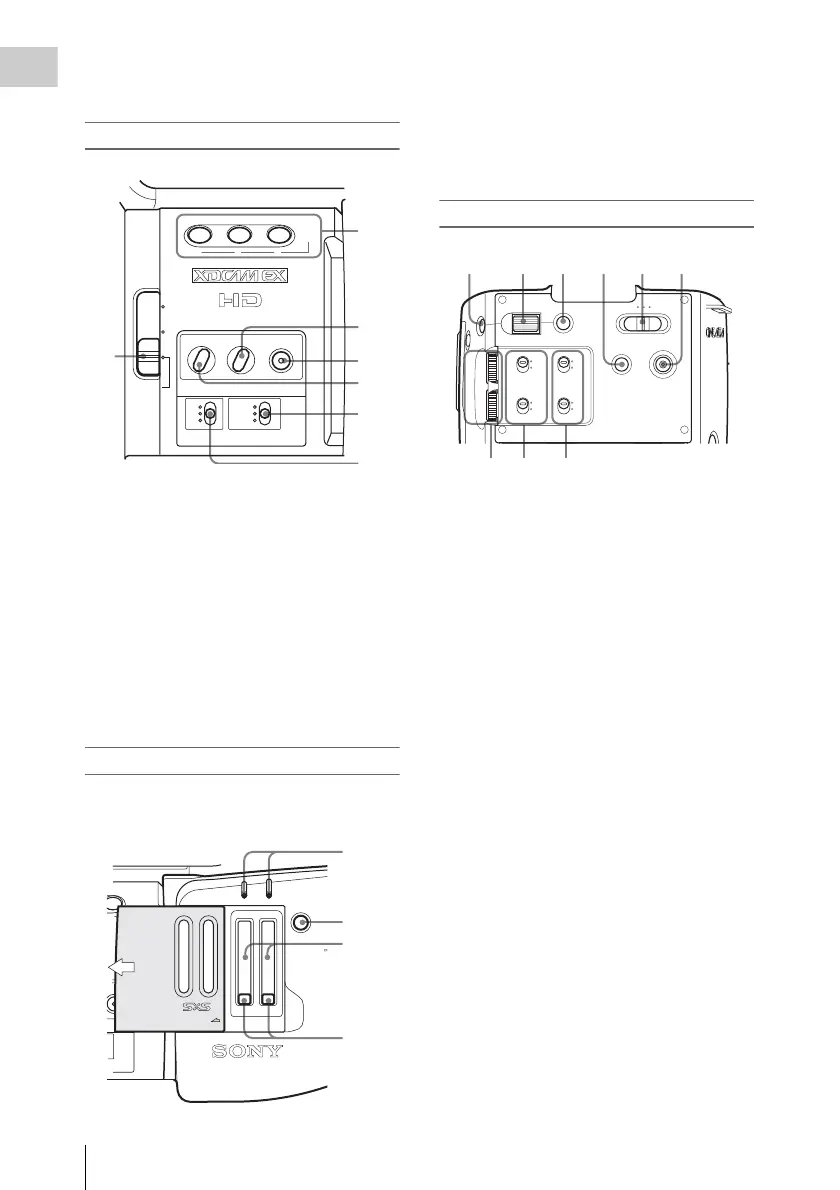
55. PUSH AF (momentary auto focus) button
(page 52)
Side operation panel
56. ND filter select switch (page 40)
57. ASSIGN (assignable)1/2/3 buttons (page
61)
58. PEAKING button (page 52)
59. FULL AUTO button and indicator (page
37)
60. ZEBRA button (page 44)
61. WHITE BAL (white balance memory)
switch (page 41)
62. GAIN switch (page 45)
Card slot block
The SxS memory card slots and EJECT buttons
are located behind the cover.
63. ACCESS lamps (page 32)
64. SLOT SELECT (SxS memory card select)
button (page 33)
65. SxS memory card slots (page 32)
66. EJECT buttons (page 33)
Rear operation panel
67. MENU (menu display ON/OFF) button
(page 99)
68. SEL/SET (selection/set) dial (Jog dial)
(page 99)
It functions accordingly when you turn it up
or down, or you push it horizontally.
It is called “the jog dial” in the subsequent
operating instructions.
69. CANCEL button (page 99)
70. PICTURE PROFILE button (page 73)
71. Power (CAMERA/MEDIA) switch (page
25)
72. DC IN (DC power input) connector (page
24)
73. AUDIO LEVEL CH-1 /CH-2 controls
(page 57)
74. AUDIO SELECT (audio level control
mode selection) switches (page 57)
75. AUDIO IN (audio input selection)
switches (page 57)
ZEBRA PEAKING
GAIN
OFF
2
1
ND
FILTER
B
A
PRST
L
M
H
WHITE BAL
FULL AUTO
123
ASSIGN
LENS INFO BRT DISP HISTOGRAM
56
57
58
59
60
61
62
SLOT SELECT
CH-1
AUDIO
LEVEL
CH-2
AB
OPEN
ACCESS
63
64
65
66
AUTO
MANUAL
INT
EXT
PICTURE
PROFILE
PMW-EX1
DC IN
CH-2
AUTO
MANUAL
INT
EXT
CH-1
AUDIO
SELECT
AUDIO
IN
OFF
CAMERACANCELSEL/SET MEDIA
BATTERY
RELEASE
MENU
CH-1
AUDIO
LEVEL
CH-2
67 68 69 70 71 72
73 74 75



 To Next Page