EasyManua.ls Logo

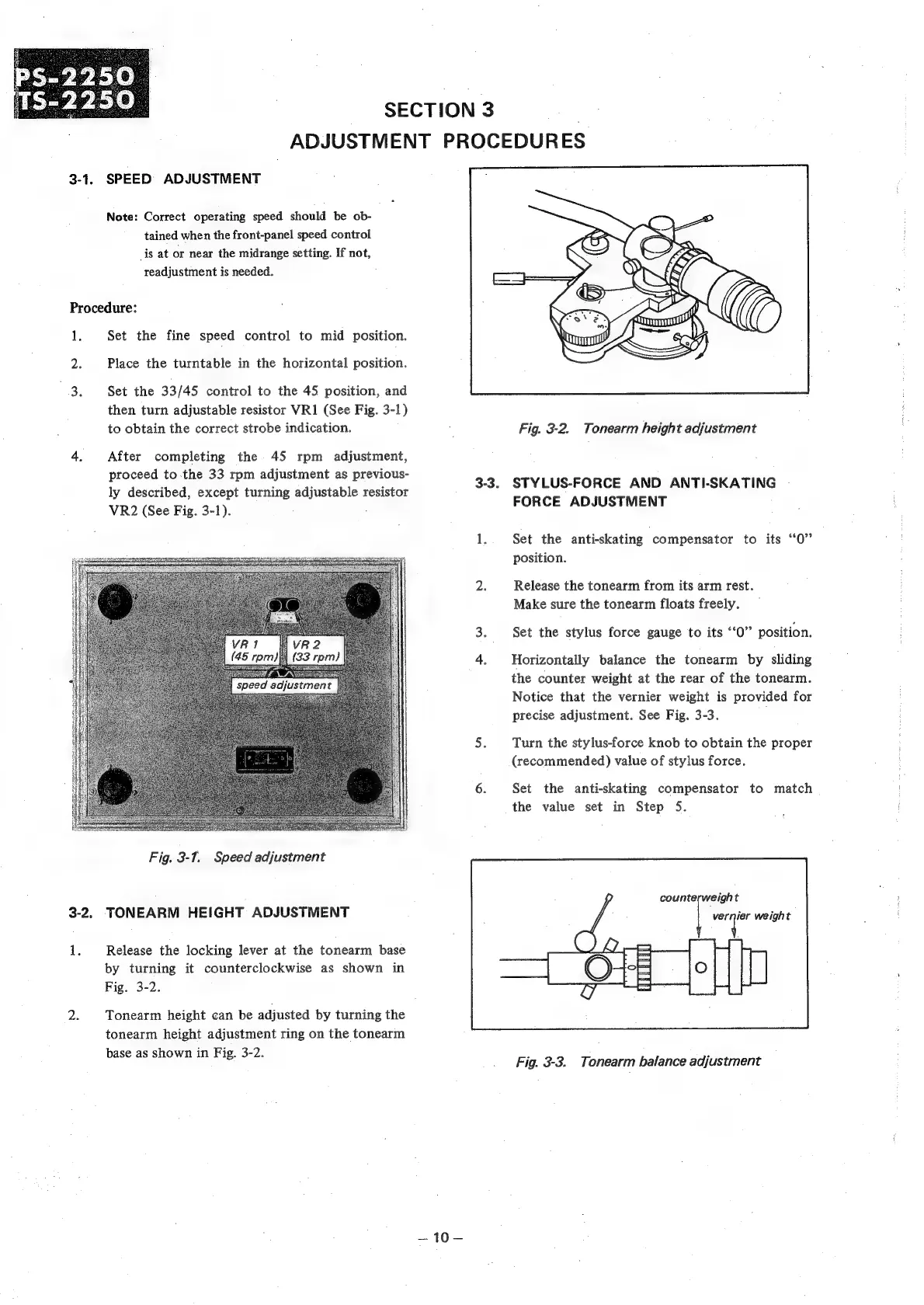
Sony PS-2250 - Adjustment Procedures; Speed Adjustment; Tonearm Height Adjustment; Stylus Force & Anti-Skating Adjustment

Sony PS-2250
26 pages
Print Icon
To Next Page IconTo Next Page
To Previous Page IconTo Previous Page
Loading...
SECTION
3
|
ADJUSTMENT
PROCEDURES
3-1.
SPEED
ADJUSTMENT
Note:
Correct
operating
speed
should
be
ob-
tained
when
the
front-panel
speed
control
_is
at
or
near
the
midrange
setting.
If
not,
readjustment
is
needed.
Procedure:
1.
Set
the
fine
speed
control
to
mid
position.
2:
Place
the
turntable
in
the
horizontal
position.
3.
Set
the
33/45
control
to
the
45
position,
and
then
turn
adjustable
resistor
VR1
(See
Fig.
3-1)
to
obtain
the
correct
strobe
indication.
Fig.
3-2.
Tonearm
height
adjustment
4.
After
completing
the
45
rpm
adjustment,
proceed
to
the
33
rpm
adjustment
as
previous-
ly
described,
except
turning
adjustable
resistor
VR2
(See
Fig.
3-1).
:
3-3.
STYLUS-FORCE
AND
ANTI-SKATING
FORCE
ADJUSTMENT
1..
Set
the
anti-skating
compensator
to
its
“0”
position.
2.
Release
the
tonearm
from
its
arm
rest.
Make
sure
the
tonearm
floats
freely.
3.
Set
the
stylus
force
gauge
to
its
‘‘0”
position.
4.
Horizontally
balance
the
tonearm
by
sliding
the
counter
weight
at
the
rear
of
the
tonearm.
Notice
that
the
vernier
weight
is
provided
for
precise
adjustment.
See
Fig.
3-3.
5.
Turn
the
stylus-force
knob
to
obtain
the
proper
(recommended)
value
of
stylus
force.
6.
Set
the
anti-skating
compensator
to
match
the
value
set
in
Step
5.
Fig.
3-1.
Speed
adjustment
.
counterweight
3-2.
TONEARM
HEIGHT
ADJUSTMENT
[er
weight
1.
Release
the
locking
lever
at
the
tonearm
base
by
turning
it
counterclockwise
as
shown
in
Fig.
3-2.
2.
Tonearm
height
can
be
adjusted
by
turning
the
tonearm
height
adjustment
ring
on
the
tonearm
base
as
shown
in
Fig.
3-2.
Fig.
3-3.
Tonearm
balance
adjustment

Other manuals for Sony PS-2250

Related product manuals