EasyManua.ls Logo

Sony PS-2250 - Microswitch Replacement

Sony PS-2250
26 pages
Print Icon
To Next Page IconTo Next Page
To Previous Page IconTo Previous Page
Loading...
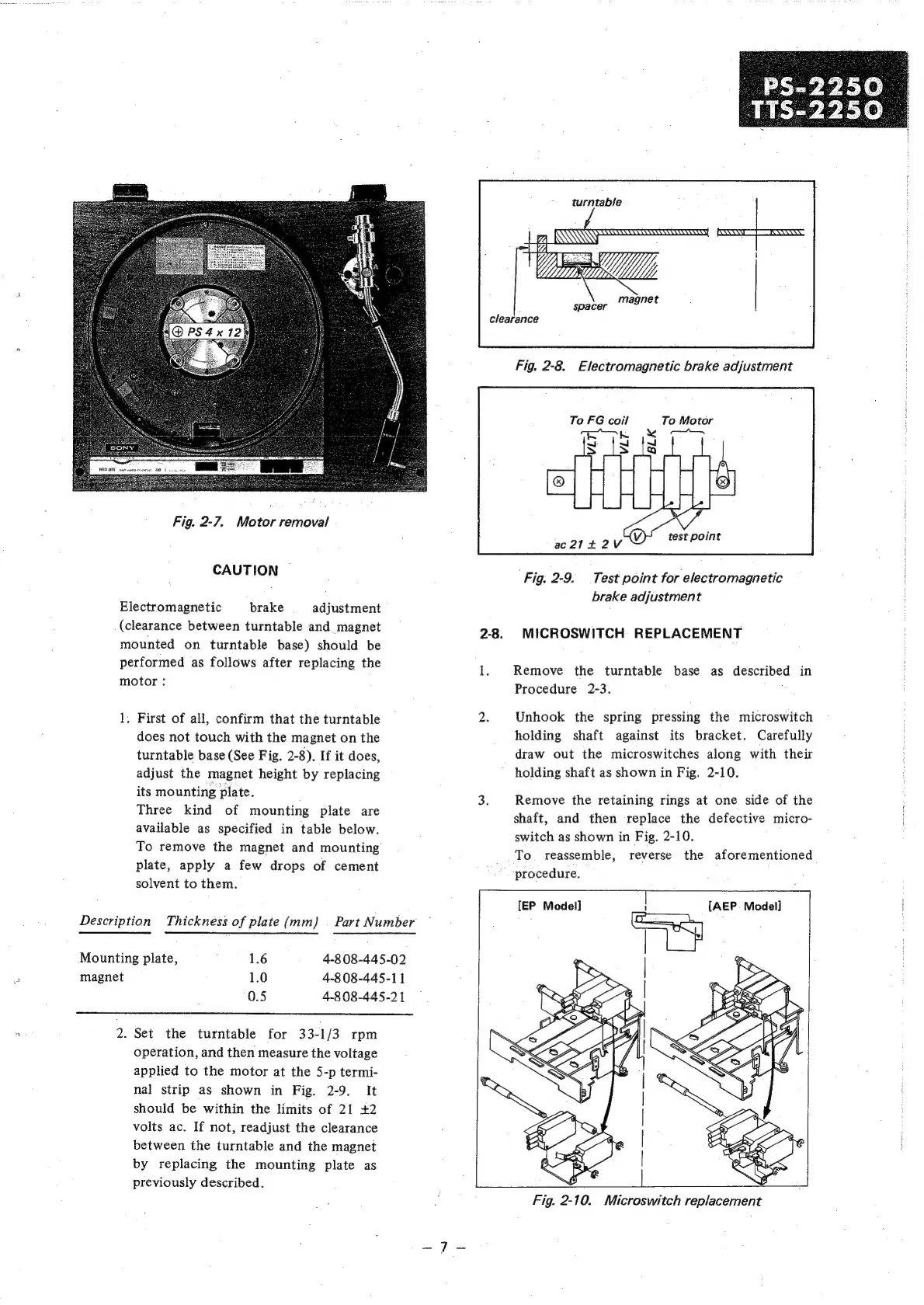
Fig.
2-7.
Motor
removal
CAUTION
Electromagnetic
brake
adjustment
(clearance
between
turntable
and
magnet
turntable
To
FG
coil
To
Motor
co
LK
“"
~
}
test
point
ac21+2V
3
Fig.
2-9.
Test
point
for
electromagnetic
brake
adjustment
2-8.
MICROSWITCH
REPLACEMENT
mounted
on
turntable
base)
should
be
Performed,
ab
Zollows
after
replacing:
the
1.
Remove
the
turntable
base
as
described
in
PIOPOES
Procedure
2-3.
1.
First
of
all,
confirm
that
the
turntable
2.
Unhook
the
spring
pressing
the
microswitch
does
not
touch
with
the
magnet
on
the
holding
shaft
against
its
bracket.
Carefully
turntable
base
(See
Fig.
2-8).
If
it
does,
draw
out
the
microswitches
along
with
their
adjust
the
magnet
height
by
replacing
holding
shaft
as
shown
in
Fig.
2-10.
i
ACR
OUS
Diaks.
3.
Remove
the
retaining
rings
at
one
side
of
the
Three
kind
of
mounting
plate
are
available
as
specified
in
table
below.
To
remove
the
magnet
and
mounting
plate,
apply
a
few
drops
of
cement
solvent
to
them.
shaft,
and
then
replace
the
defective
micro-
switch
as
shown
in
Fig.
2-10.
To.
reassemble,
reverse
the
aforementioned
procedure.
[EP
Model]
1
[AEP
Model]
Description
Thickness
of
plate
(mm)
|
Part
Number
Mounting
plate,
;
1.6
4-8
08-445-02
5
magnet
1.0
4-8
08-445-11
0.5
4-8
08-445-21
2.
Set
the
turntable
for
33-1/3
rpm
operation,
and
then
measure
the
voltage
applied
to
the
motor
at
the
5-p
termi-
nal
strip
as
shown
in
Fig.
2-9.
It
should
be
within
the
limits
of
21
+2
volts
ac.
If
not,
readjust
the
clearance
between
the
turntable
and
the
magnet
by
replacing
the
mounting
plate
as
previously
described.
SS
Qe
SH
Fig.
2-10.
Microswitch
replacement

Other manuals for Sony PS-2250

Related product manuals