EasyManua.ls Logo

Sony PS-D707H - Record Playback Operations; Automatic Playback Initiation; Manual Track Selection; Drop-point Adjustment

Sony PS-D707H
7 pages
Print Icon
To Next Page IconTo Next Page
To Previous Page IconTo Previous Page
Loading...
|
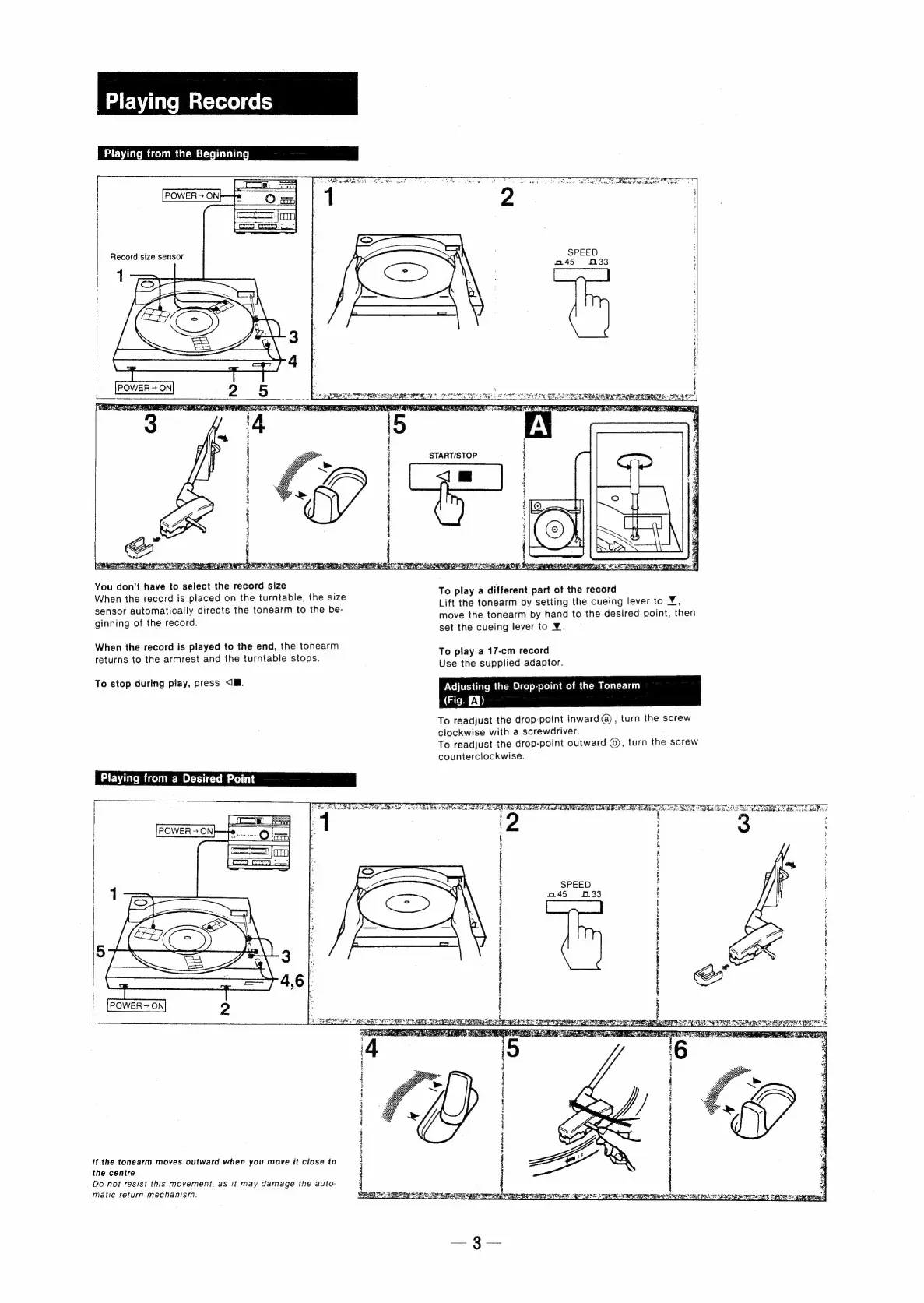
Playing
Records
Playing
from
the
Beginning
WF
eA
ON
Goo
TERA
ch
SRR
Record
size
sensor
AR
Wa
IR
BNL
an
ae
YMRS
TERE
SE
DOPE
Ma
AMEN
INC.
Soe
RS
You
don’t
have
to
select
the
record
size
To
pl
diff
ioaitotth
4
When
the
record
is
placed
on
the
turntable,
the
size
pepe
;
pea
pe
7
is
iets
|
to
V
sensor
automatically
directs
the
tonearm
to
the
be-
Se
tonearm
By
seHing.
We
Suen’
Brel
ie
paar
move
the
tonearm
by
hand
to
the
desired
point,
then
ginning
of
the
record.
:
set
the
cueing
lever
to
¥.
When
the
record
is
played
to
the
end,
the
tonearm
To
pl
17
rl
returns
to
the
armrest
and
the
turntable
stops.
o:
play’
aie
recor
Use
the
supplied
adaptor.
To
stop
during
play,
press
<M.
Adjusting
the
Drop-point
of
the
Tonearm
taieen
AB)
To
readjust
the
drop-point
inward
@),
turn
the
screw
clockwise
with
a
screwdriver.
To
readjust
the
drop-point
outward
©),
turn
the
screw
counterclockwise.
Playing
from
a
Desired
Point
/
The
See
ae
OD
aoe
ee
ee
er
Ee
ee
Le
eee
TET
pater
g
et
:
SEE
VEER
ORES
ERR
RE
EMME
Se
ESL
EG
Rea
Debs
ADRS
de
ne
OA
ADE
REE
da
goat
baa
tA
ENON
AE
ET
CPM
ECR
REA
ea
PERS
EMRE
LR
BPR
pin
ok
serine
er
cde
ot
‘6
i
i
i
{
i
i
z
i
i
j
i
}
3
if
the
tonearm
moves
outward
when
you
move
it
close
to
i
i
‘4
the
centre
.
Do
not
resist
this
movement,
as
it
may
damage
the
auto-
|
4
matic
return
mechanism.
St
ERS
SI
SO
ei
er
peer
pmmeweeniTy
Bat
OF
pena
gh
LEER
TEE
oer
Pat?
woes

Related product manuals