EasyManua.ls Logo

Sony PS-LX55C - Location and Function of Controls

Sony PS-LX55C
12 pages
Print Icon
To Next Page IconTo Next Page
To Previous Page IconTo Previous Page
Loading...
LOCATION
AND
FUNCTION
OF
CONTROLS
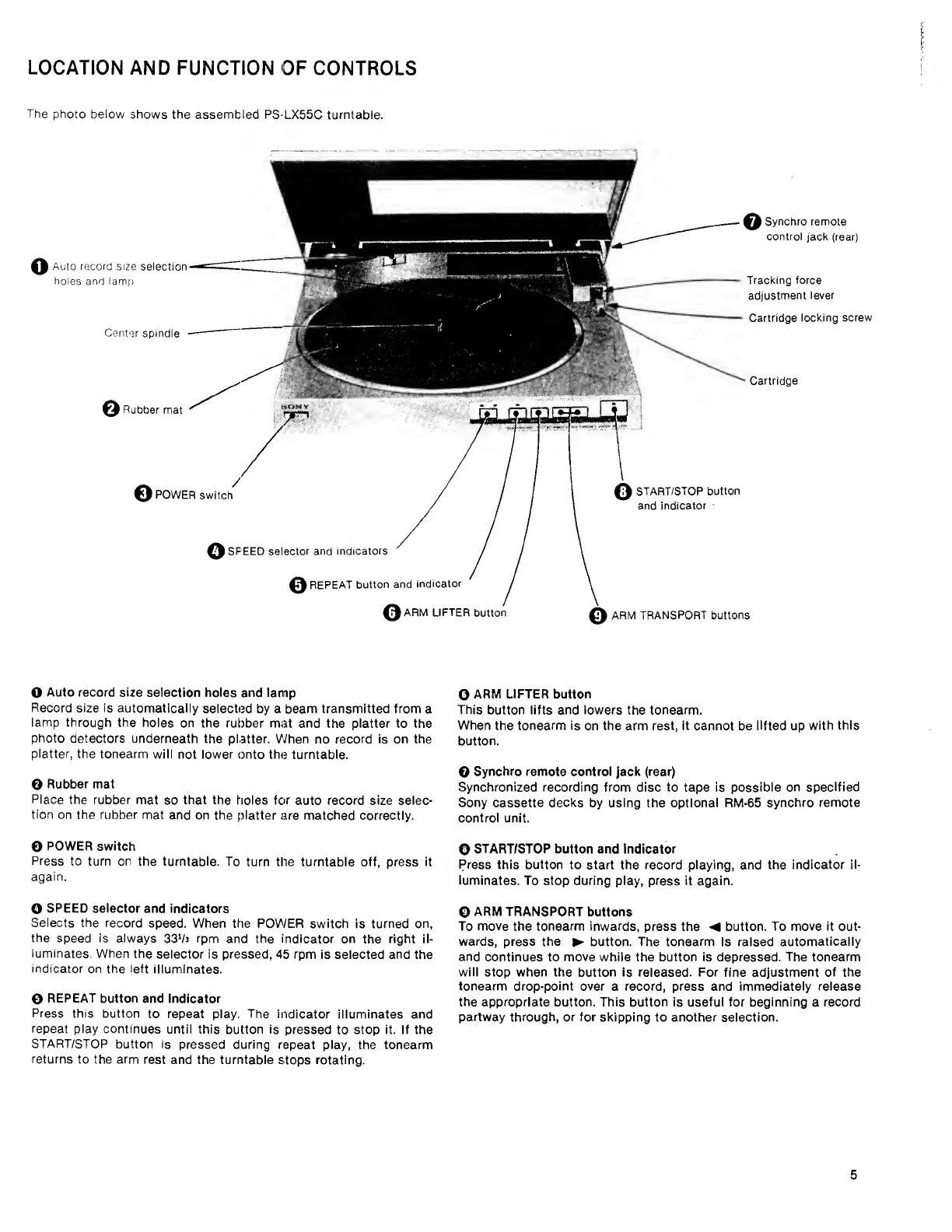
The
photo
below
shows
the
assembled
PS-LX55C
turntable.
o
Auto
record
size
selection
holes
and
lamp
Center
spindle
©
Rubber
mat
Cartridge
©
POWER
switch
Q
START/STOP
button
and
indicator
o
SPEED
selector
and
indicators
0
REPEAT
button
and
indicator
0ARM
LIFTER
button
ARM
TRANSPORT
buttons
Synchro
remote
control
jack
(rear)
Tracking
force
adjustment
lever
Cartridge
locking
screw
O
Auto
record
size
selection
holes
and
lamp
Record
size
is
automatically
selected
by
a
beam
transmitted
from
a
lamp
through
the
holes
on
the
rubber
mat
and
the
platter
to
the
photo
detectors
underneath
the
platter.
When
no
record
is
on
the
platter,
the
tonearm
will
not
lower
onto
the
turntable.
0
Rubber
mat
Place
the
rubber
mat
so
that
the
holes
for
auto
record
size
selec¬
tion
on
the
rubber
mat
and
on
the
platter
are
matched
correctly.
©
POWER
switch
Press
to
turn
on
the
turntable.
To
turn
the
turntable
off,
press
it
again.
O
SPEED
selector
and
indicators
Selects
the
record
speed.
When
the
POWER
switch
is
turned
on,
the
speed
is
always
33
‘/j
rpm
and
the
indicator
on
the
right
il¬
luminates.
When
the
selector
is
pressed,
45
rpm
is
selected
and
the
indicator
on
the
left
illuminates.
0
REPEAT
button
and
indicator
Press
this
button
to
repeat
play.
The
indicator
illuminates
and
repeat
play
continues
until
this
button
is
pressed
to
stop
it.
If
the
START/STOP
button
is
pressed
during
repeat
play,
the
tonearm
returns
to
the
arm
rest
and
the
turntable
stops
rotating.
©
ARM
LIFTER
button
This
button
lifts
and
lowers
the
tonearm.
When
the
tonearm
is
on
the
arm
rest,
it
cannot
be
lifted
up
with
this
button.
O
Synchro
remote
control
jack
(rear)
Synchronized
recording
from
disc
to
tape
is
possible
on
specified
Sony
cassette
decks
by
using
the
optional
RM-65
synchro
remote
control
unit.
O
START/STOP
button
and
indicator
Press
this
button
to
start
the
record
playing,
and
the
indicator
il¬
luminates.
To
stop
during
play,
press
it
again.
0
ARM
TRANSPORT
buttons
To
move
the
tonearm
inwards,
press
the
button.
To
move
it
out¬
wards,
press
the
button.
The
tonearm
is
raised
automatically
and
continues
to
move
while
the
button
is
depressed.
The
tonearm
will
stop
when
the
button
is
released.
For
fine
adjustment
of
the
tonearm
drop-point
over
a
record,
press
and
immediately
release
the
appropriate
button.
This
button
is
useful
for
beginning
a
record
partway
through,
or
for
skipping
to
another
selection.
5

Related product manuals