EN
5
6
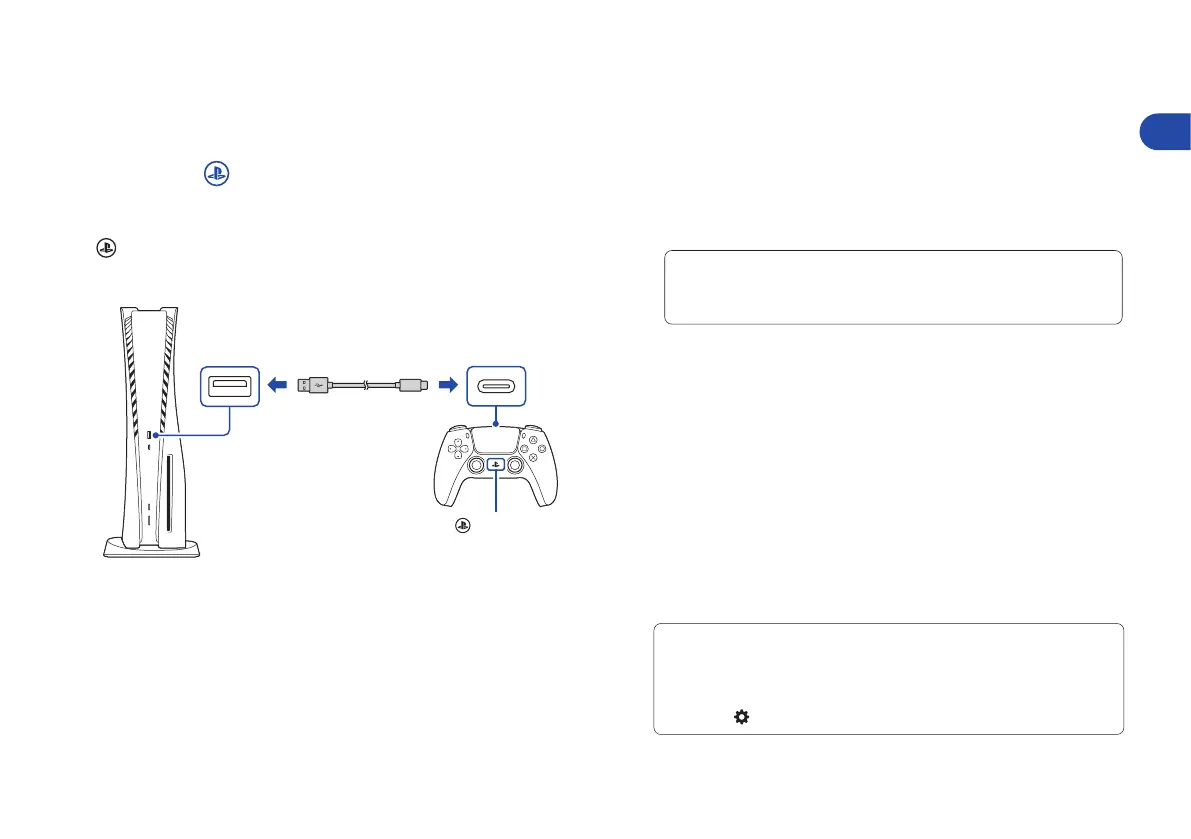
Connect your wireless controller to your
console using a USB cable, and then
press the (PS) button.
To pair your controller, connect it with a USB cable
to the USB port on your console. When you press the
(PS) button, the controller turns on.
7
Make it your own.
You’re almost done! Follow the on-screen instructions to
• Set up your console
Select your language, configure your internet connection
settings, and manage your power save settings.
• Set up your account
Create a new account or sign in with an existing account,
such as one you created on a PlayStation®4 console. See
also “For PS4 users” (page 6).
• Download your content
Download purchased PS5™ games and media apps.
If you have a PS4™ console, you can transfer the data
to your PS5 console.
You’ll know that setup is complete when Welcome
to PlayStation 5 appears on your screen.
Will a child be using your PS5 console? See also “Parental
controls” (page 6).
• The setup options that you see are tailored to your needs,
based on information such as your network environment and
the account that you’re signed into.
• You can go back and change any of your settings by selecting
Settings
from the home screen.
USB cable
USB Type-A port
USB port
(PS) button
Front view
To save energy while powered-down, your console is set to
Low Power Use in rest mode. See also “Put your console in rest
mode” (page 12).
Let’s get started



 To Next Page