232
Settings for the PSP® system
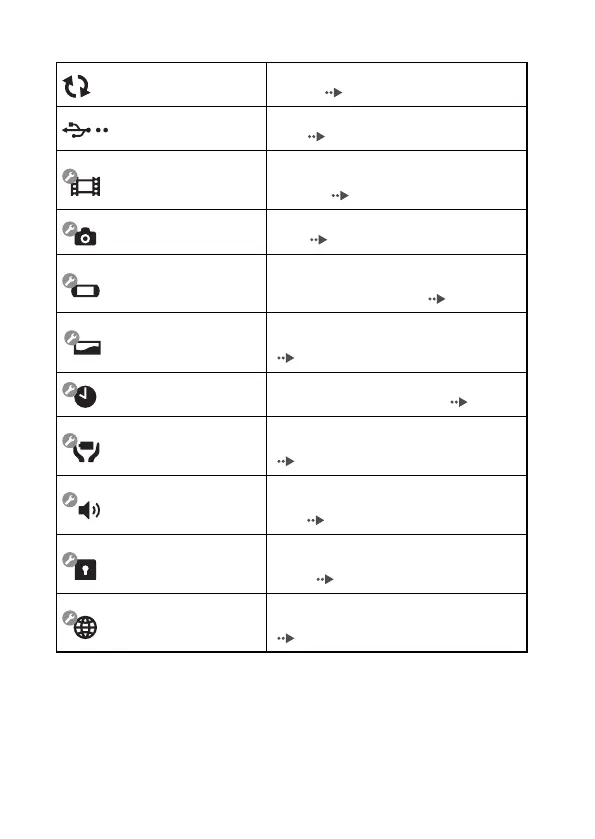
Icons displayed under Settings
Network Update
Provides access to updates for the system
software ( page 256)
USB Connection
Allows for connection to a PC using a USB
cable ( page 247)
Video Settings
Includes settings for UMD
®VIDEO Menu
Language, Audio Language and Subtitle
Language ( page 233)
Photo Settings
Includes settings for adjusting the slideshow
speed ( page 234)
System Settings
Includes settings for the System Language and
Nickname, and provides an option to format
Memory Stick Duo™ media ( page 235)
Theme Settings
Allows the user to change the background color
and display an image as wallpaper
( page 238)
Date & Time Settings
Allows the user to set the date and time as well
as adjust for daylight saving time ( page 239)
Power Save Settings
Includes settings to automatically turn off the
backlight and put the system in sleep mode
( page 240)
Sound Settings
Provides access to settings for AVLS
(Automatic Volume Limiter System) and Key
Tone ( page 242)
Security Settings
Allows the user to change the password and
adjust the level setting for the parental control
feature ( page 243)
Network Settings
Provides access to settings for connecting to a
wireless local area network (WLAN)
( page 249)





 To Next Page