000
5. Menu Display and Settings: Setup Menu List
52
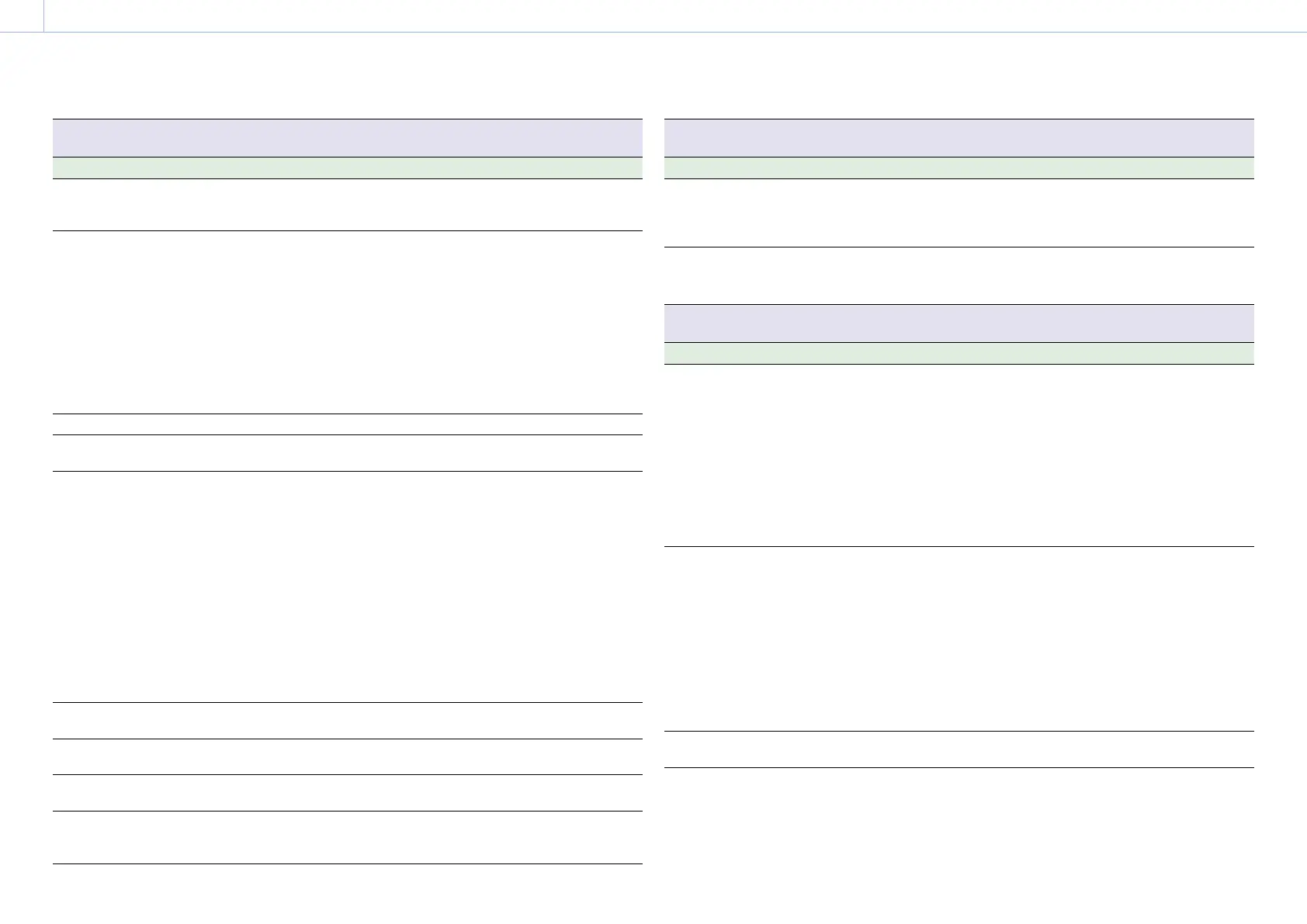
Camera >Auto Exposure
Sets automatic exposure adjustment settings.
Item Sub-item setting Description
Level –2.0 / –1.75 / –1.5 / –1.25 / –1.0 / –0.75 / –0.5 /
–0.25 / 0 / +0.25 / +0.5 / +0.75 / +1.0 / +1.25 /
+1.5 / +1.75 / +2.0
Sets the brightness level for the
automatically detected exposure.
Mode Backlight / Standard / Spotlight Sets the control mode.
Backlight:
Backlight mode (mode for reduced
darkening of a subject when the subject
is backlit)
Standard:
Standard mode
Spotlight:
Spotlight mode (mode for reduced
clipped whites when subject is lit by
spotlighting)
Speed –99 to +99 (±0) Sets the adjustment speed.
AGC On / Off Turns the AGC (auto gain control) function
on/off.
AGC Limit When ISO/Gain/EI Mode is set to dB:
3dB / 6dB / 9dB / 12dB / 15dB / 18dB
When ISO/Gain/EI Mode is set to ISO and
dynamic range is 460%:
ISO1000 / ISO1600 / ISO2000 / ISO3200 /
ISO4000 / ISO6400
When ISO/Gain/EI Mode is set to ISO and
dynamic range is 800%:
ISO2000 / ISO3200 / ISO4000 / ISO6400 /
ISO8000 / ISO12500
When ISO/Gain/EI Mode is set to ISO and
dynamic range is 1300%:
ISO2500 / ISO4000 / ISO5000 / ISO8000 /
ISO10000 / ISO16000
Sets the maximum gain of the AGC function.
Auto ND Filter On / Off Turns the auto ND filter function on/off
(page 33).
Auto Shutter On / Off Turns the auto shutter control function on/
off.
A.SHT Limit 1/100 / 1/150 / 1/200 / 1/250 / 1/2000 Sets the fastest shutter speed of the auto
shutter function.
Clip High light On / Off Turns the function that ignores brightest
areas to provide a flatter reaction to high
luminance on/off.
Camera >Auto Exposure
Sets automatic exposure adjustment settings.
Item Sub-item setting Description
Detect
Window
1 / 2 / 3 / 4 / 5 / 6 Sets the light meter range for automatically
adjusting the exposure according to the
brightness of the subject. (Not available
when adjusting exposure manually)
Detect
Window
Indication
On / Off Turns the Detect Window function on/off.
Camera >Focus
Sets focus settings.
Item Sub-item setting Description
Focus Area Wide / Center / Flexible Spot Sets the target area for auto focus
(page 31).
Wide:
Searches for a subject over a wide angle
of the image when focusing.
Center:
Focuses on a subject in the center of the
image.
Flexible Spot:
Focuses on a specified position in the
image.
Focus Area
(Push AF)
Center / Flexible Spot Sets the target area for push auto focus
(page 31).
Center:
Focuses on a subject in the center of the
image.
Flexible Spot:
Focuses on a specified position in the
image.
[Note]
On the LA-EA2/4 (option), the position cannot be
set.
AF Assist On / Off When set to On, allows you to temporarily
override auto focus and set focus manually.



 To Next Page